Why long AI agent tasks cost more, and how compaction caps it
Each model call resends the whole conversation, so every step of a long agent task costs more. How OpenTeam's compaction works, with a measured run.
On this page
A model keeps nothing between calls, so an agent resends the whole conversation on every step, and each step costs more than the last. Prompt caching makes the resent part 20 times cheaper. Compaction caps the size by swapping the history for a summary. OpenTeam, our open-source app for self-hosted AI agents, does it at 90% of the model's prompt limit.
We build OpenTeam, so read this as a practitioner's account. We build the design up from the simplest loop to what OpenTeam does now, one idea per step; the version numbers exist only for this post. Every number comes from the code or from one long task we ran for this post on a local OpenTeam server, with GPT-6.1 Sol through OpenRouter.
Why long agent tasks get more expensive
NVIDIA's post on agent memory describes the problem from the data center: "Agentic trajectories carry prior context across repeated model and tool calls," up to 3 million tokens in some cases. On the other side of the API, the same growth shows up as a bill. Every call sends the system prompt, the tool definitions and everything that has happened so far.
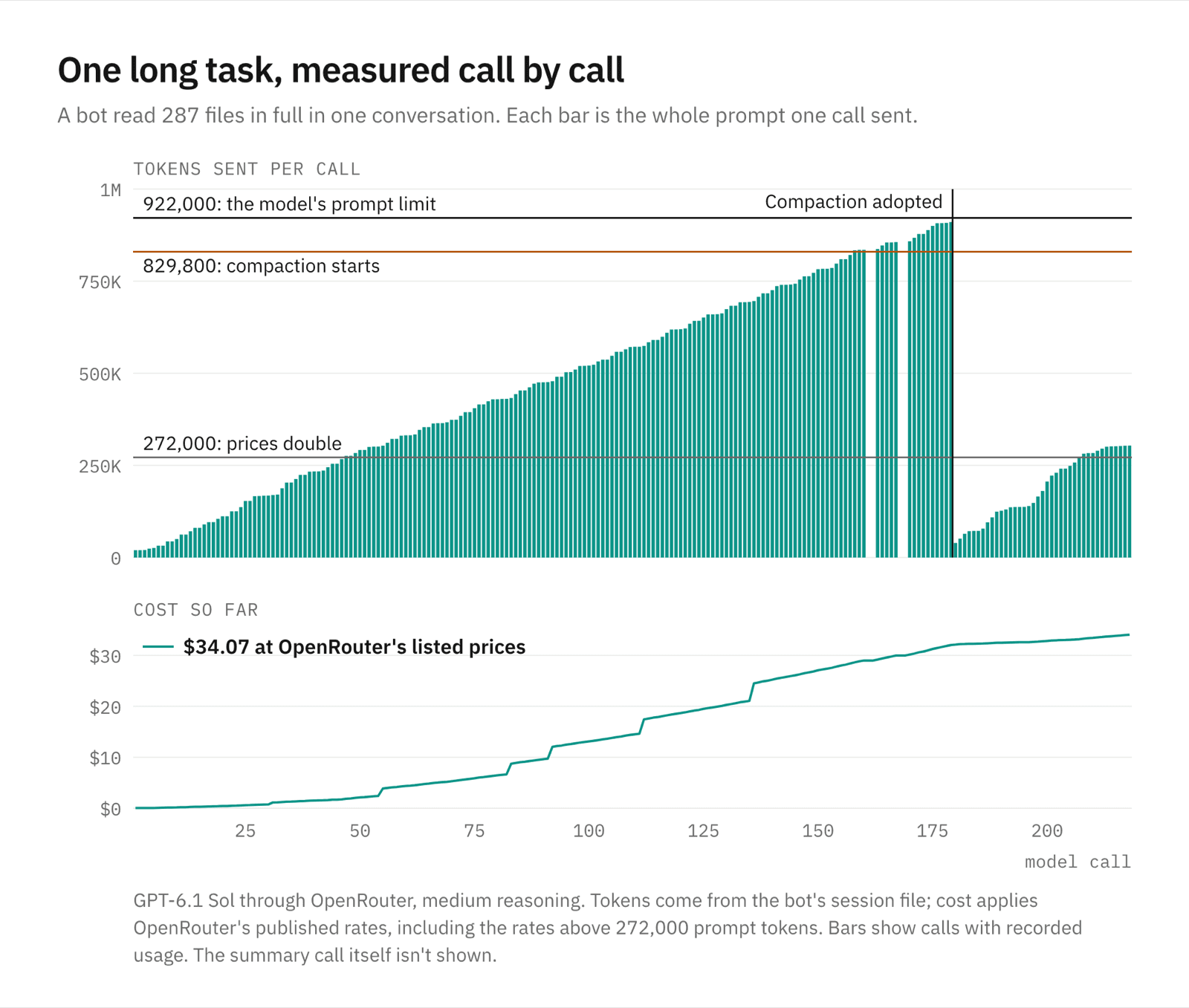
If each step adds about the same amount, step 100 sends a hundred times as much as step 1, and the whole task costs roughly the square of its length. To measure it, we asked a bot to read 287 of OpenTeam's own source files in full and review them. We told it not to hand the reading to helpers, which OpenTeam's bots do by default for long jobs, so one conversation had to hold everything.
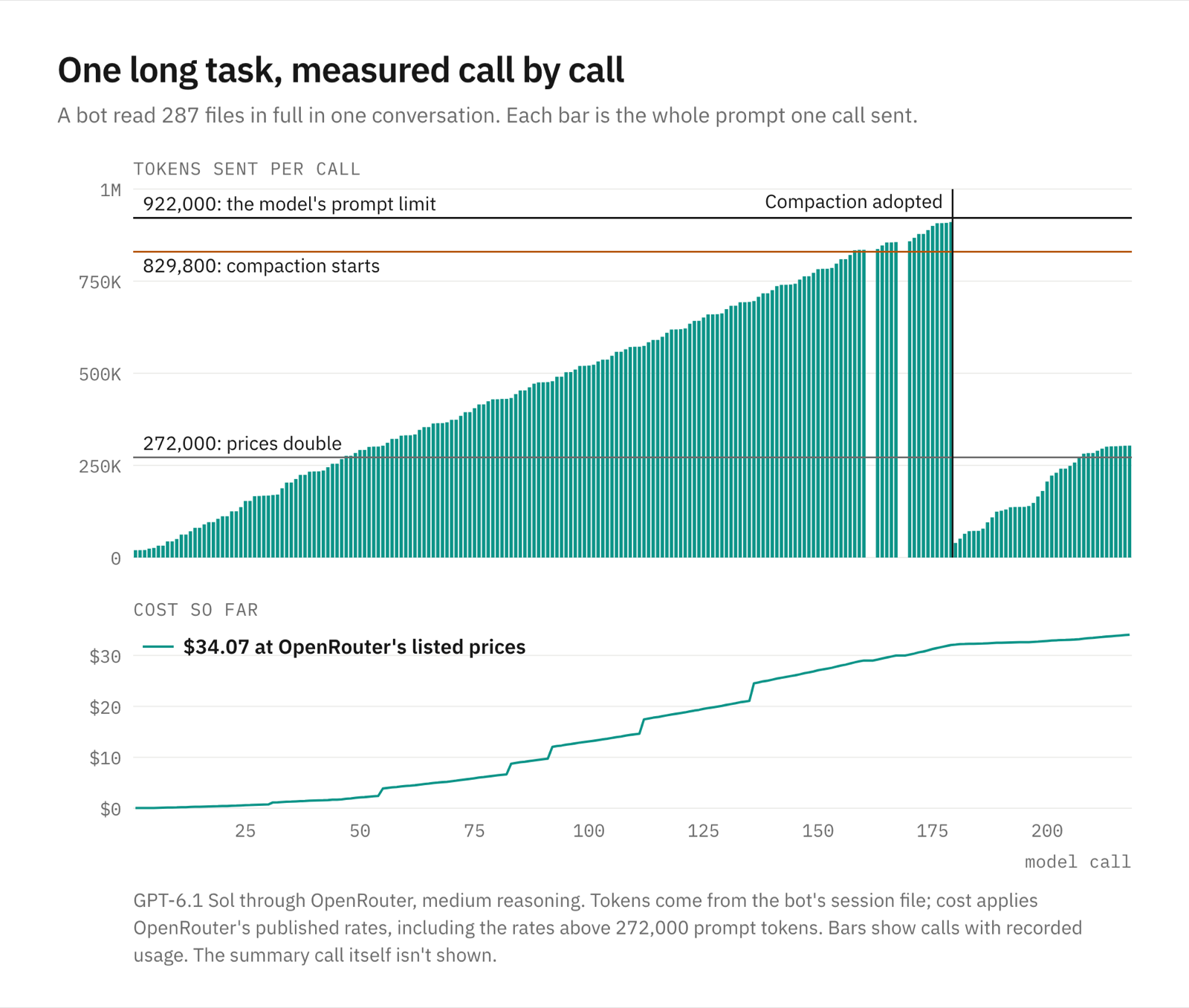
The first call sent 19,852 tokens. Call 179 sent 910,475, 46 times as much, and calls that large took a median 9.9 seconds against 4.1 under 100,000. Before the summary, the bot's 179 calls sent 81.4 million tokens, 95.7% of them billed as cache reads. At OpenRouter's listed prices that came to $32.05; without caching, the same calls would have listed at about $314.
v0: resend everything
The simplest agent loop keeps the conversation in a list and sends the whole list on every call.
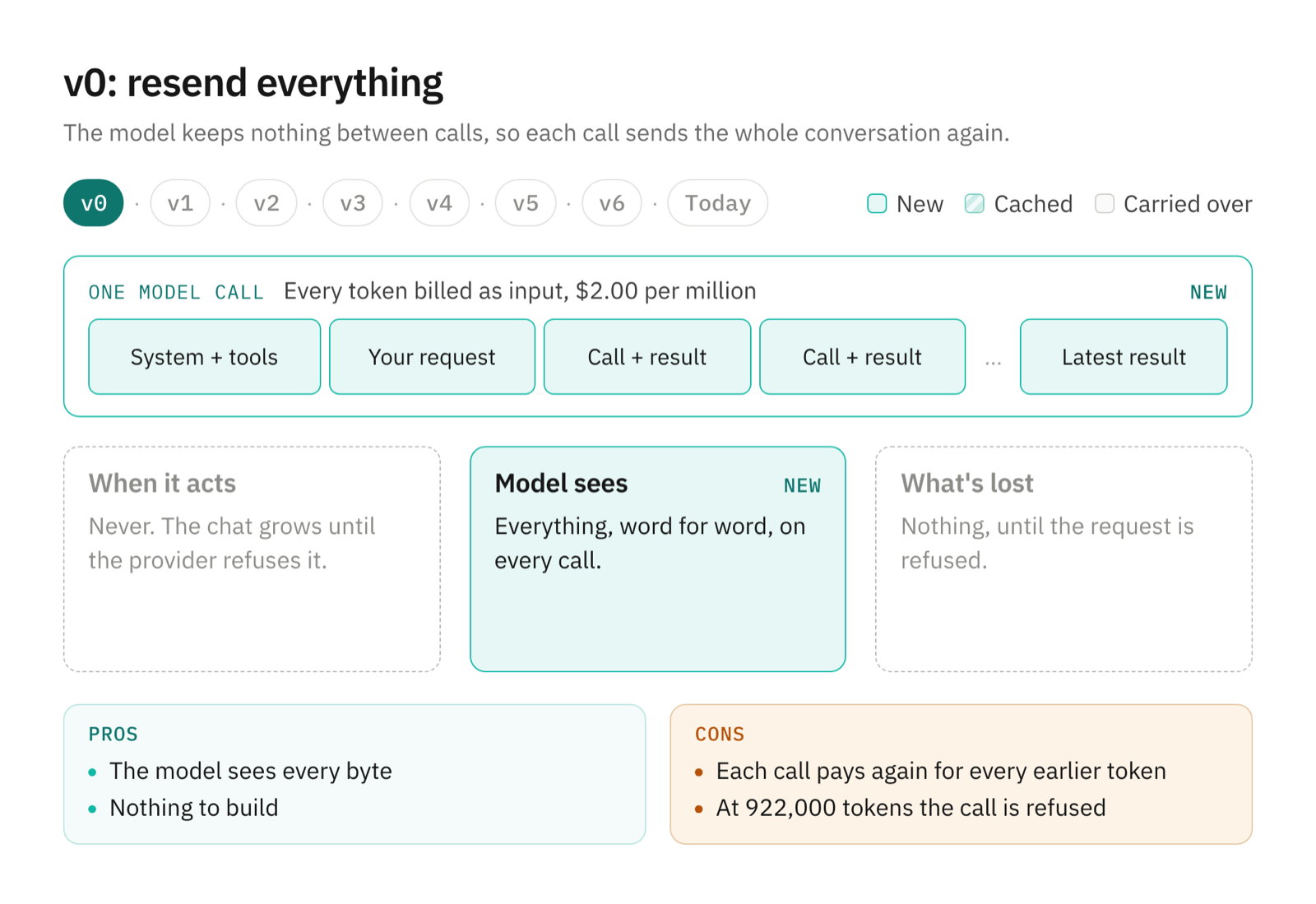
How it works. Each call carries the system prompt, the tool definitions, your request, and every tool call and result so far. The model answers with another tool call, the result is appended, and the loop sends everything again.
Pros.
- The model sees every byte of the work, exactly as it happened.
- There's nothing to build, store or get wrong.
Cons.
- Every call pays again for every earlier token.
- The list only grows. When it passes the model's prompt limit, the provider refuses the call and the task stops.
v1: cache the prefix
Providers bill a repeated prompt prefix as a cheap cache read, so keep the front of every request byte-identical.
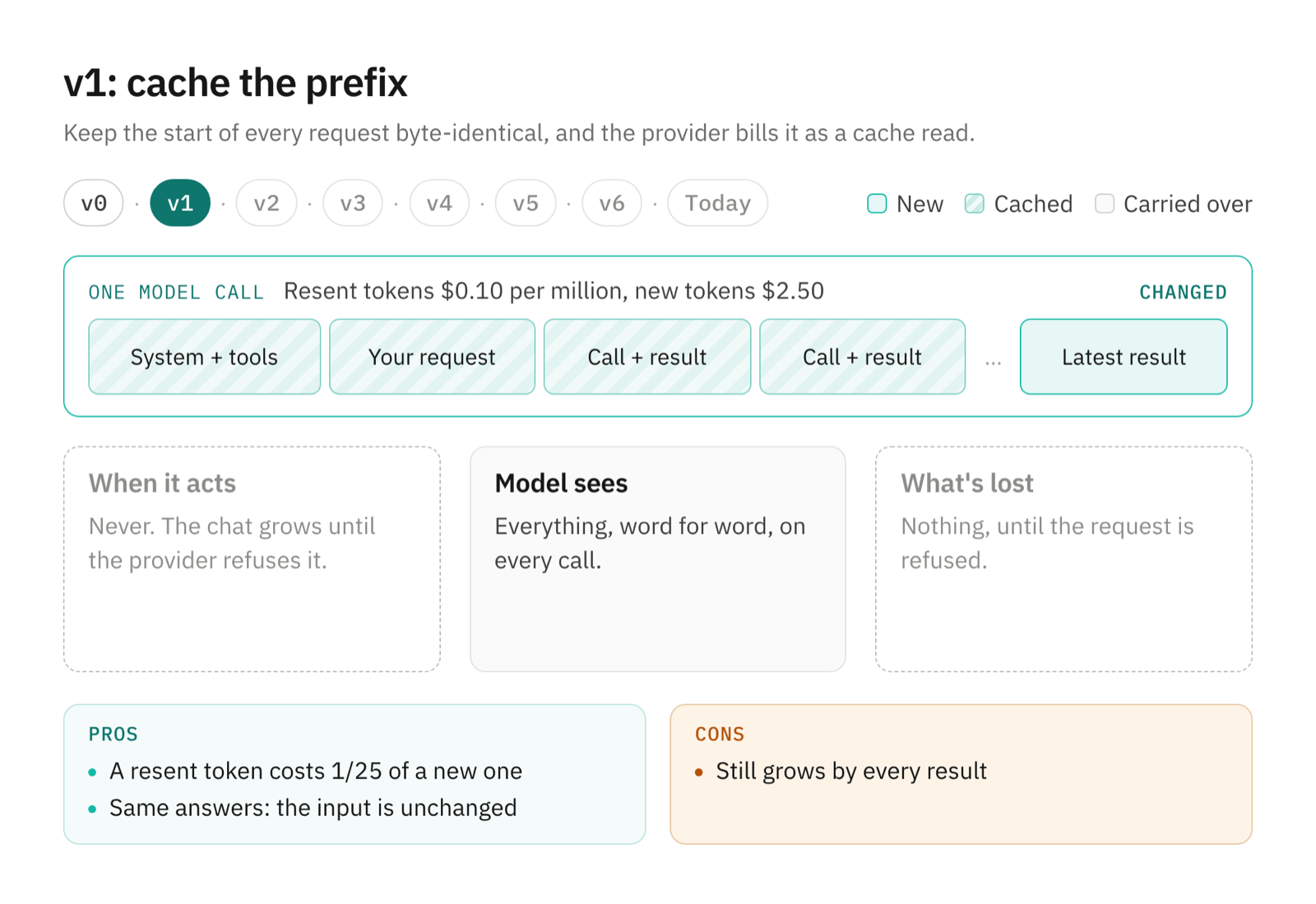
How it works. OpenRouter lists GPT-6.1 Sol at $2.50 per million tokens for a cache write and $0.10 for a cache read, a 25-to-1 ratio. The discount needs an unchanged prefix, so the rule is to append and never edit what's been sent. OpenTeam orders its system prompt "so per-turn changes sit late in the cached prefix," and freezes its platform sections until the next compaction. The tool catalog is pinned the same way, so a newly installed plugin is announced in a later message. Even a progress note is "persisted once," because the code says an ephemeral tail message "would move on every model call and invalidate the cached prefix."
Pros.
- A resent token costs a twenty-fifth of a new one.
- The model's input doesn't change, so neither do its answers.
Cons.
- The conversation still grows by every result, and still hits the limit.
v2: drop the oldest messages
When the next call wouldn't fit, cut messages from the front.
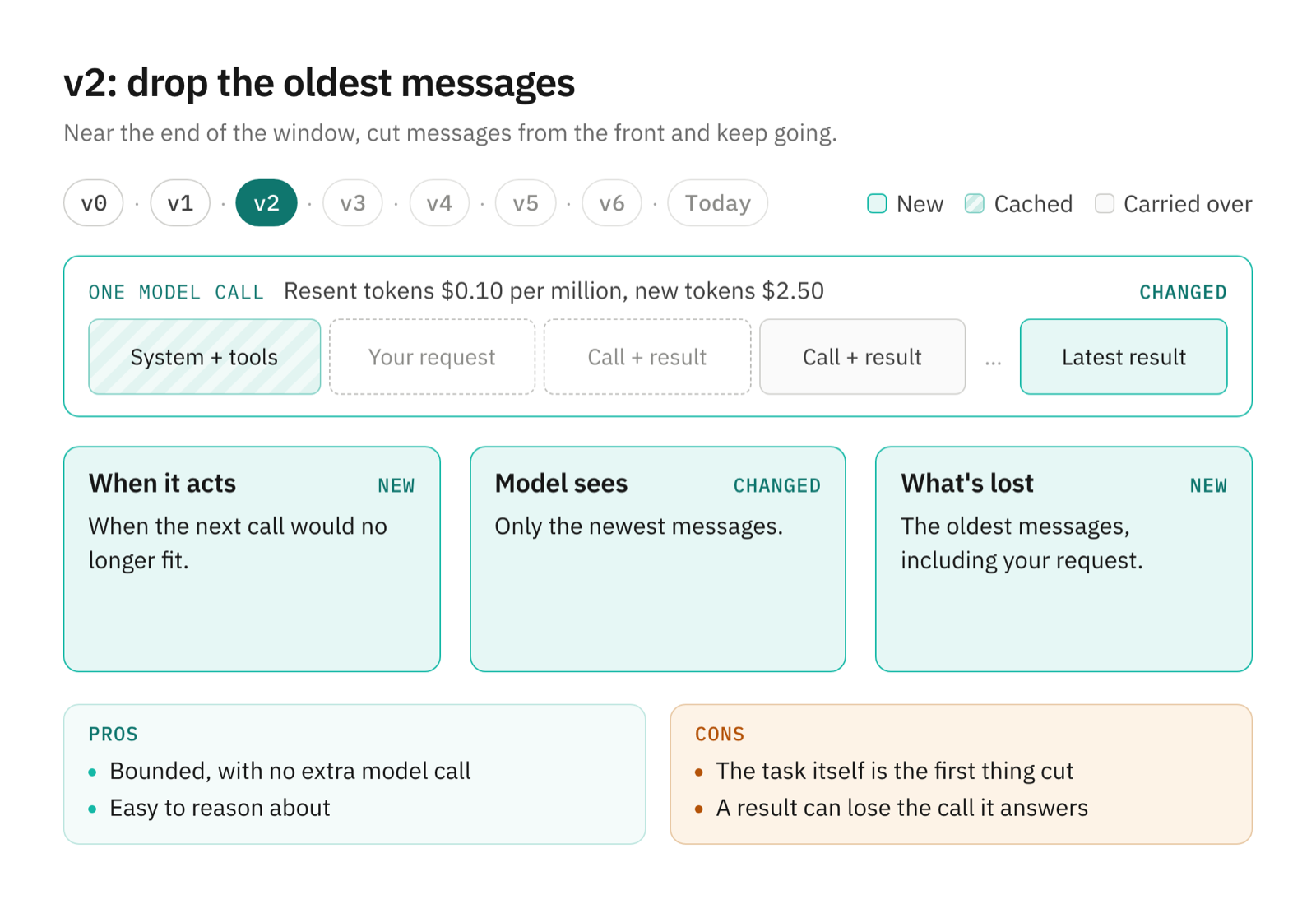
How it works. A sliding window keeps the system prompt and as many of the newest messages as fit. Nothing calls the model to do it.
Pros.
- The conversation stays bounded, with no extra model call.
- It's easy to reason about.
Cons.
- The first thing cut is your request, then the early decisions.
- A cut can separate a tool result from the call that produced it, and providers reject a result whose call is missing.
v3: summarize at a threshold
Near the limit, ask the model to summarize the work so far, and start the next call from the summary.
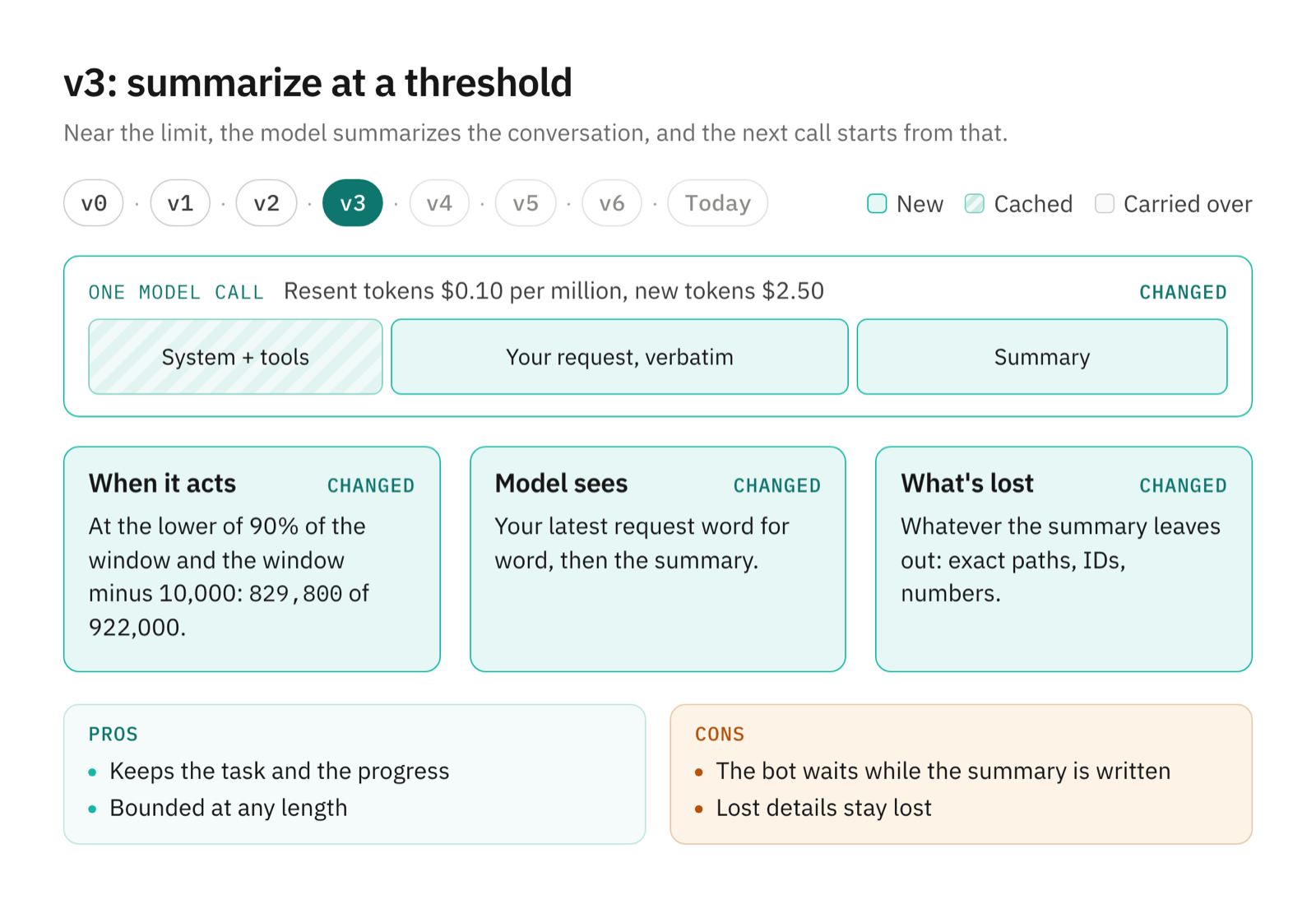
How it works. The threshold is the lower of 90% of the prompt limit and the limit minus 10,000 tokens: 829,800 of 922,000 for GPT-6.1 Sol. The summary goes to the same model, with the bot's instructions and tool definitions. The request asks it to cover "the user's requests and especially corrections, constraints and preferences, what you've done so far, key decisions and their reasons," and what's left to do. It ends: "DO NOT call any tools." The next call sends your latest request word for word, then the summary.
Pros.
- The task and the progress survive.
- The conversation stays bounded at any length.
Cons.
- The bot stops while the summary is written, which is a model call over the whole conversation.
- Whatever the summary leaves out, an exact path, an ID, a number, is gone.
v4: summarize in the background
Start the summary at the threshold, let the bot keep working, and swap it in when it's ready.
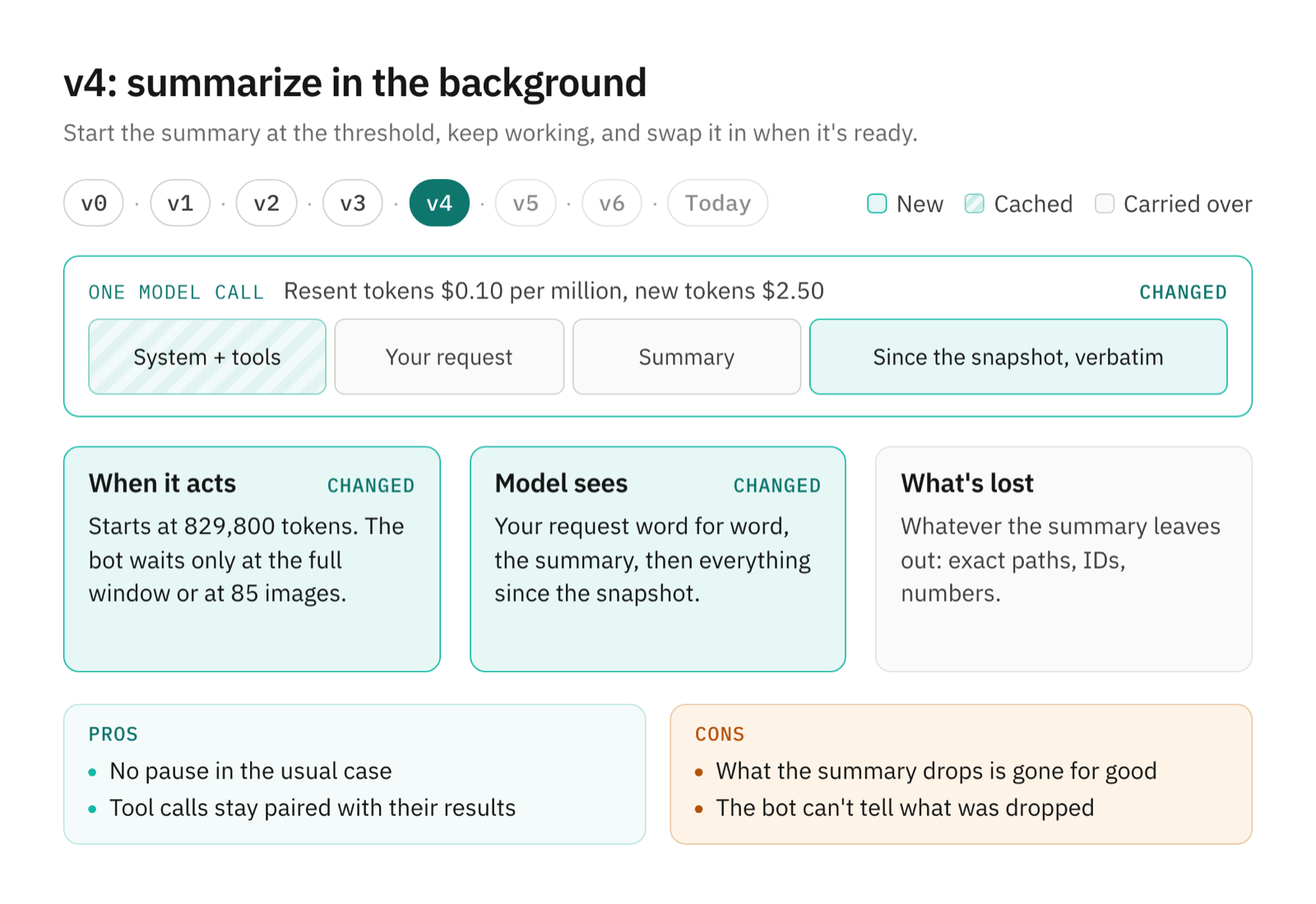
How it works. The summary covers a snapshot of the conversation. When it comes back, OpenTeam checks that the conversation still starts with that snapshot and that the system prompt hasn't changed. Then it sends your request, the summary and every message added since the snapshot, verbatim, keeping each tool call beside its result. The bot only waits once it reaches the full limit or 85 images. A failed summary gets three attempts: shorter after an output-limit error, with fewer inputs after an input-limit error, and after a two-second pause on a rate limit.
Pros.
- No pause in the usual case.
- Nothing after the snapshot gets summarized.
Cons.
- What the summary drops is gone for good.
- The bot can't tell what it lost, so it can't go back for it.
v5: keep the archive
Save what was summarized, and tell the bot where to look.
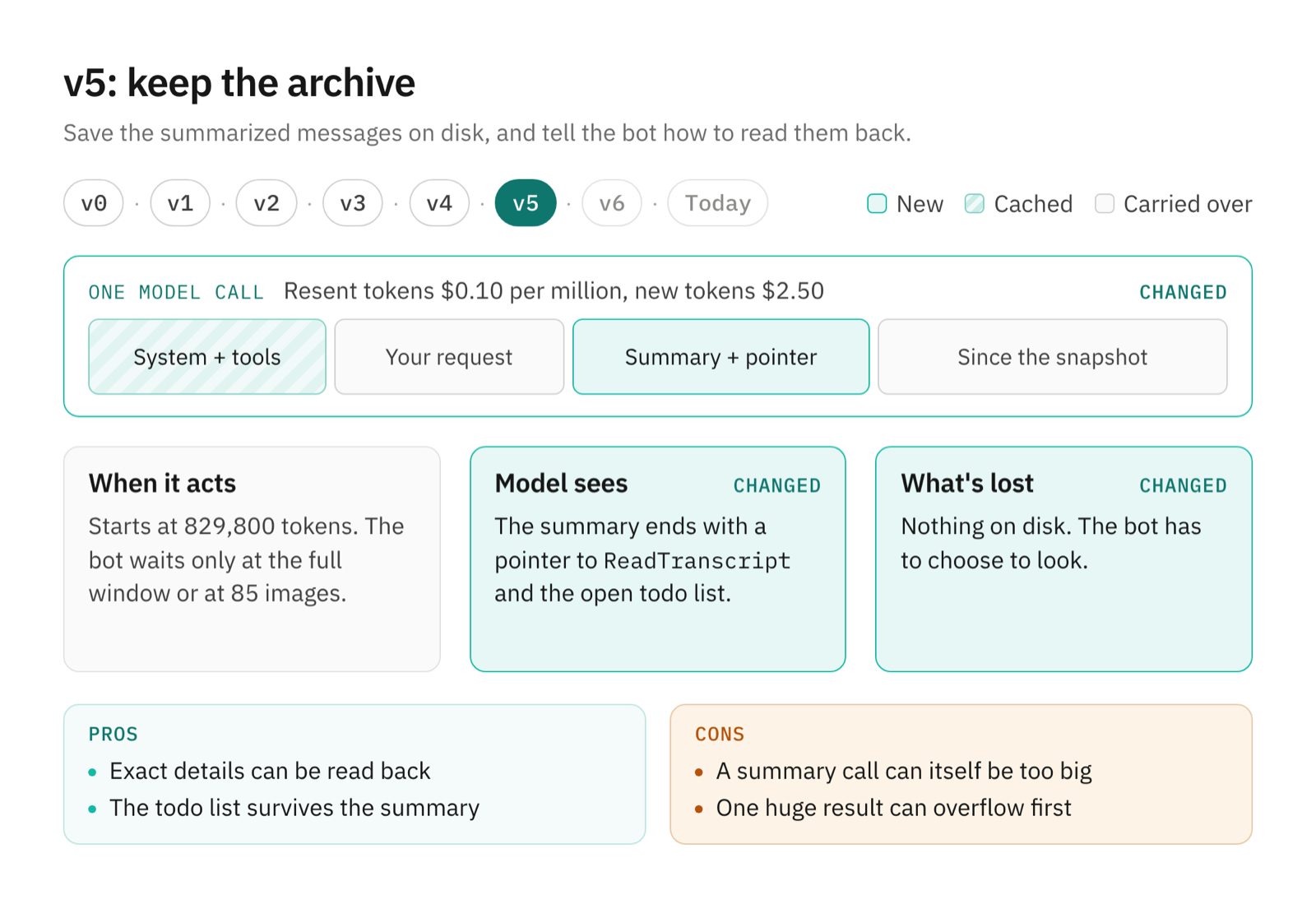
How it works. Each compaction writes an archive on the bot computer: a manifest and a blob with the summary, the messages it replaced and the kept tail. It's staged first, so an interrupted swap can be recovered. The summary message points to ReadTranscript, a tool that pages back through the conversation and the bot's own tool calls, newest first. The open todo list and any skills you attached by hand ride along.
Pros.
- Exact details can be read back.
- The todo list survives the summary.
Cons.
- The summary call is itself a full-size request, and it can be refused.
- One huge tool result can push the conversation past the limit before any summary exists.
v6: recover from an overflow
If the provider still refuses a request, summarize a flattened, size-capped copy and retry.
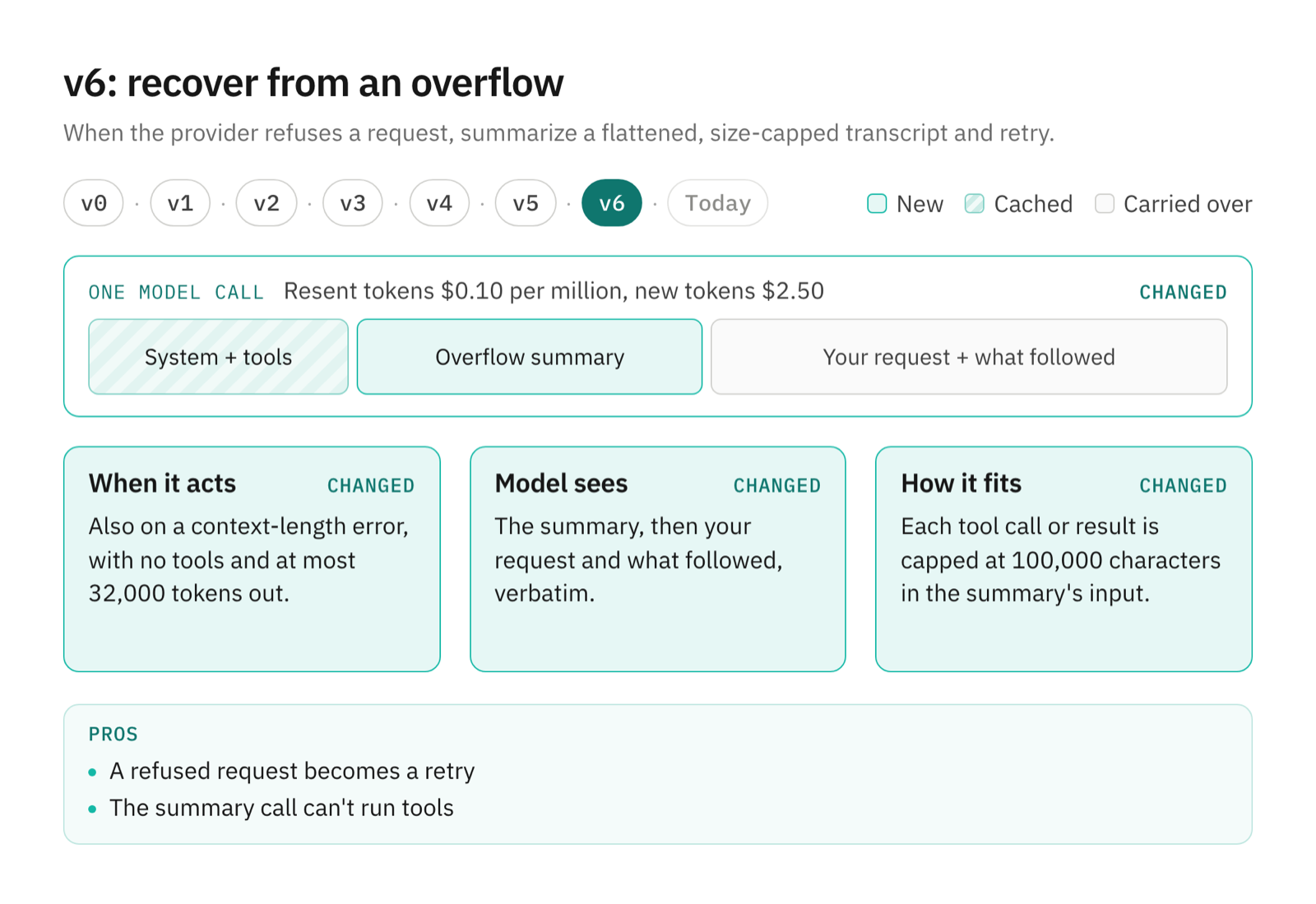
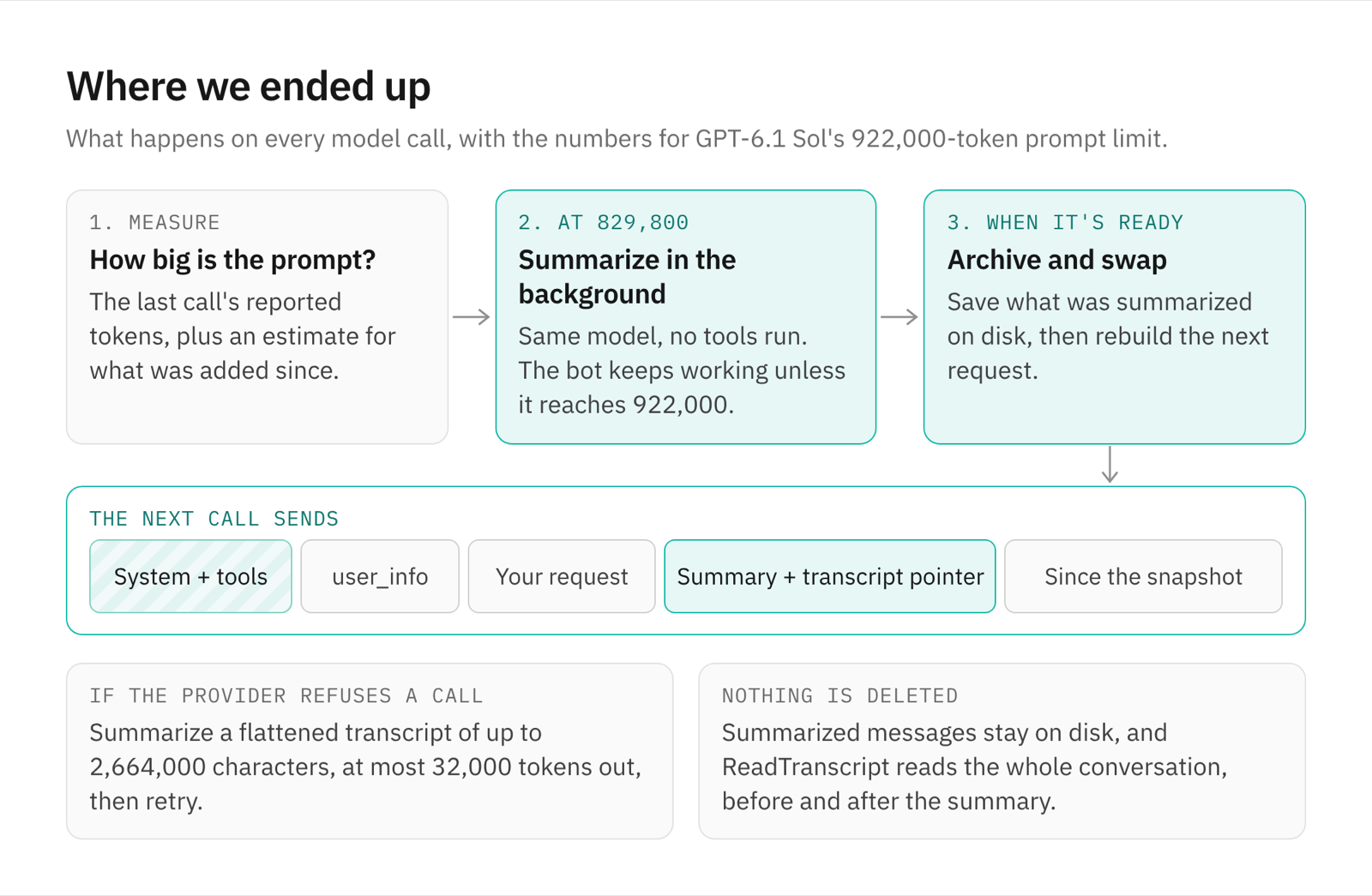
How it works. On a context-length error, OpenTeam renders the conversation as a plain transcript, with each tool call or result capped at 100,000 characters. The budget is three characters per token of the window left, at most 2.8 million characters: 2,664,000 for a 922,000-token limit. If that's still too long, every message gets a fair share and the longest are trimmed. The summary call runs with no tools and at most 32,000 output tokens, and your last request and what followed stay verbatim. Each retry halves, then thirds, the budget.
Pros.
- A refused request becomes a retry.
- The summary call can't run tools.
Where we ended up
Today's design is v6, with v1's cache rules throughout.
When it starts
OpenTeam measures each call from the provider's own usage report, plus an estimate for anything added since: the larger of characters divided by four and an o200k token count. A summary starts at 829,800 tokens or 85 images. The limit is the smallest one the provider publishes. OpenRouter advertises 1,050,000 tokens for GPT-6.1 Sol, but its endpoints accept 922,000, so OpenTeam uses 922,000; a custom endpoint that publishes nothing gets 128,000. Each call's output gets the room above the threshold, 92,200 tokens here.
The summary and the swap
When the summary is ready, OpenTeam checks that the conversation still starts with the snapshot it summarized. Then it writes the archive and rebuilds the next request: system prompt and tools, user_info, your latest request, the summary, then everything since the snapshot. The summary message ends: "If the task is complete, respond to the user. Otherwise, continue working on the task." The server records each compaction with its reason, its tokens before and after, and its timing.
Pros
- Long tasks finish. A conversation can pass the prompt limit as many times as it needs.
- No pause while the summary keeps up. It's written while the bot works.
- Resent tokens are cheap. The prompt is ordered and frozen so the provider can cache it.
- Nothing is deleted. Summarized messages stay on disk and in the transcript.
What one long task cost
The bot read all 287 files, wrote a note for each and delivered its review in 218 model calls over 46 minutes.
| What we measured | Result |
|---|---|
| Largest prompt | 910,475 tokens, call 179 |
| Before the summary | 179 calls, $32.05 listed |
| The summary call | 910,075 tokens in, 4,916 out, 99 seconds |
| First prompt after the swap | 39,547 tokens |
| After the summary | 39 calls, $2.02 listed, back up to 303,659 tokens |
| All 218 calls | $34.07 listed |
The summary ran to 22,362 characters and stood in for 718 messages. OpenTeam estimated the new prompt at 44,539 tokens; the provider measured 39,547. The last call before the swap listed at $0.20. The first one after it listed at $0.07, most of that for writing the new prompt to the cache, and five calls later they cost under a cent.
The bot didn't need ReadTranscript. It carried on from a state file and a notes file it had written in /workspace, and re-read source files when it needed exact text. Afterwards we asked for two details from a file it had read well before the summary, an MTU and a proxy port. It answered both correctly by opening the file again.
That's also why OpenTeam's bots hand long jobs to helpers by default (how bots delegate and talk to each other). Each helper works in its own conversation, so the one you talk to stays small. We switched that off to fill a single context on purpose.
Frequently asked questions
What is context compaction in AI agents?
It's replacing older conversation with a summary when the conversation nears the model's prompt limit, so the agent can keep working. In OpenTeam it starts at the lower of 90% of the limit and the limit minus 10,000 tokens.
Why do AI agents get more expensive the longer they work?
Because every call resends everything so far. Caching makes the resent part cheaper, but the prompt still grows, calls get slower, and some providers charge more for long prompts: OpenRouter lists GPT-6.1 Sol at double rates above 272,000 tokens.
Does compaction make an agent forget things?
The summary keeps your requests and corrections, the decisions so far and what's left to do. Nothing is deleted: OpenTeam archives the summarized messages, and ReadTranscript lets the bot read the whole conversation, before and after the summary. Long-term memory is separate and survives compaction (how OpenTeam's bots remember, and the memory docs). In our run, the bot answered questions about details from before the summary by re-reading files and its own notes.
How much does prompt caching save?
A lot, if the prefix stays stable. In our run, 95.7% of the tokens sent before the summary were cache reads, and the calls listed at $32.05 instead of about $314 uncached.
Does compaction work with every model?
Yes. OpenTeam uses each model's own prompt limit, either the smallest one the provider publishes or the context window you set for a custom endpoint, and starts at the lower of 90% of it and the limit minus 10,000 tokens. If a provider reports an earlier threshold, OpenTeam uses that.
Try OpenTeam
Install the server with curl -fsSL https://openteam.so/install | sh on macOS or Linux, then follow the quickstart. Pick a provider in Settings → Model; compaction works the same way with every model, using that model's own prompt limit.