Three LifeVal-style errands for a bot team, checked against the source
OpenAI's LifeVal grades AI on errands like childcare and budgets. Here are three we gave OpenTeam's self-hosted bots, each answer checked against its source.
On this page
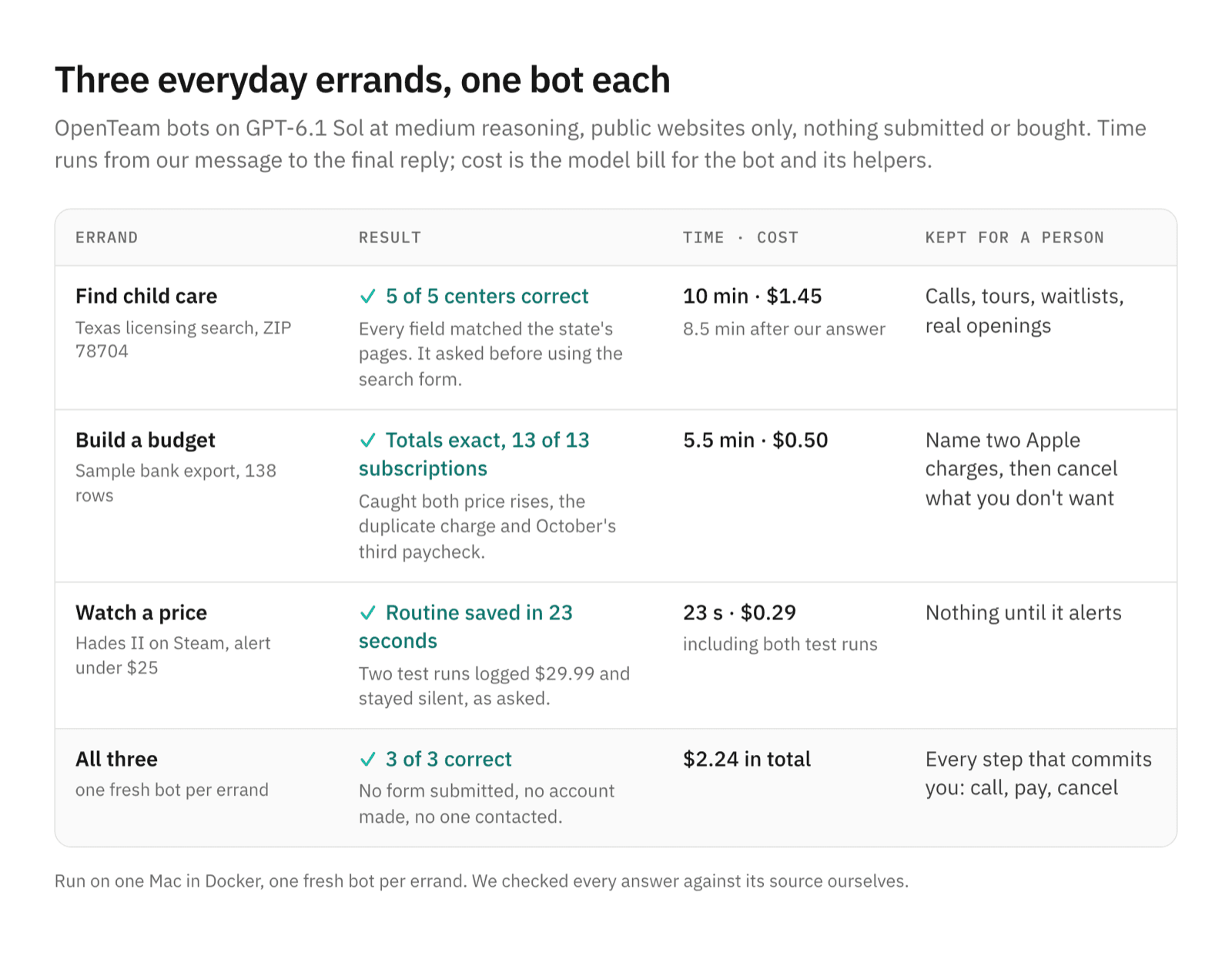
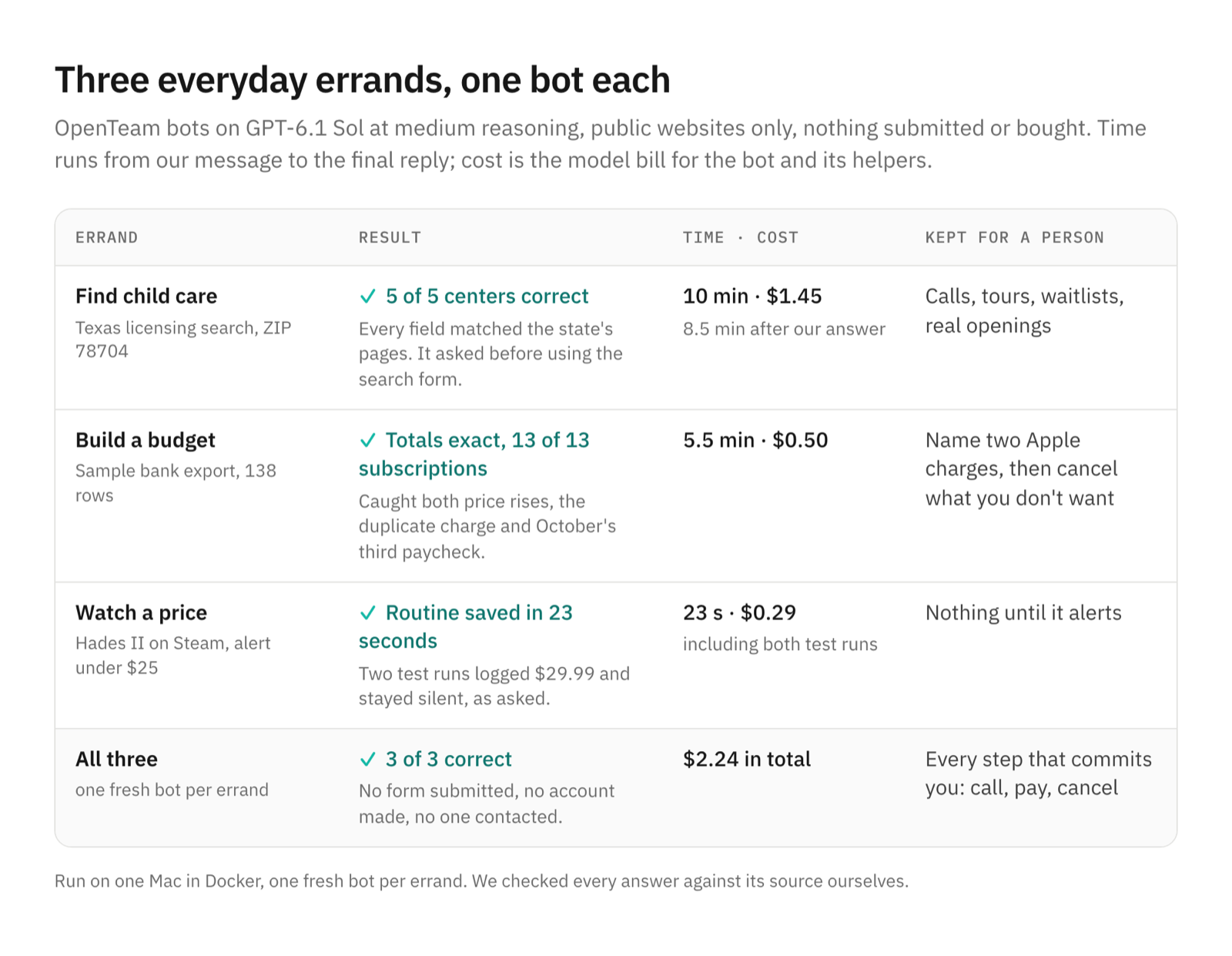
Here are three errands from OpenAI's new LifeVal categories that we gave OpenTeam, our open-source, self-hosted AI agent team: a child care shortlist, a monthly budget and a price watch. All three came back correct, for $2.24 in model costs. We kept the steps that commit you, such as calling or cancelling, for ourselves.
We build OpenTeam, so weigh our view accordingly. For this post we ran each errand once, on public websites, with no accounts, nothing submitted and nobody contacted. We checked every answer against its source ourselves.
What LifeVal measures
On November 2, OpenAI published LifeVal, a benchmark for what it calls "the practical challenges of everyday life", such as finding childcare, accessing government services and creating a budget. OpenAI built it from two time-use studies, the American Time Use Survey and the Multinational Time Use Study. It then surveyed 3,995 people about where they most wanted help.
The tasks cover caregiving, health, education, household administration, personal finances, shopping and government services. OpenAI's chart averages 169 tasks equally. GPT-6 Astra, at its xhigh reasoning setting, scores 80.6% average reward, up from 49.3% for GPT-5.2 last December. Published examples include enrolling in a kindergarten after a move (93.1%), a Texas SNAP application (98.7%) and meal prep after a diabetes diagnosis (90.4%).
OpenAI's bar is action, not advice: "To be a truly helpful personal assistant, ChatGPT should be able to take actions that actually get things done." Its kindergarten example ends with "Submitting interest forms." The task set, rubrics and grader aren't public, so nobody outside OpenAI can run LifeVal. We borrowed its categories instead, and stopped every errand before the step that commits you to something.
How we tested
Everything ran on one OpenTeam server on a Mac, in Docker, on the current release. Each errand got a fresh bot, and every bot used GPT-6.1 Sol at medium reasoning through OpenRouter, at $2 and $10 per million input and output tokens. Web search was off, which is OpenTeam's default, so bots read official sites directly with the built-in page reader and their own Chromium (web search settings).
Nothing personal went in. The bank export was a made-up file of 138 transactions with problems planted in it. We wrote the requests the way a person would, for example:
We're moving to Austin (ZIP 78704) in January and need full-time child care
for our 2-year-old, weekdays about 7:30 AM to 5:30 PM. Use the State of Texas's
official child care search (Texas HHS) to find five licensed child care centers
in 78704 that take 2-year-olds and are open those hours. [...] Don't contact
any provider and don't submit any forms.
Times run from our message to the bot's final reply. Costs are the model bill for the bot and its helpers, read from each session's token usage at OpenRouter's list price.
Errand 1: child care near a ZIP code
The bot handed the browsing to a helper (a subagent, see how AI agents talk to each other) and kept us posted. Two minutes in, it paused to ask. The state's search only returns results after you submit its search form, and we had said not to submit forms. So it asked, with two buttons.
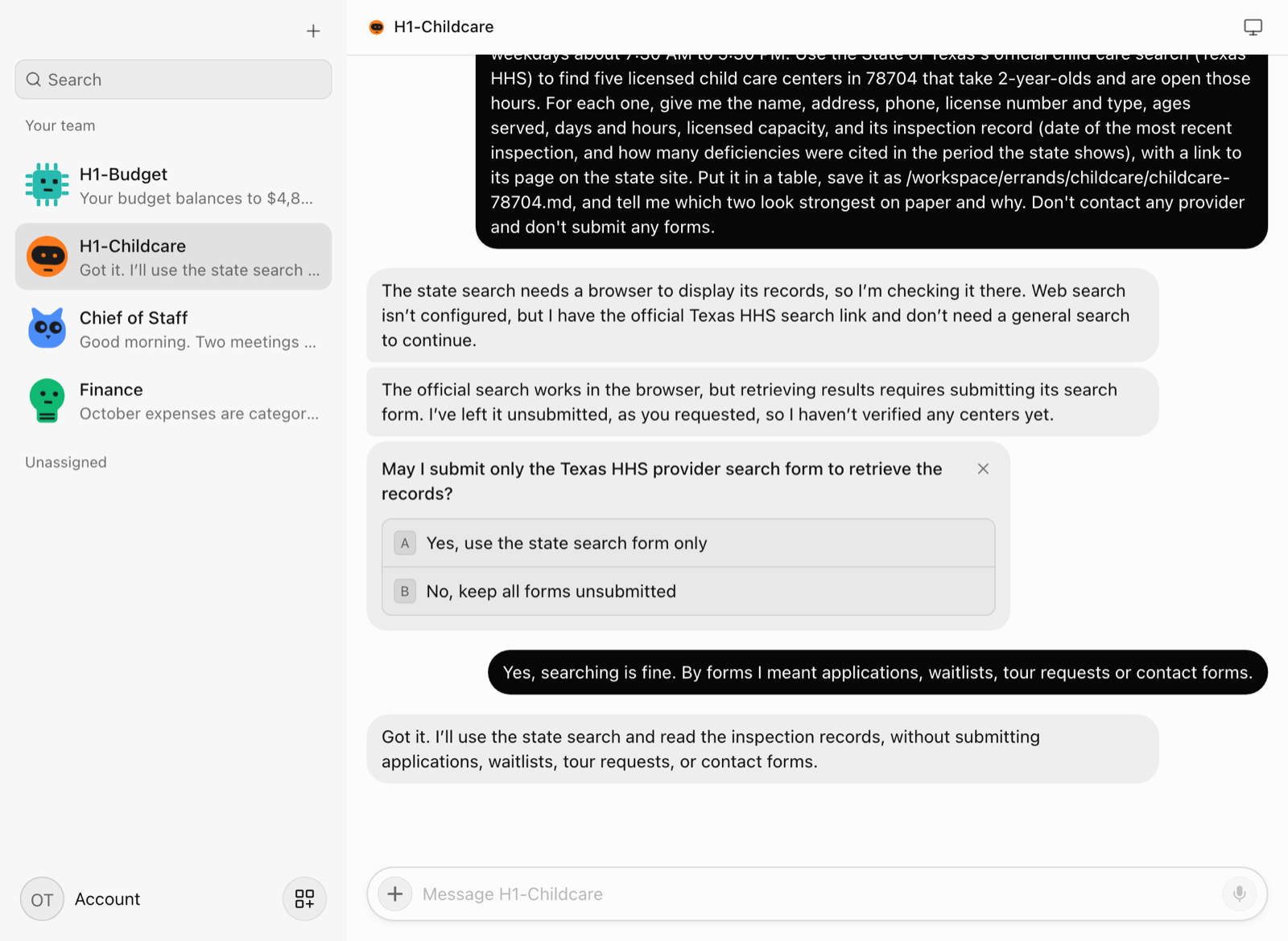
That was the right call: our wording really did cover the search form. Once we said searching was fine, it read all 21 listings for Austin 78704, opened eight profiles and picked five centers. For each it listed the address, phone, license number, ages, hours, capacity, latest inspection and deficiency count.
We checked all five against the state's own pages, and every field matched. It also explained that the state's count is a running total over 60 months, not the last inspection. And it said, unprompted, that posted hours don't prove a January opening.
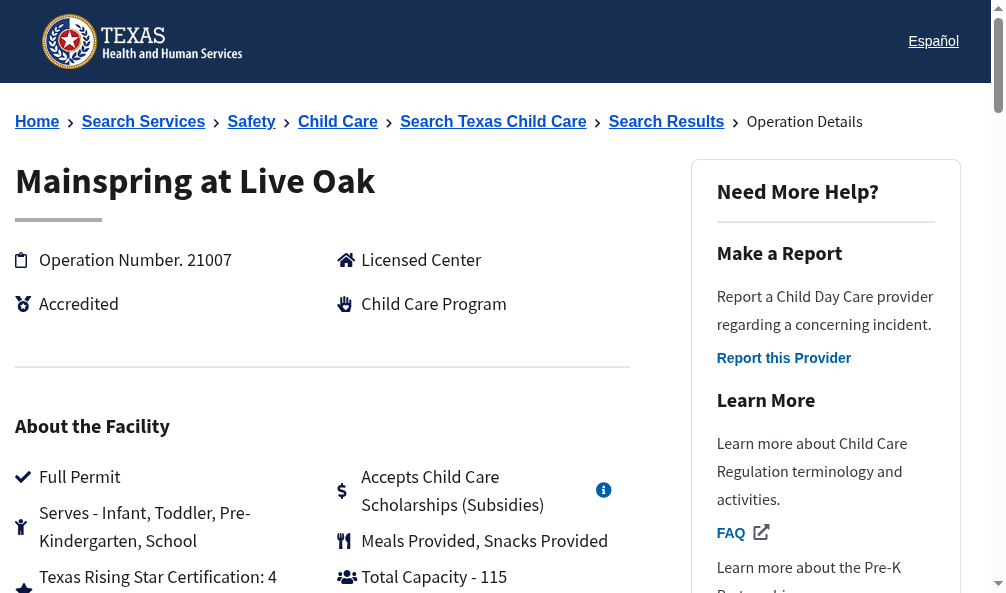
It took 10 minutes, 8.5 of them after our answer, and cost $1.45: 40 browser actions, 11 terminal commands to check its saved copies, and two helpers. Left for a person: calling, touring, joining waitlists and finding out who actually has a toddler opening.
Errand 2: a monthly budget from a bank export
We put a sample checking-account export in the bots' shared /workspace folder. We asked for a monthly budget, a list of subscriptions, and flags for anything worth a look. The file had traps:
- Two subscriptions that went up (Spotify by $1, a newspaper from a $4 introductory price to $25)
- A new streaming charge, and a streaming bundle that may include a service billed separately
- Two identical restaurant charges on the same day
- Two annual fees, a bank fee and a refund
- A third paycheck in October, transfers to savings and a credit card autopay
The bot got it all. Its normal-month take-home of $4,825.10 and average spending of $3,391.24 match our own calculation exactly. It found all 13 subscription lines for $176.57 a month, with the annual fees spread across months, and flagged every trap above.
It treated savings transfers and the card payment as money moved, not spent, and kept October's extra paycheck out of the baseline. On the two Apple charges, it said they "need identification, not automatic cancellation."
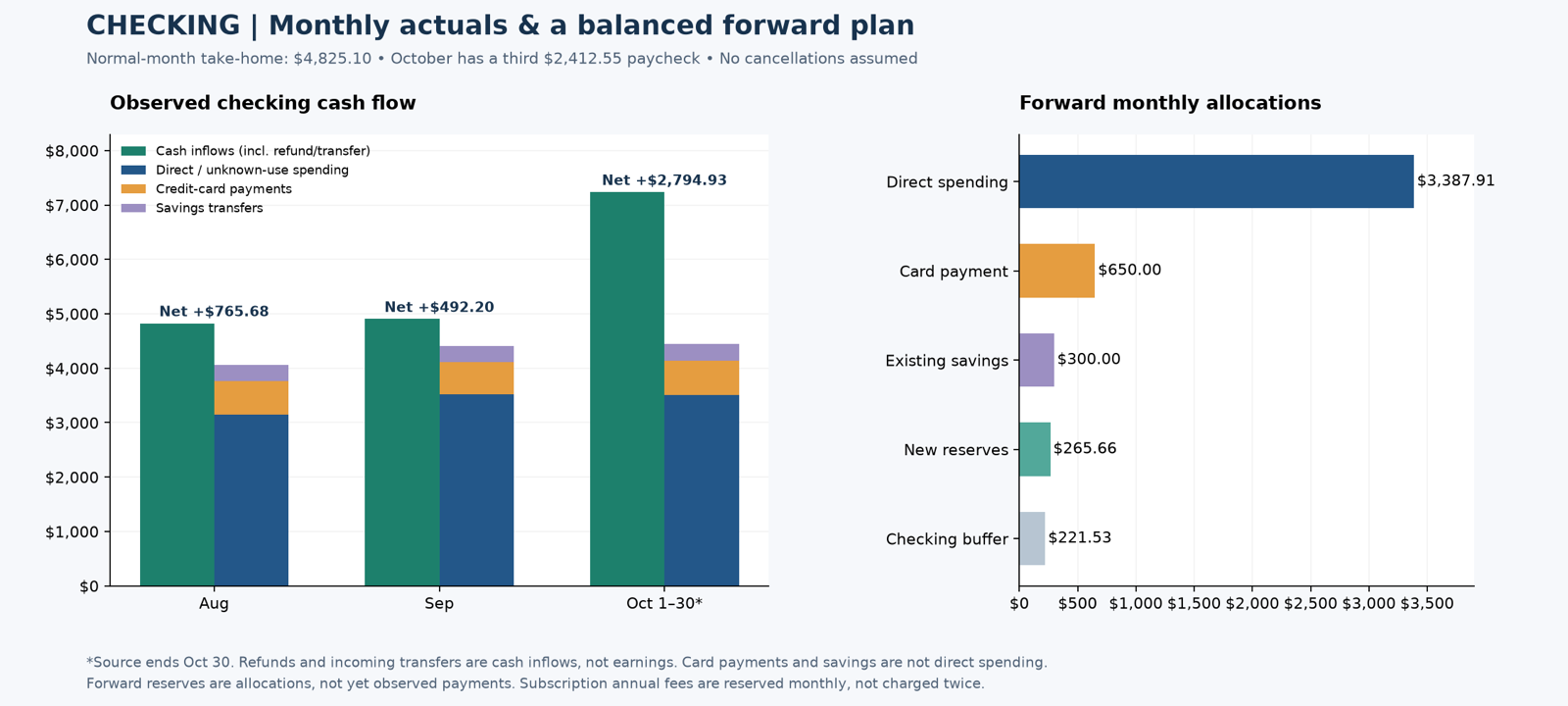
It took 5.5 minutes and cost $0.50. A helper wrote a Python script and a verification file to build the spreadsheet, and the numbers were right. Left for a person: saying which Apple charges are which, and any cancelling.
Errand 3: watching a price with a routine
Last, we asked a bot to check the price of Hades II on Steam every morning at 9. It should message us only below $25, and otherwise log the price in a CSV file. Twenty-three seconds later it had saved a routine, and it said so in the chat.
OpenTeam's routine instructions default loose schedules to weekday working hours. This bot kept weekends, noting in the saved routine that it's "a personal game-price watch." It also wrote its own rules: never treat a failed lookup as a price, and stop the watch after the first alert.
We pressed Test run twice. Each run handed the check to a helper, which read the Steam page and Steam's public price data and logged $29.99. That matched Steam at the time, with no discount. Neither run sent a message, and the second run didn't add a duplicate row for the same day. Setup plus both runs cost $0.29.
One more thing we noticed
Midway through, our Docker disk reached 85% full, mostly with other projects, so each bot we created after that opened with a low-disk notice. That's a deliberate check: the bot names the biggest folders once and deletes nothing without a yes.
What we kept for ourselves
Two kinds of step stayed with us in every run:
- Anything that commits you: submitting, paying, calling, cancelling. LifeVal grades models on doing these; we kept them for ourselves.
- Judgment about your own life: which charge is which, and which center feels right.
The rest of the legwork took the bots up to 10 minutes and $0.29 to $1.45 an errand. It was mostly reading official records closely, and nothing we checked was wrong.
How to hand a bot an errand
- Name the official source. "Use the State of Texas's official child care search" kept the bot off listing sites, and none of our errands needed web search.
- Say exactly what not to do. "Don't submit applications or contact forms; searching is fine" is clearer than "don't submit any forms."
- Give it sample or minimal data first. We used a made-up bank export. Your files stay on your server, and only what each task needs goes to your model provider (privacy).
- Use routines for anything you'd check twice. One sentence set up the price watch, and Test run shows the result before the first scheduled run.
Frequently asked questions
What is OpenAI's LifeVal?
It's OpenAI's benchmark of 169 everyday tasks, published November 2, 2026, in areas such as childcare, budgets and government paperwork. The tasks came from time-use studies and a survey of 3,995 people. OpenAI reports GPT-6 Astra at 80.6% average reward. The task set and grader aren't public.
Can an AI agent run my errands for me?
The legwork, yes. In our test, bots did the research and paperwork correctly: a child care shortlist in 10 minutes, a monthly budget in 5.5 and a price watch saved in 23 seconds. We kept submitting, paying and calling for ourselves.
Is it safe to give an AI agent my bank transactions?
That depends on where it runs and which model sees the data. With OpenTeam, the file and the bot's work stay on your server, and only what the task needs goes to the model provider you chose. We'd start with a trimmed export, as we did, and keep bank logins out of the bot entirely.
Do AI agents need web search to do errands?
Not if you name the source. OpenTeam's web search is off until you add a provider in Settings → Providers, and none of these three errands needed it. Bots went straight to the official sites with the page reader and their own browser.
How much does it cost to run errands with an AI agent?
These three errands cost $2.24 in total on GPT-6.1 Sol, from $0.29 for the price watch to $1.45 for the child care search. OpenTeam itself is free; you pay for the machine and the model provider.
Try OpenTeam
Install the server with curl -fsSL https://openteam.so/install | sh on macOS or Linux, and guided setup follows. The quickstart walks you through your first bot, and how to self-host AI agents covers running it on a home server or VM.