n8n vs OpenTeam: workflows or a team of bots, and how to use both
We ran the same jobs in n8n and in OpenTeam, a self-hosted AI agent team, on one VM. Where each won, what broke, and two bridges that worked.
On this page
n8n is a workflow builder: you wire the steps, and an AI node can fill one of them in. OpenTeam is an open-source, self-hosted AI agent team: you tell a bot the job, and it works out the steps on its own Linux computer. Pick n8n when you know the steps and a bot when you don't. They connect over MCP and webhooks.
We build OpenTeam, so weigh our view accordingly. For this post we installed n8n's Community Edition next to OpenTeam on one cloud VM in late October 2026. Both got the same model and the same jobs, and we wrote down what broke on each side. n8n facts we didn't test link to n8n's docs, pricing page or repo.
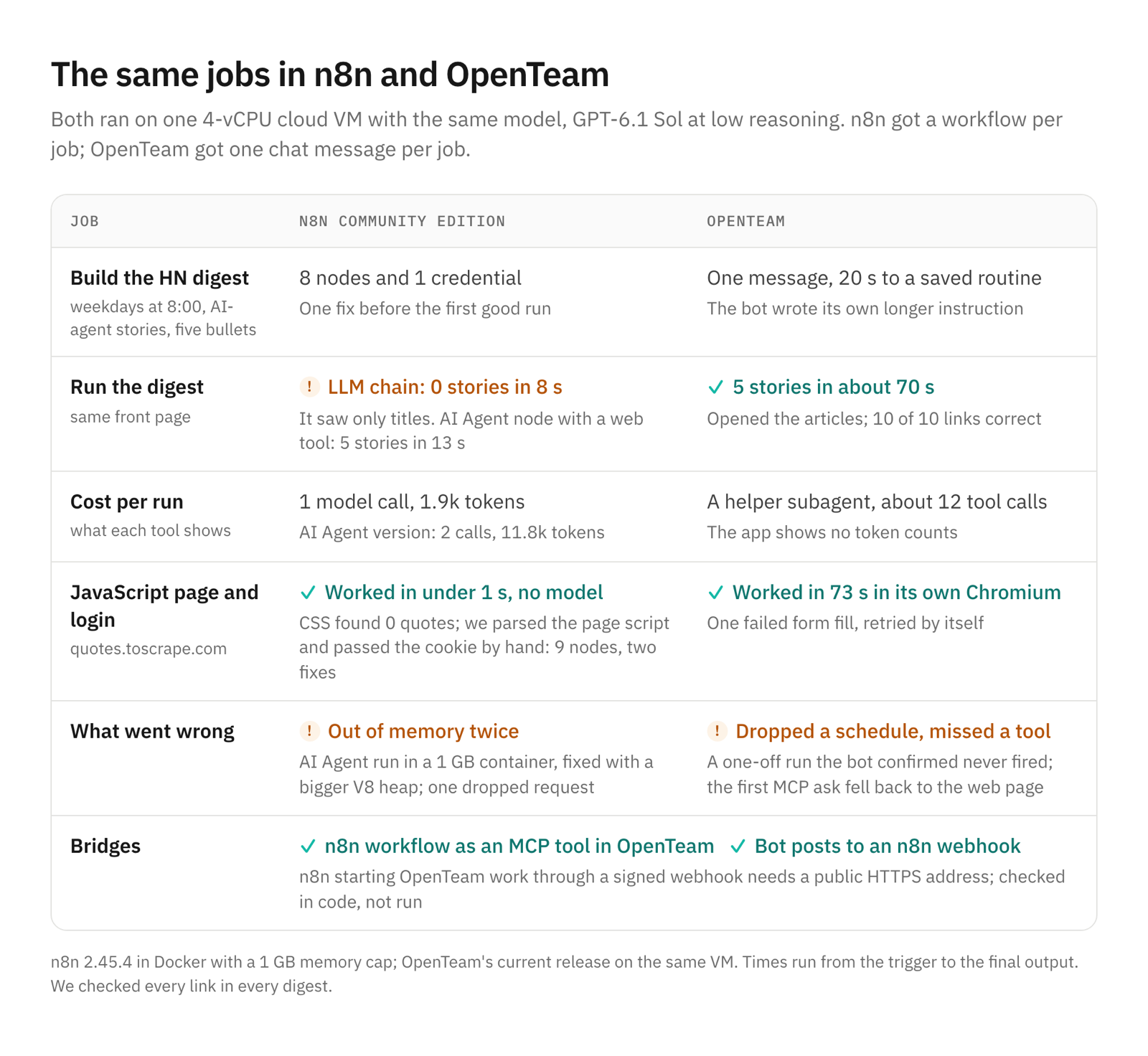
n8n vs OpenTeam at a glance
n8n facts come from its docs, pricing page and repo, checked in late October 2026. OpenTeam facts come from its docs and code. Prices are n8n's euro list prices with annual billing.
| n8n | OpenTeam | |
|---|---|---|
| What it is | Workflow automation with AI nodes and an Agents preview | A team of AI agents ("bots"), each with its own Linux computer |
| How you build | Nodes on a canvas | A chat message; the bot saves a routine |
| Who decides each step | You, when you build it | The model, when it runs |
| License | Sustainable Use License ("fair-code") | GPL-3.0 |
| Price | Community Edition free; Cloud from €20/month; self-hosted Business €667/month | Free; you pay for the machine and the model |
| Integrations | 500+ built-in, 2,000+ with partner and community nodes | 16 bundled plugins plus any MCP server |
| Web browsing | HTTP requests; Browser Use is Cloud-only, in your own Chrome | A Chromium per bot that you can watch and take over |
| Run history | Every node's input and output; retry from the failed step | Run history per routine, plus the bot's messages |
| Approvals | Human review before AI tool calls; send-and-wait steps | Email drafts wait for your Send; nothing else |
| People | Many users; SSO and roles on paid plans | One human account per server |
| Apps | Web editor | macOS (Apple silicon), Linux x64, iPhone beta |
How we tested
Both ran on one Azure VM with 4 vCPUs and 15 GB of RAM, where OpenTeam's current release was already installed. We added n8n 2.45.4, the current stable release, from the official Docker image. It got its own volume, a 1 GB memory cap and telemetry off, with a throwaway owner account and no license key.
Both used GPT-6.1 Sol at low reasoning effort: OpenTeam through the VM's existing Codex sign-in, n8n through its OpenRouter Chat Model node. OpenTeam's jobs went to a temporary bot named Scout, deleted afterwards. The first job, word for word in both:
Get the current Hacker News front page (the top 30 stories), pick the stories
about AI agents, and write a five-bullet digest. Each bullet gives the story
title linked to the story's URL, one sentence on why it matters, and a link to
the HN discussion. If fewer than five stories are about AI agents, list only
those and say how many there were.
For OpenTeam we added "every weekday at 8:00 AM New York time" and "post the digest in this chat". We checked every link in every digest, and times run from the trigger or message to the final output.
Job 1: a weekday Hacker News digest
In n8n: 8 nodes, 8 seconds, and a blind spot
We built it as seven nodes plus a model. A Schedule Trigger starts it, an HTTP Request fetches HN's top story IDs, and a Code node keeps the first 30. Another HTTP Request fetches each story, then Edit Fields, Aggregate and a Basic LLM Chain with the OpenRouter model write the digest. It needs one credential.
The first run failed with a 401 at "Get each story". HTTP Request had split the 500 IDs into 500 items, and our Code node expected one array. The execution pointed at the node and item, and a one-line fix sorted it.
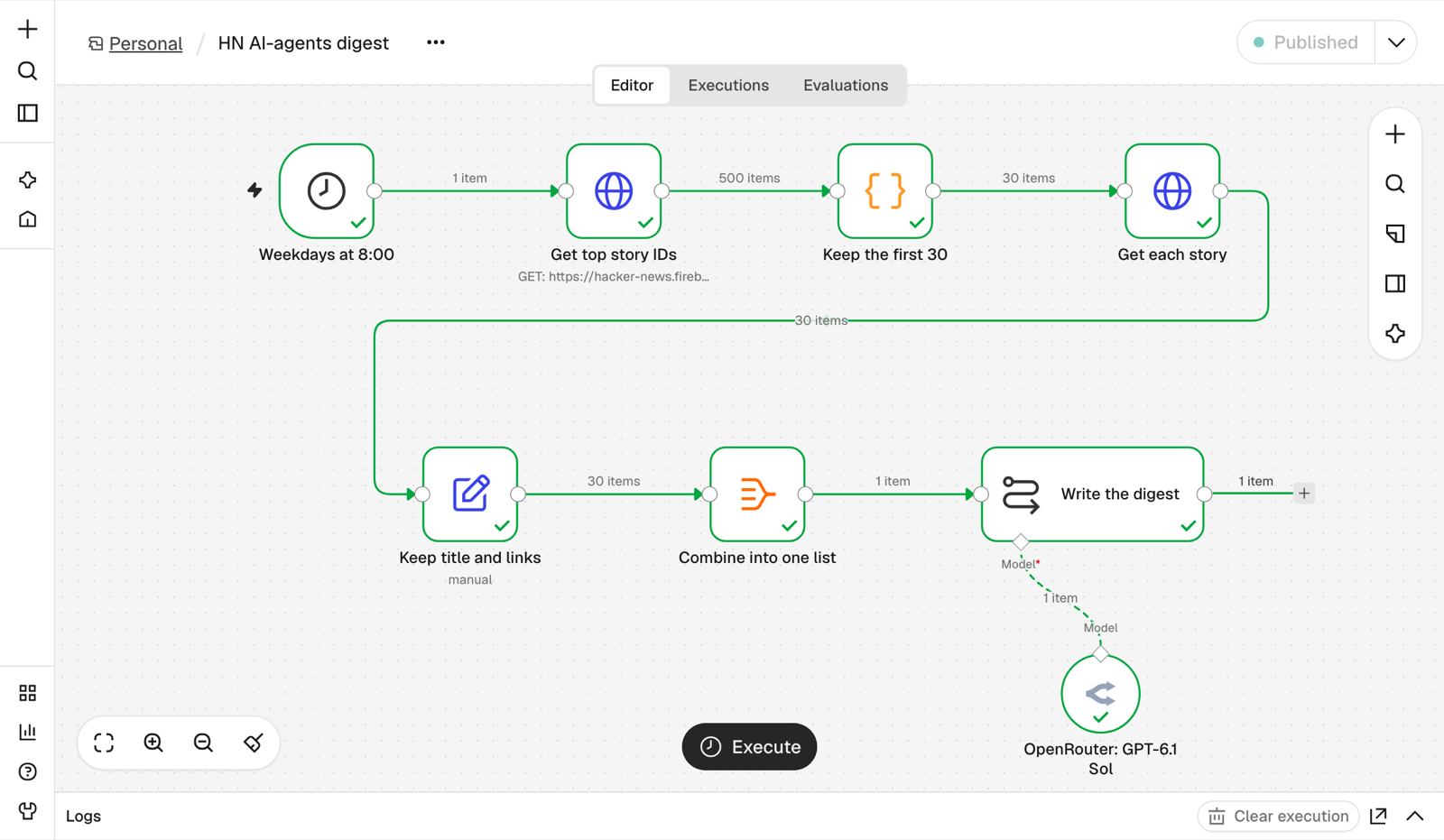
After that, each run took about 8 seconds and one model call of roughly 1,900 tokens, which n8n shows on the model node. At OpenRouter's list price of $2 per million input tokens and $10 per million output tokens, that's about half a cent.
Both runs found nothing: "0 stories are explicitly identifiable as being about AI agents from the supplied titles... I only have the titles and URLs." That's the design working as built. A chain sees only what the workflow hands it, and ours handed it titles.
So we built a second version with n8n's AI Agent node and an HTTP Request tool, so the model could open articles. Its first two runs crashed the whole n8n process with "JavaScript heap out of memory" while it read pages, one of them 8.7 MB of HTML. Our 1 GB cap is well under the 4 GB that n8n's Docker Compose guide asks for. Following n8n's memory guide, we set --max-old-space-size=768, still inside 1 GB, and it ran.
The next run lost one of its 30 HN requests to a connection reset, which stopped the run. n8n's Retry picked up from the failed node. The agent then read six articles and picked five stories in 13 seconds, with two model calls and about 11,800 tokens. All ten links were correct.
In OpenTeam: one message, about 70 seconds
Twenty seconds after our message, Scout had saved a routine on 0 8 * * 1-5 in New York time. It also rewrote our instruction into a longer saved prompt with rules such as "Do not fill with unrelated AI stories or invent facts." You can read and edit that text in the routine panel (routines).
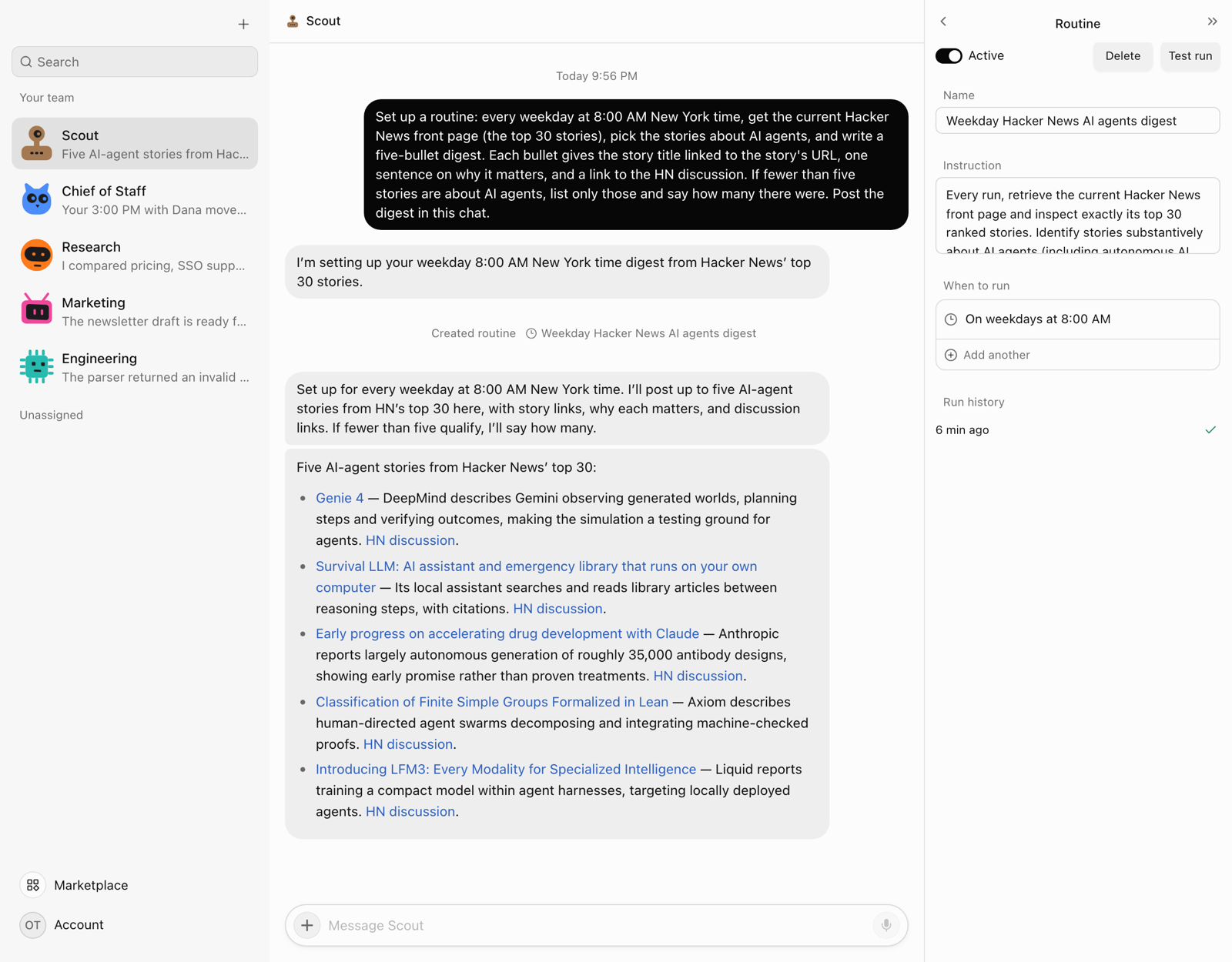
We pressed Test run twice, and each took about 70 seconds. Scout handed the job to a helper subagent, which fetched the HN page, parsed it in its terminal and opened seven candidate articles before writing. Both digests listed the same five stories with all ten links correct, though the wording changed.
The bot read "about AI agents" generously. Two picks clearly were, such as Axiom's "swarms of dozens of AI agents". Two were partly about agents, and one, an offline assistant, was a stretch.
To watch both schedulers work, we then added a one-off 2:10 AM run to each. Both n8n workflows fired on time and succeeded. OpenTeam's didn't. Scout confirmed "Added today's one-time run for 2:10 AM EDT" and saved both schedules, but the routine's next run stayed at 8:00 AM and nothing ran at 2:10. In OpenTeam's code, a sync from the routine's saved file recomputes the next run from the first schedule only. That's an OpenTeam bug, found in this test.
What the digest job shows
n8n's run is fast, cheap and repeatable, but its model knows only what you pass it. The bot researched without being told how, but took five to nine times as long and its output varies. n8n names the failing node and item and retries from there (executions). OpenTeam's run history shows whether a run succeeded, and the bot's messages say what happened.
Job 2: a JavaScript page and a login form
The second job used quotes.toscrape.com, a practice site for scrapers. We asked for the 10 quotes on its JavaScript-drawn /js/ page, then a login and the Goodreads links that appear only when you're logged in.
In n8n: works, by hand
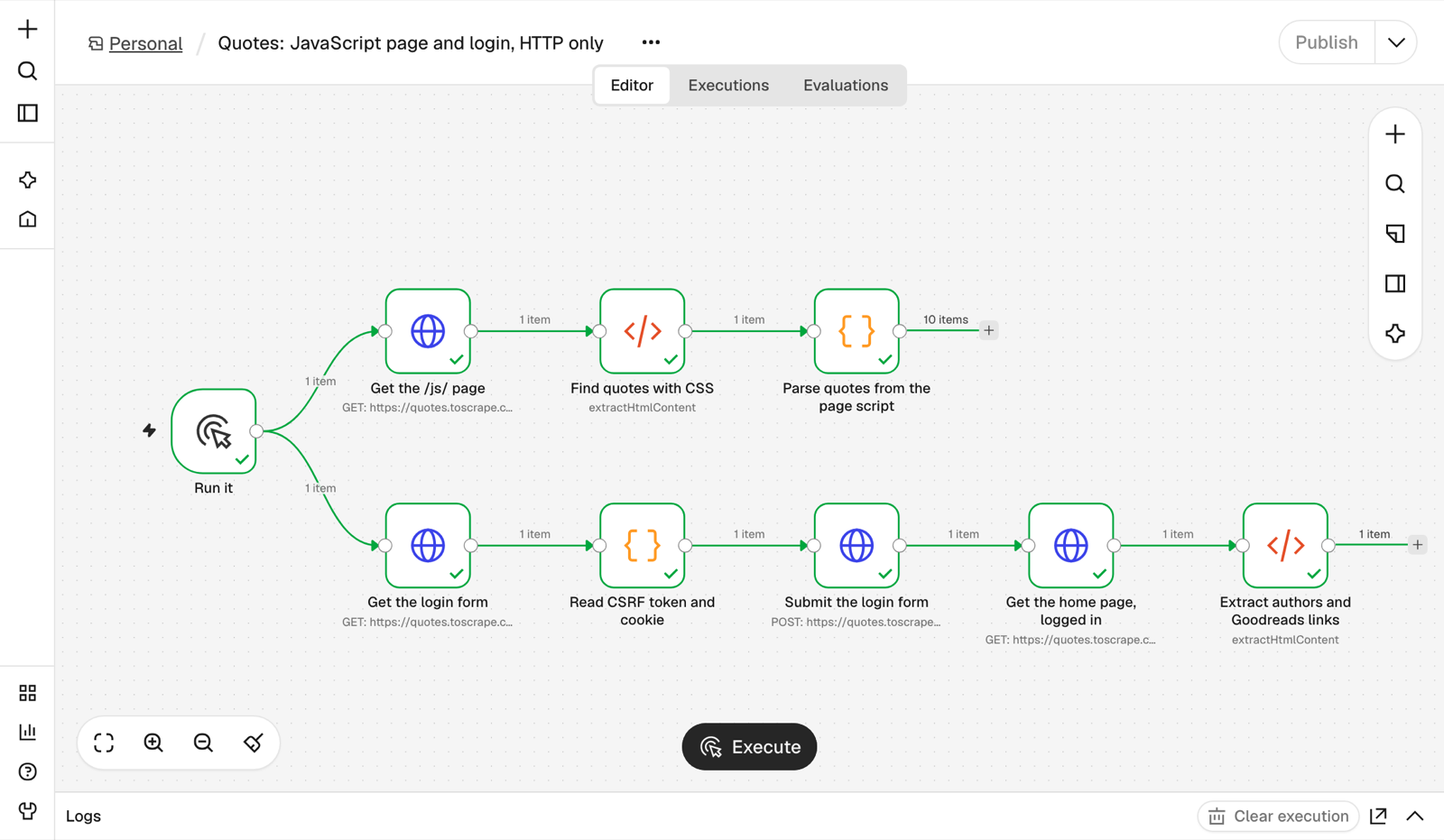
HTTP Request gets the page before any JavaScript runs, so the HTML node's .quote .text selector returned an empty array. This page happens to embed its quotes as JSON in a script tag, so a Code node with a regular expression recovered all 10.
The login took four more nodes. They fetch the form, read the CSRF token and session cookie, post the form with redirects off, and fetch the home page with the new cookie. It finished in under a second with no model, after two fixes to our own expressions.
That only works because this site is simple. For a real browser, n8n's Browser Use lets its building assistant drive your own Chrome through an extension. The docs say it "isn't available on self-hosted n8n" and "can't run as part of a published workflow." The built-in Airtop node drives a third-party cloud browser and needs an Airtop account, which we didn't create.
In OpenTeam: its own Chromium
Scout first spent about 15 seconds searching its plugin catalog for a quotes.toscrape.com connector, then handed the job to a browser subagent. That subagent read the rendered page in the bot's Chromium and failed its first attempt to fill the login form. It took a snapshot of the page and logged in on the second try.
It returned the same 10 quotes and 10 Goodreads links as n8n, 73 seconds after our message. Asked again in the same chat, Scout repeated its last answer in 8 seconds instead of rerunning.
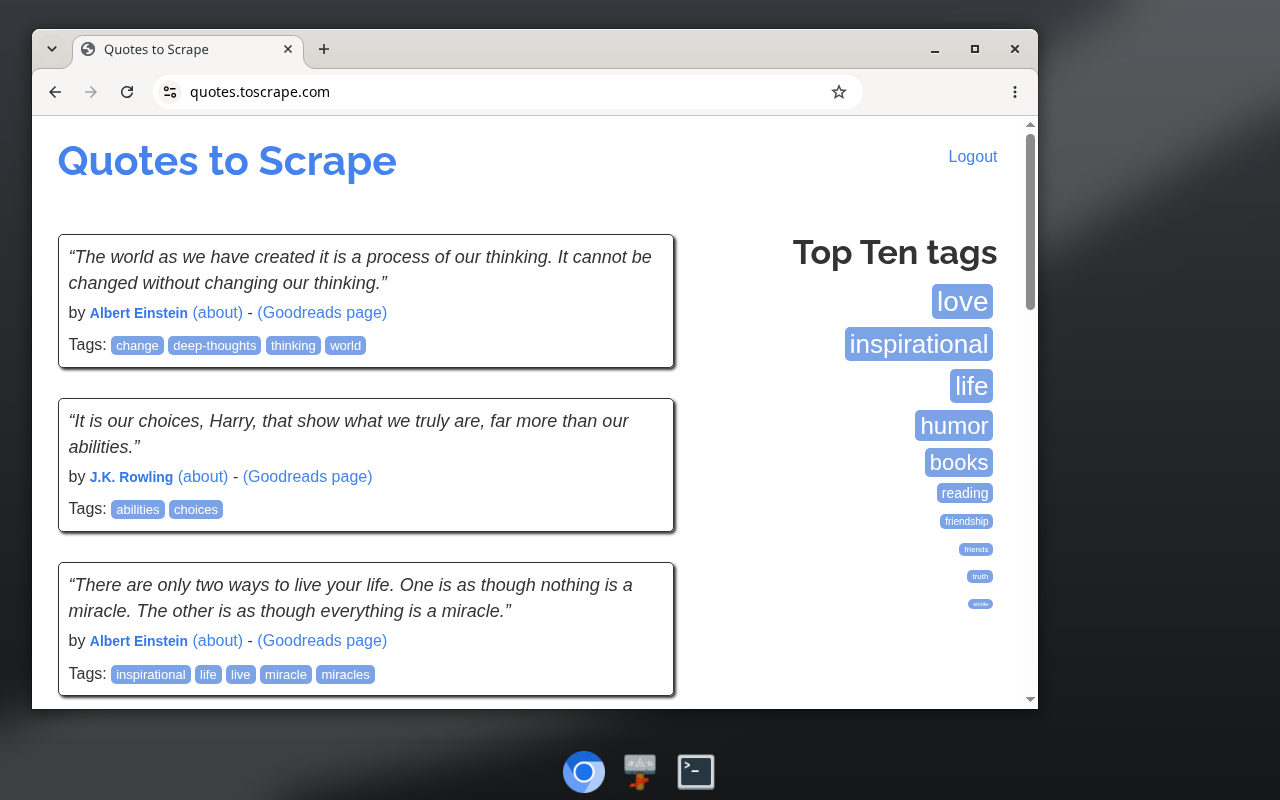
You can watch any bot's screen and take control. Giving every AI agent its own computer covers how that desktop works and its limits.
n8n has AI agents too
n8n isn't only fixed workflows. The AI Agent node lets a model choose tools inside a workflow, and n8n can require human review before chosen tool calls, approved in chat, Slack, Gmail and other channels.
Since version 2.42, n8n also turns on n8n Agents, a preview of standalone agents. Each gets a model, instructions, skills, tools (workflows, MCP servers and sub-agents), web search, memory, schedules and chat channels; our install listed Slack, Telegram, Linear and Discord. The docs add approvals for sensitive tools and say "Queue mode isn't supported for agents yet."
We tried to build one, but with our OpenRouter credential the builder's model list stayed on "Loading…" and the agent never saved. n8n agents call tools and workflows. They don't get a desktop or a browser, and running code needs a separate sandbox service.
Where n8n is better
- Predictable, auditable runs. Each execution keeps every node's input and output, and you can retry from the failed step. Per-node Retry On Fail would have absorbed our reset. n8n's own comparison with OpenClaw puts it well: "n8n puts agents inside structured, observable workflows."
- Cost and speed per run. Our quotes job used no model at all, and the digest cost about half a cent in 8 seconds.
- Integrations and templates. n8n has 500+ built-in integrations, 2,000+ with partner and community nodes, and more than 13,000 templates. OpenTeam bundles 16 plugins plus any MCP server.
- Scale. Queue mode spreads executions across workers. OpenTeam runs on one server.
- People in the loop. Approval steps are built in. OpenTeam has no approval engine; only email drafts wait for your Send, and bots can't send email themselves.
- Teams and maturity. n8n supports many users, adds SSO, roles and Git on paid plans, and has a large community. OpenTeam is a young project with a small community and one human account per server.
If any of those decides it, n8n is the better tool.
Where OpenTeam fell short in our test
It was slower, about 70 seconds against n8n's 8 to 13, and its output changed between runs. It dropped the extra schedule its own bot had confirmed, searched its plugin catalog when it didn't need to, and missed the n8n tool on our first try (see below). When we deleted Scout, its routine stayed scheduled until we deleted the routine too. It shows no token counts. Its usual limits apply too: one model serves every bot on a server, and desktop apps exist only for macOS on Apple silicon and Linux x64, plus an iPhone beta.
When to use both
The split that worked for us: n8n owns the fixed steps and delivery, and a bot handles judgment and browsing. We tested two bridges end to end and read the third in code.
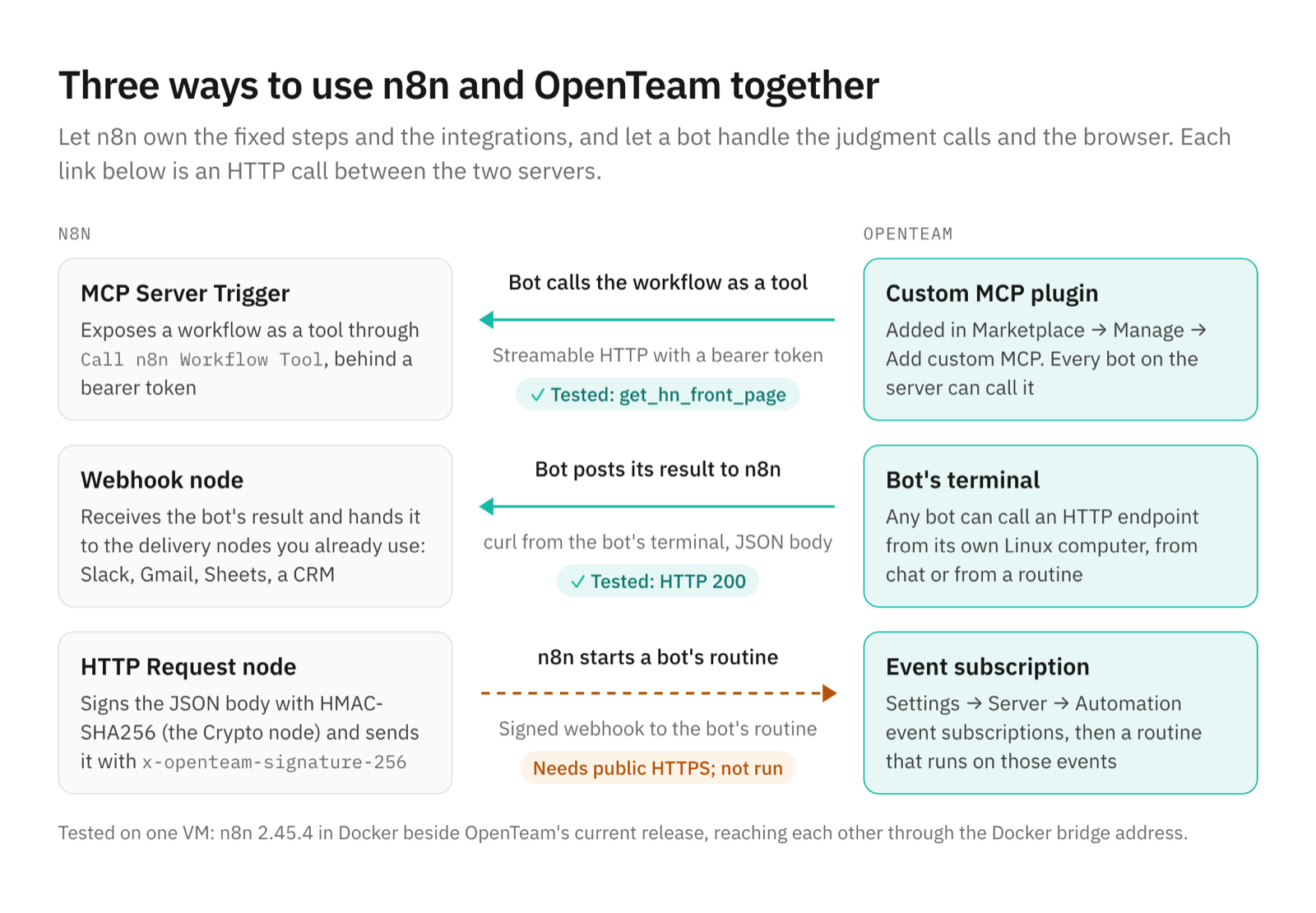
An n8n workflow as a bot's tool. n8n's MCP Server Trigger exposes workflows as MCP tools over SSE or streamable HTTP, with bearer or header auth. We published a sub-workflow that returns the HN front page as the tool get_hn_front_page.
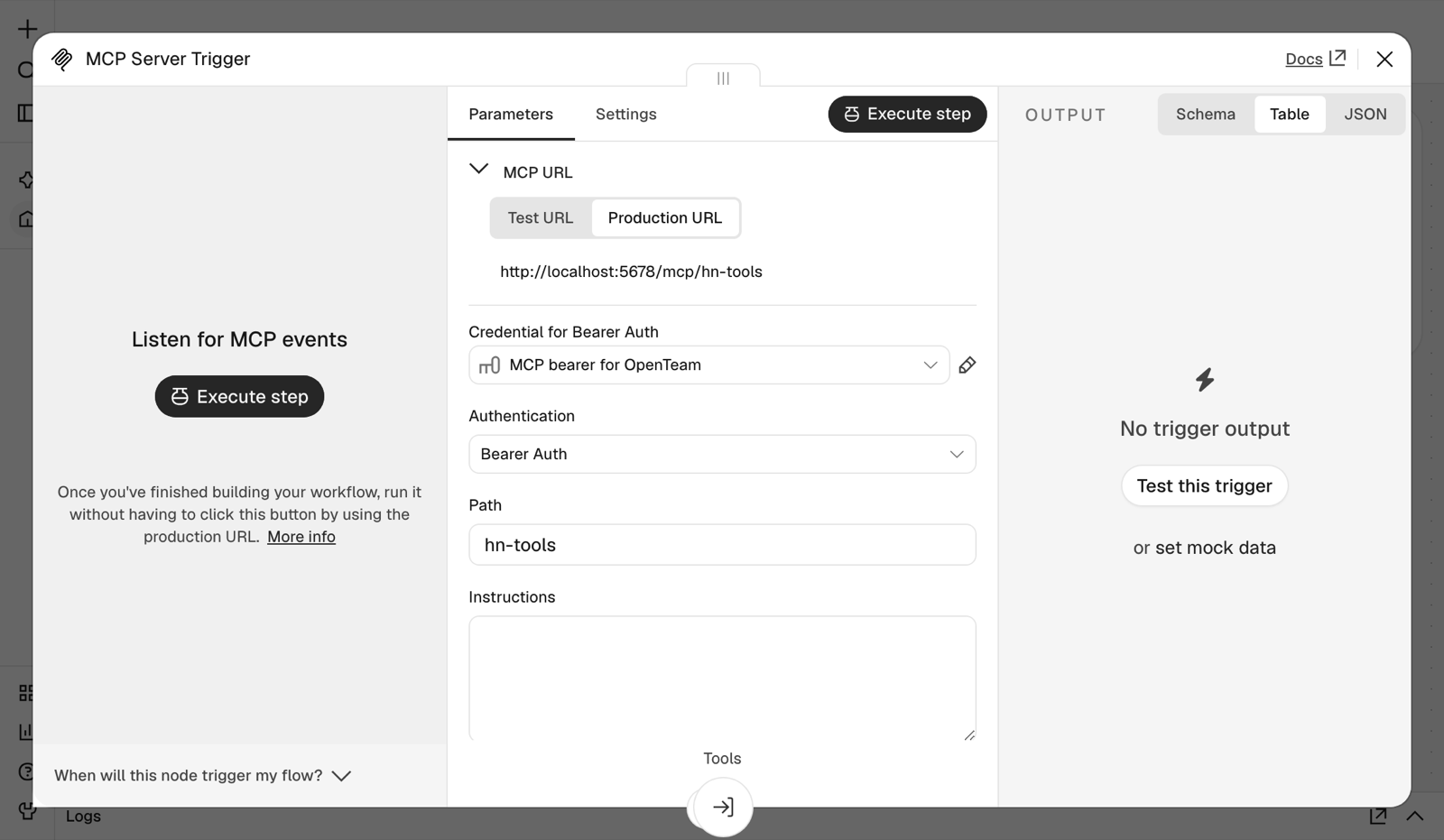
In OpenTeam, Marketplace → Manage → Add custom MCP takes the URL and an Authorization header (plugins). Its client tries streamable HTTP, then SSE, and it connected with one tool. Our first request ("Use the n8n Hacker News tools plugin...") still failed. Scout searched the plugin catalog, which doesn't list custom servers, then read HN directly and said so. Once we named the server and tool, it called the tool and answered in 16 seconds, and n8n logged both executions.
A bot posting to an n8n webhook. We asked Scout to POST its latest digest as JSON to an n8n Webhook node with curl from its terminal. n8n answered HTTP 200 and stored the digest, ready for its Slack, Gmail or Sheets nodes. Outside a test, add header auth.
n8n starting a bot's routine. Routines can run on "any service that sends signed webhooks" through Settings → Server → Automation event subscriptions, which needs a public HTTPS address. OpenTeam's code expects JSON with id, kind and text, signed in an x-openteam-signature-256 header as sha256= plus the hex HMAC-SHA256 of the raw body. n8n's Crypto node can compute that. We confirmed this in code and didn't run it.
Which should you use?
- Choose n8n if the steps are known, the job must run the same way every time, or you need many integrations, approval steps or several people building.
- Choose OpenTeam if the job needs judgment, reading or a real browser, and you want bots that keep their own computers and sign-ins on your server.
- Use both if you have fixed plumbing around a fuzzy middle: n8n fetches and delivers, and a bot decides.
Frequently asked questions
Is n8n open source?
No, not by the Open Source Initiative's definition, and n8n says "we do not call ourselves open source." Its Sustainable Use License allows use "only for your own internal business purposes or for non-commercial or personal use." Files marked .ee. need an Enterprise License. n8n calls this fair-code. OpenTeam is GPL-3.0.
Is there an open-source n8n alternative for AI agents?
Yes, if you want agents rather than workflows. OpenTeam is a GPL-3.0 self-hosted AI agent team in which each bot gets its own Linux desktop; see also the best self-hosted AI agents.
Can n8n browse websites like an AI agent?
Only partly. HTTP Request and the HTML node read pages without running JavaScript. Browser Use drives your own Chrome but is Cloud-only, and Airtop's node uses a third-party cloud browser.
Does n8n have AI agents?
Yes. The AI Agent node runs a model with tools inside a workflow, and n8n Agents, in preview, adds standalone agents with schedules, channels and approvals. Neither gives the agent its own computer.
Can I use n8n and OpenTeam together?
Yes. In our test, an n8n MCP Server Trigger worked as an OpenTeam custom MCP plugin, and a bot posted results to an n8n webhook. Signed webhooks from n8n can also start routines, given a public HTTPS address.
Is it safe to self-host n8n?
It can be, if you keep it patched. CISA added n8n's CVE-2025-68613, an authenticated code-execution flaw, to its exploited-vulnerabilities catalog on March 11, 2026, and the unauthenticated CVE-2026-21858, rated 10.0 and disclosed in January 2026, affects versions before 1.121.0. Self-hosting OpenTeam means patching it yourself too (updates).
Try OpenTeam
Install the server with curl -fsSL https://openteam.so/install | sh on macOS or Linux, or irm https://openteam.so/install.ps1 | iex in Windows PowerShell, and guided setup follows. How to self-host AI agents covers a home server or VM, and the apps are on the download page.