How to make phone calls from OpenTeam with call4me
Give OpenTeam's self-hosted AI agents a phone with call4me's MCP server: setup, call briefs, mid-call questions, costs from $0.25 a minute, and limits.
On this page
Yes, an OpenTeam bot can phone a business for you. OpenTeam is a self-hosted AI agent team, and connecting call4me as a custom MCP server gives your bots a calling tool. The bot dials, asks you in chat when the business needs something, and reports the outcome and transcript. Calls cost $0.25 a minute from pickup. Bots dial without an approval prompt.
We build OpenTeam; call4me is a separate hosted service. The call4me facts below come from its site, rules and skill file as of October 15, 2026, and the OpenTeam steps from the v0.0.2 desktop app, released October 14. We didn't place a real call for this guide, and the screenshots are staged with sample data.
What you need
- An OpenTeam server and the desktop app, for macOS on Apple silicon or Linux x64 (quickstart).
- A model that handles tool calls reliably, chosen in Settings → Server → Model and reasoning. One model serves every bot (models).
- A call4me account with prepaid credits, from $10. Sign in with Google or X; the first sign-in creates the account.
- An API key from your call4me account page.
- Your own phone number in your call4me calling profile, if you want to listen in or take over.
How an AI agent that makes phone calls works in OpenTeam
OpenTeam has no phone of its own; its bots work through chat, their own Linux desktops and connected tools (Introducing OpenTeam). call4me adds the phone over MCP. Its server at https://call4.me/mcp exposes tools such as call4me_place_call (call4me's MCP page), and a voice caller that sounds like a person handles the line.
The work splits in two. The bot writes the brief, starts the call, follows it and answers questions. The caller talks to the business, works the phone menu and waits on hold. That's all MCP phone calls need from OpenTeam: a connection and a model that can use tools.
Step 1: Add call4me as a custom MCP server
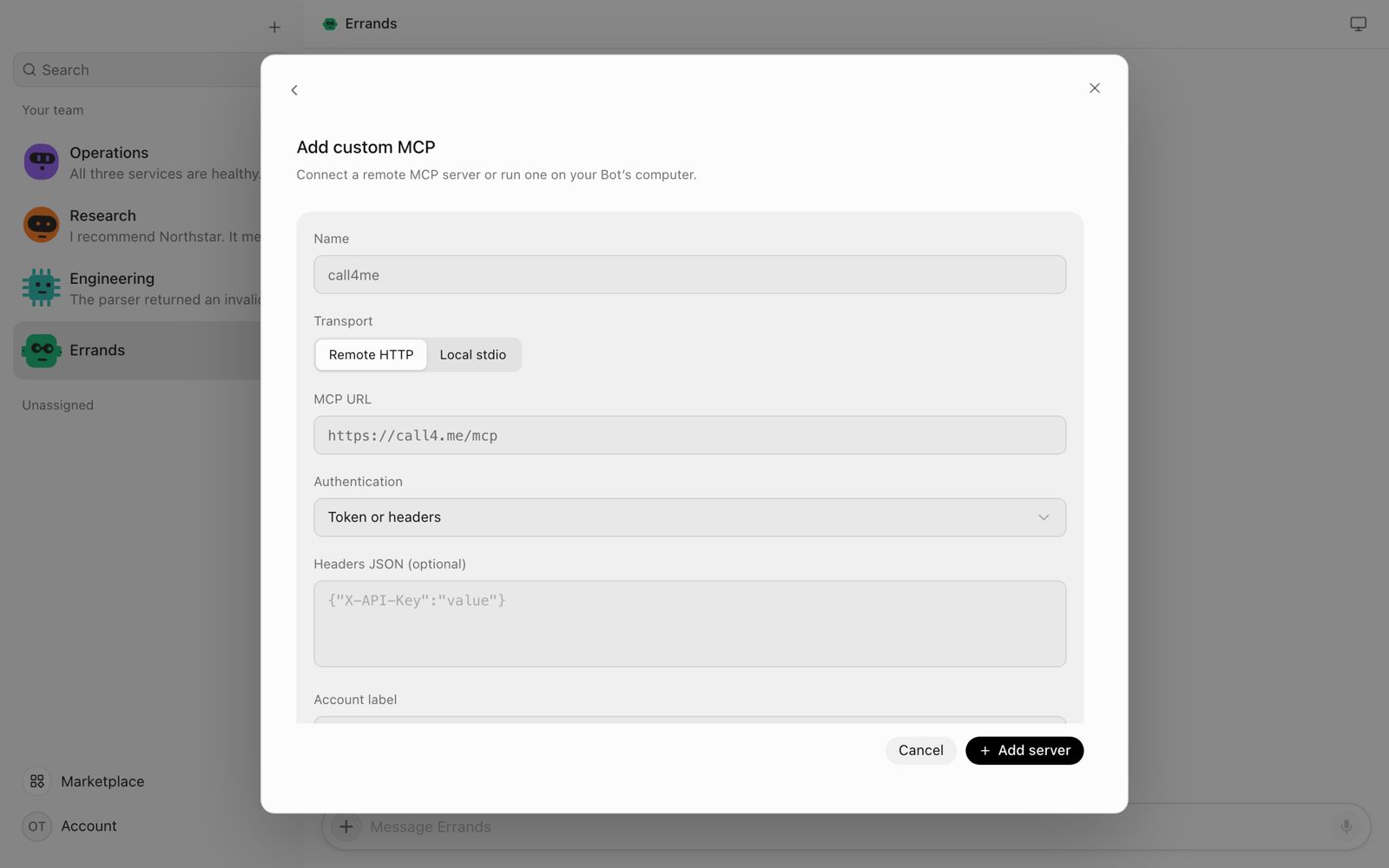
- In the desktop app, open Marketplace, then choose Manage → Add custom MCP (plugins).
- Enter the name
call4me, choose Remote HTTP, and set the MCP URL tohttps://call4.me/mcp. - Set Authentication to Token or headers, leave Headers JSON empty, and choose Add server.
- In Marketplace, open your installed plugins (the installed count at the top) and choose call4me. Under Accounts, open the account's settings, paste your API key into Bearer token, and choose Save token. OpenTeam saves it and connects.
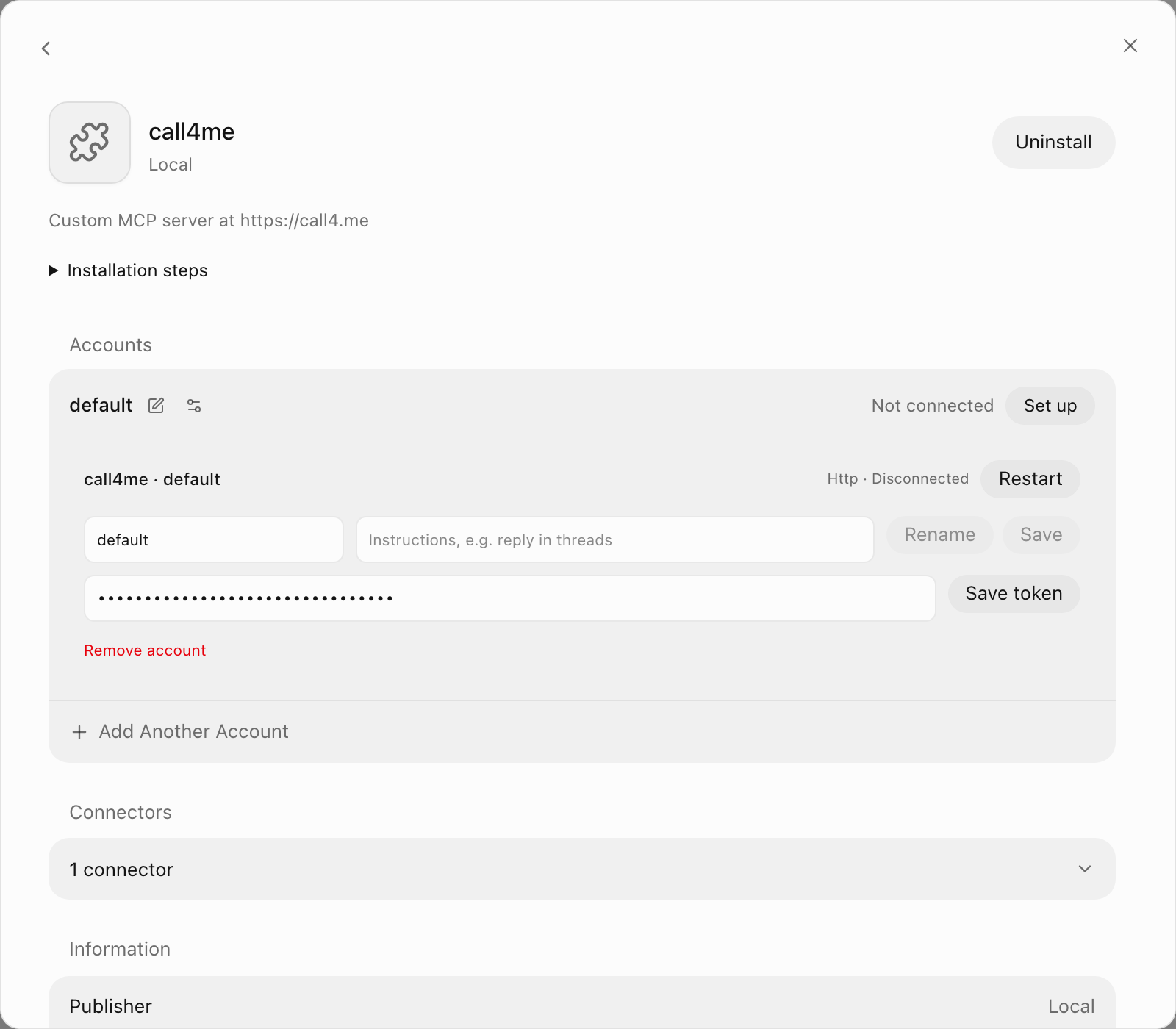
The account should now show Connected.
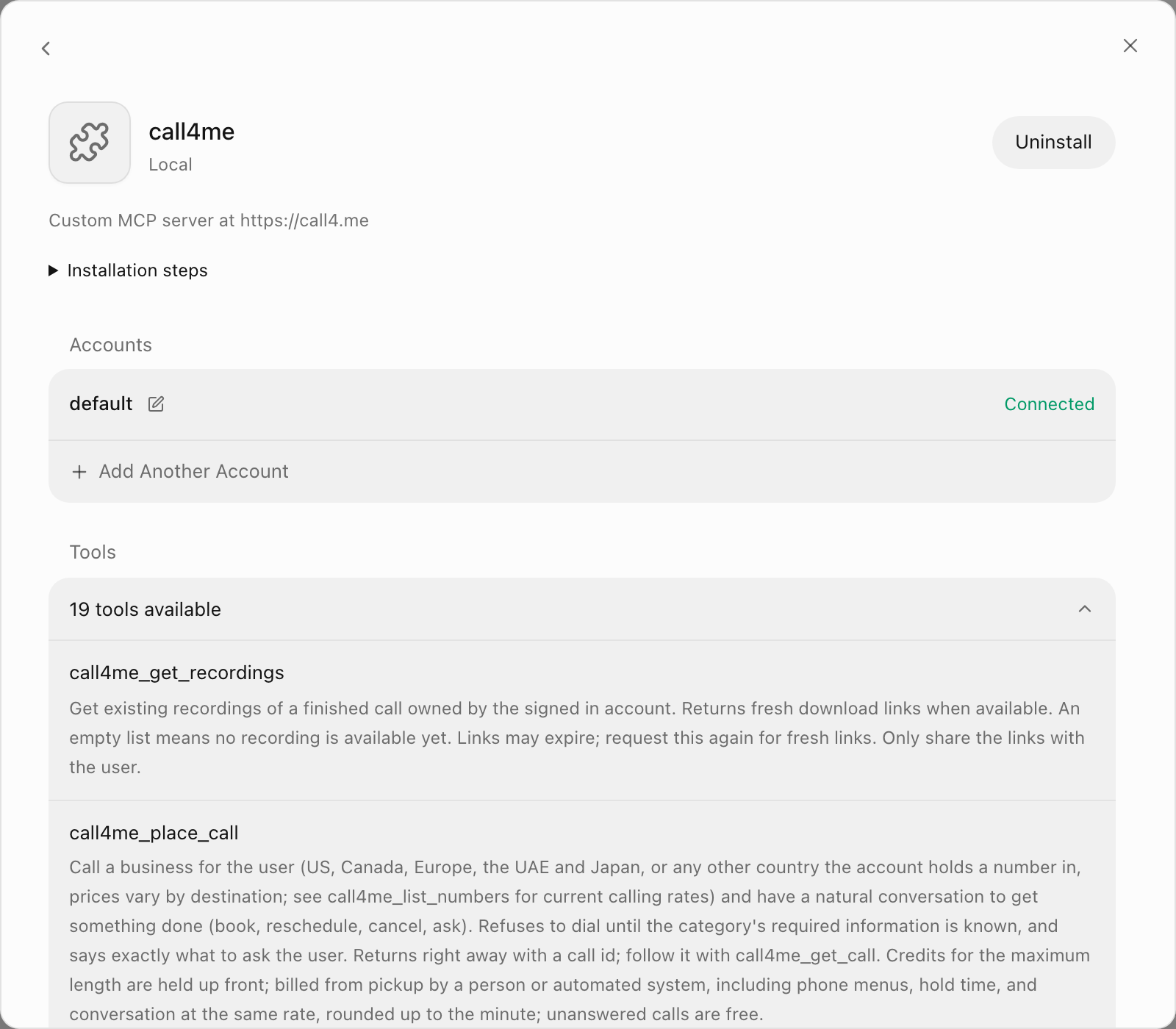
OpenTeam's server keeps the key and makes the tool calls, so bots never see it. Creating a new key on call4me's account page revokes the old one (auth.md). call4me also accepts the key inside the URL for apps that can't send headers; OpenTeam can, so keep it in the token field.
What about OAuth? call4me supports OAuth 2.1, and OpenTeam offers OAuth for custom MCP servers. Depending on your setup, it can need an HTTPS server callback, for example through Tailscale HTTPS. The API key avoids that. We haven't tested the OAuth route with call4me.
Step 2: Import call4me's skill
Optional, but recommended. MCP gives bots the tools; a skill gives them the procedure. call4me publishes its own, covering requirements, mid-call questions and when to warn you before your phone rings.
- Save call4me's SKILL.md to your computer.
- In Marketplace, choose Manage → Private skills → Import SKILL.md and pick the file.
- Under Available to Bots, tick the bots that should make calls. None is ticked by default.
- Choose Save skill (skills).
The skill is limited to those bots. The connection isn't: every bot can use a connected account's tools.
Step 3: Check the connection without placing a call
Ask a bot that has the skill:
Run call4me_get_balance and show me my balance, the price per minute and my assigned call4me numbers. Don't place a call.
You should see the tool call and your real balance. An empty numbers list is normal: your free US number is assigned on your first call. Save it as a contact named call4me; businesses see it as caller ID, and it's the number that rings you.
Step 4: Give the bot a bounded call brief
The caller can only say what you give it. Name the business, the goal, what it may share, what it may agree to, and when to stop:
Use call4me to call [business] at [number, or "find the official number and show it to me"].
Goal: [one sentence describing a good outcome].
You may share: [name, account ZIP code, booking reference].
You may agree to: [times, prices or changes]. Ask me before accepting anything else.
Don't: [pay, cancel, give a callback number, accept an upsell].
Category: [category]. Cap the call at [N] minutes (max_minutes).
Before dialing, show me the number and your plan, and wait for my OK.
If the caller asks something you can't answer from this brief, ask me here.
When it ends, report the outcome, what was confirmed, the cost, and the transcript lines behind each point.
Example: an AI that calls customer service for you
Brightline Fiber is a made-up provider; swap in yours.
Call Brightline Fiber at the number on my bill and ask what would lower my $80 monthly internet bill without a contract. You may share the account holder's name and service ZIP code. Don't change the plan or accept an offer; get each offer's price and duration. If they'll only talk to the account holder, ring me to join. Category internet_existing_account, max 30 minutes.
Example: book an appointment
Call [dental office] at [number] and book a cleaning for me, an existing patient, any weekday morning before 11 AM in the next three weeks. If nothing's open, take the earliest afternoon. Don't agree to added treatments. Category dental, max 15 minutes. Then add it to my Google Calendar.
Example: a restaurant that only books by phone
Call [restaurant] at [number] for a table for six on Saturday, October 24, between 7 and 8:30 PM, under my name. Outside is fine; the bar isn't. If they want a card to hold the table, ring me to join. Category restaurant, max 10 minutes.
For restaurants on OpenTable or Resy, a bot can book in its own browser with OpenTeam's built-in restaurant-booking skill. call4me covers places that only answer the phone.
What happens during the call
- Requirements. The bot calls
call4me_get_requirementsfor the category and asks you for anything the brief lacks, in one message. - Dial. It calls
call4me_place_callwith the number, goal, details and what the caller may accept. - Follow. It polls
call4me_get_callwithwait_seconds: 30, reading the status and live transcript. - Questions. If the business asks something the brief didn't cover, it appears under
open_questionswhile the business waits. The bot asks you in chat, sends your reply withcall4me_answer_question, and the caller relays it. Answer quickly. - Result. The bot reports the outcome, what was confirmed, the cost and transcript excerpts.
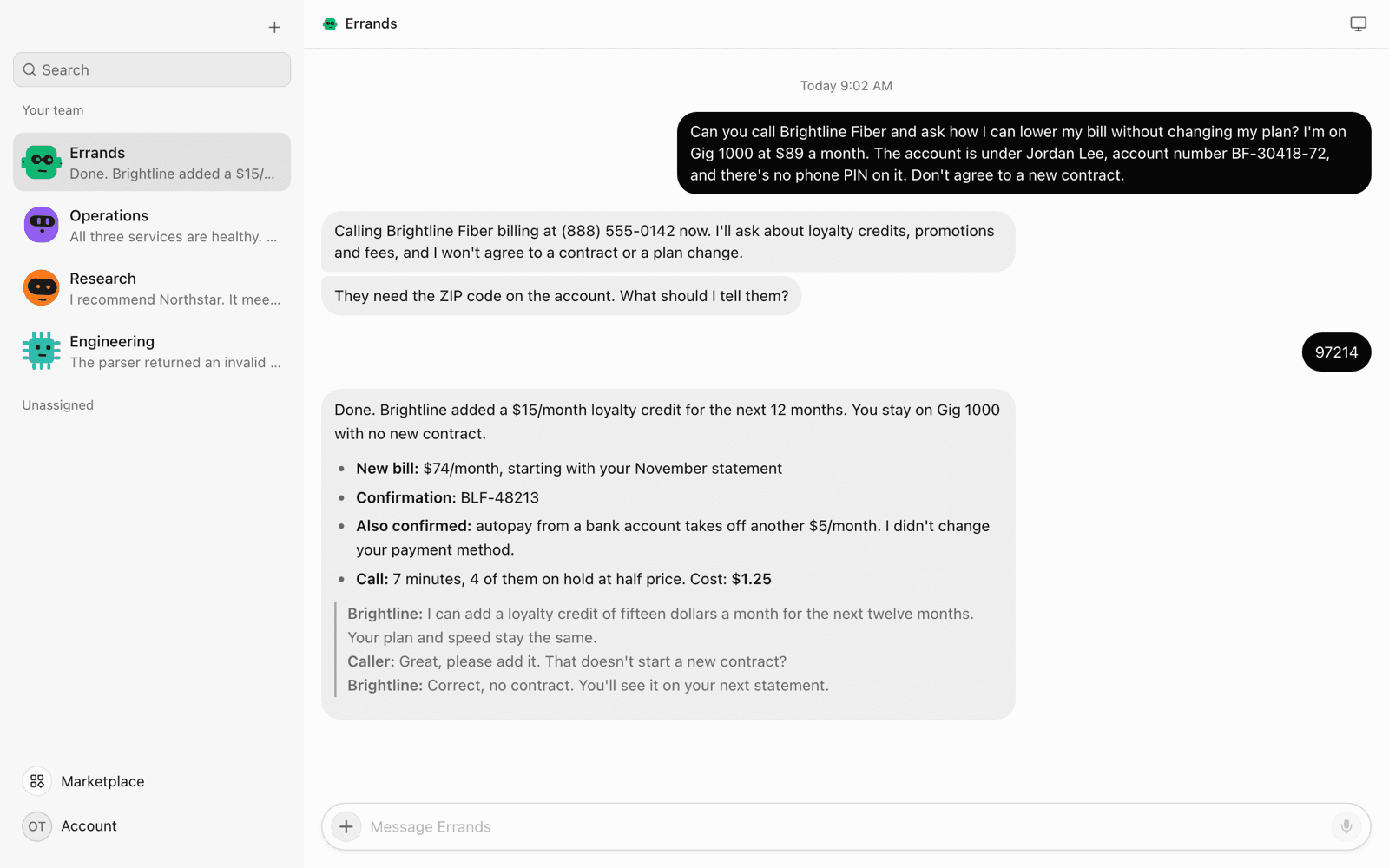
The chat stays readable: you see the bot's messages, its question and the result, as in the screenshot at the top of this post. Each tool call is listed under Activity on the call4me plugin page.
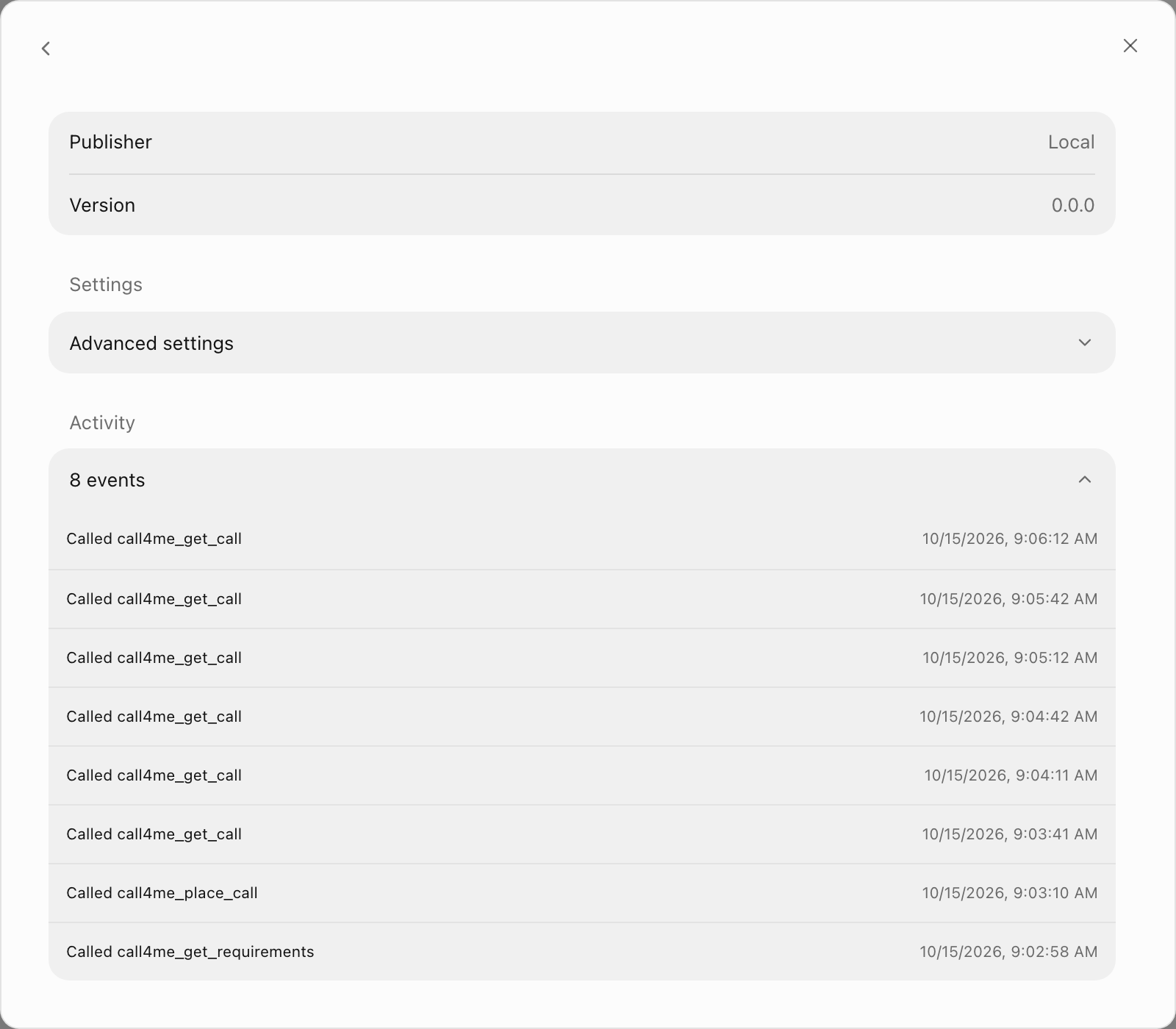
"Completed" only means the call ended, so check the transcript lines behind anything marked confirmed. call4me's phone carrier, Telnyx, records calls, and the recording and transcript stay in your call4me account.
Step 5: Schedule a call, or repeat it with a routine
When the business is closed, ask for a scheduled call:
The clinic opens at 8. Schedule a call for Monday, October 19, at 8:05 AM clinic time to move my Thursday appointment to any afternoon next week.
The bot uses call4me_schedule_call: the same details plus call_at, up to 60 days ahead. call4me checks the brief immediately, dials within a minute of the time, and holds credits only when it dials (AI call assistant). Nobody may be following when it dials, so put every fact and acceptable alternative in the brief. The bot gets a sched_ ID to check or cancel later. Calls needing an account PIN can't be scheduled. call4me's scheduling walkthrough covers time formats.
For a repeating check, use an OpenTeam routine, a saved instruction that runs on the server on a schedule:
Every weekday at 10 AM, use call4me to call [store] at [number] and ask whether the 18V drill battery is back in stock. Cap each call at 5 minutes and post the answer here.
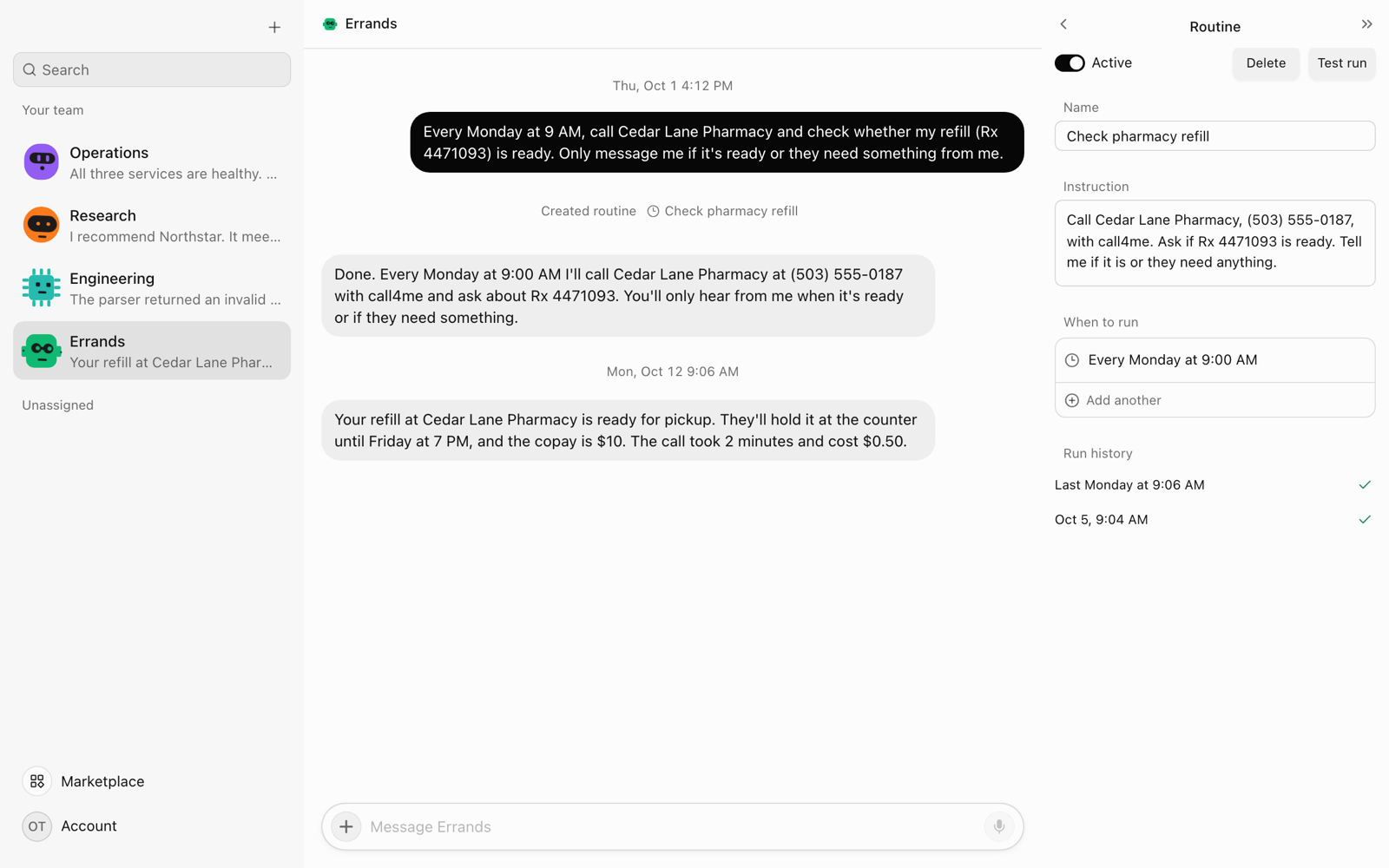
A routine can have up to eight schedules and runs at most every five minutes. Each connected call costs money, and call4me calls the same number only a few times a day. Turn off Active once you have your answer.
Step 6: Listen in or take over
call4me can ring the phone in your calling profile. Ask the bot to:
- Ring you when a person answers. This passes
connect_when, so you skip the hold music. Hold time is still billed. - Let you listen in.
listen_inrings you when the business answers. Nobody hears you, and you press 1 to take over. - Connect you mid-call with
call4me_connect_me.
Press 1 to join, and * or hang up to hand the call back. The ring comes from your call4me number; the bot should tell you which first. Voicemail can't join. To end a call early, ask the bot to hang up.
What call4me costs
Prices from call4me's AI call assistant page as of October 15, 2026. Billing starts when a person or automated system answers, rounded up to the minute. Phone menus cost the full rate; whole minutes on hold cost half.
| Example call | Minutes | Cost |
|---|---|---|
| Unanswered, busy or failed | 0 | Free |
| Restaurant booking | 2 | $0.50 |
| Appointment change with a phone menu | 4 | $1.00 |
| Customer service: 3 talking, 4 on hold | 7 | $1.25 |
| Customer service: 6 talking, 20 on hold | 26 | $4.00 |
| Long hold: 10 talking, 60 on hold | 70 | $10.00 |
| Japan or the UAE, no hold | 5 | $2.00 |
Credits are prepaid from $10 and don't expire. Each call holds its maximum cost when it dials and returns the unused part. Monthly reload is on by default: untick it before paying, or turn it off in your account. Checkout links from call4me_add_funds also reload monthly. Your model provider bills the bot's polling turns separately.
Limits of phone calls from a self-hosted AI agent
OpenTeam has no per-action approval prompts in v0.0.2. A bot can place a call as soon as it decides to, and every bot can use a connected account. Your limits are:
- The brief. "Wait for my OK" is an instruction the model usually follows; nothing enforces it.
- The balance. Load $10 and untick or lower the reload while testing.
max_minuteson every call.- Fewer bots. Limit the skill to bots that need it. The connection is shared, so disconnect it when idle.
The bot polls from the server, so you can close the app, but a laptop server that sleeps stops the bot until it wakes. OpenTeam also has one model and one human account per server, an iPhone app in TestFlight beta, and no Android app.
call4me's rules apply too: only businesses and services you want to reach, and no telemarketing, surveys, collections, or calls to people who don't expect them. No emergency or premium-rate numbers. The caller never reads out card numbers or passwords and never claims to be you. Breaking the rules closes the account without a refund.
Troubleshooting
The account shows an HTTP 401 and "sign in to call4me"
No valid key reached call4me. Check that Authentication is Token or headers, then save the key again under Bearer token. "call4me key not accepted" means the key is wrong or was replaced by a newer one.
The bot can't find the call4me tools
In Marketplace, open your installed plugins and choose call4me. If the account isn't Connected, hover over its status for the reason, then choose Connect, or Restart in the account's settings, to reconnect and reload the tools.
The call sits on hold
max_minutes caps the conversation, not the hold: a call on hold at the limit keeps waiting while your balance covers it, up to four hours. Ask the bot to ring you when a person picks up, hang up after a set wait, or schedule a quieter time. call4me's hold-time study of 34 companies found a median of 2:08 to reach a person.
call4me answers "Not calling yet"
That's call4me's pre-dial check: the brief lacks something the category needs, such as whether you're a new patient. Nothing was dialed. Answer what it lists, and the bot tries again.
Frequently asked questions
Can OpenTeam's AI agents make phone calls?
Yes, through a calling service connected over MCP. OpenTeam has no built-in phone, but with call4me connected, a bot can call businesses and report the result in chat.
How much does an AI phone call cost?
$0.25 a minute from pickup, with hold at half price and unanswered calls free. A two-minute booking costs $0.50. Your model provider charges separately for the bot's turns.
Does the caller say it's an AI?
Not up front. It doesn't open by announcing it's an AI, but if someone sincerely asks, it tells the truth. It never claims to be you.
Can I listen in or take over the call?
Yes. Ask the bot to ring you when a person answers or to let you listen in. Press 1 to join and * to hand it back.
Which countries can it call?
The US, Canada, the EU, the UK, Iceland, Liechtenstein, Norway, Switzerland, the UAE and Japan, from your free US number. UAE and Japan calls cost $0.40 a minute. Other supported destinations may need a local call4me number.
Can I schedule calls?
Yes. call4me_schedule_call dials once at a set time, up to 60 days ahead, and an OpenTeam routine repeats a call on a schedule.
Try OpenTeam
Install the server with curl -fsSL https://openteam.so/install | sh on macOS or Linux, or irm https://openteam.so/install.ps1 | iex in Windows PowerShell, then follow the quickstart. Get the desktop app from the download page. Still choosing? See the best self-hosted AI agents in 2026.