Let a bot check your server's security: ten planted problems, two passes
We planted ten problems on a throwaway web server and had a self-hosted AI agent find them. What it found in two passes, and what it cost.
On this page
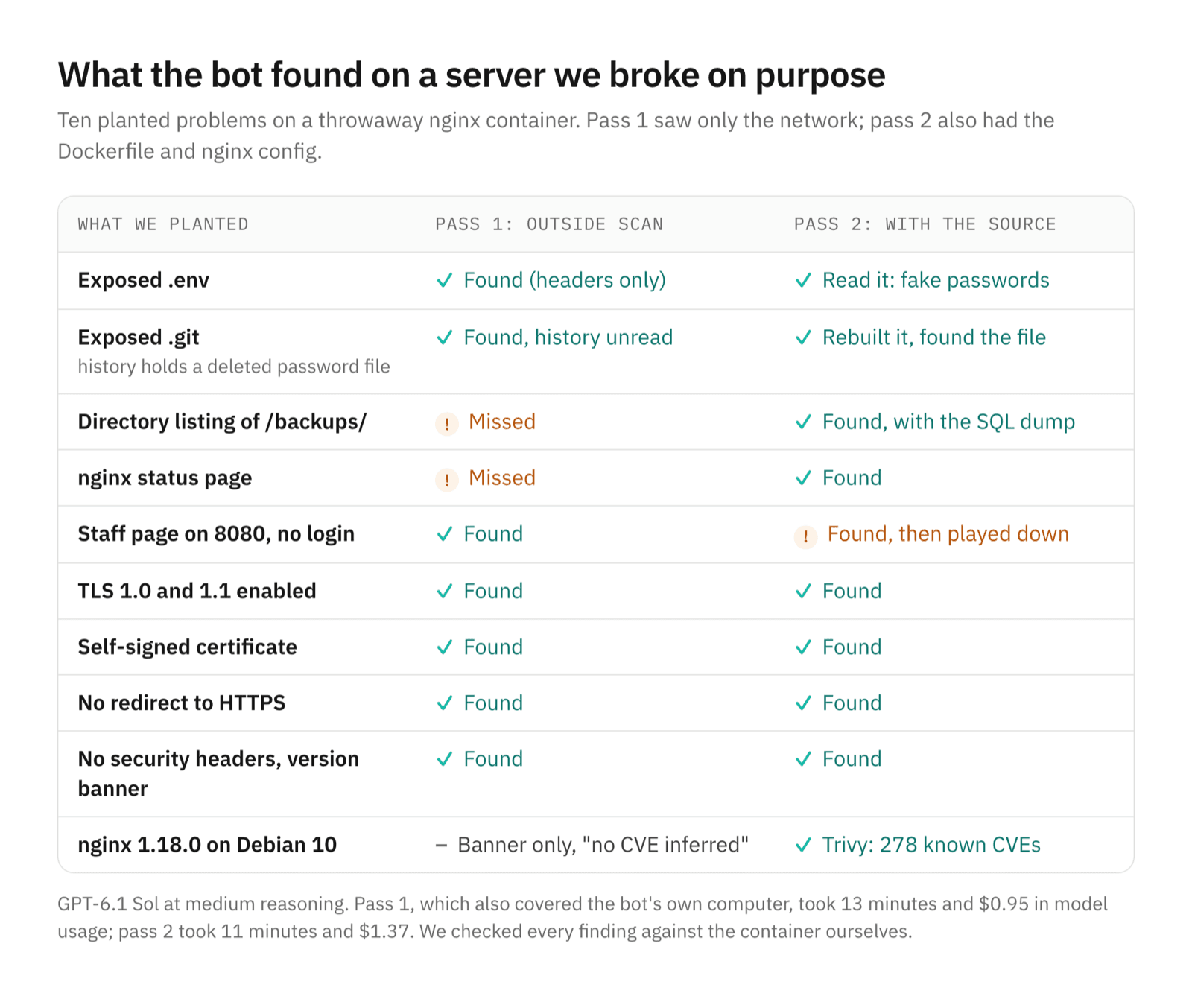
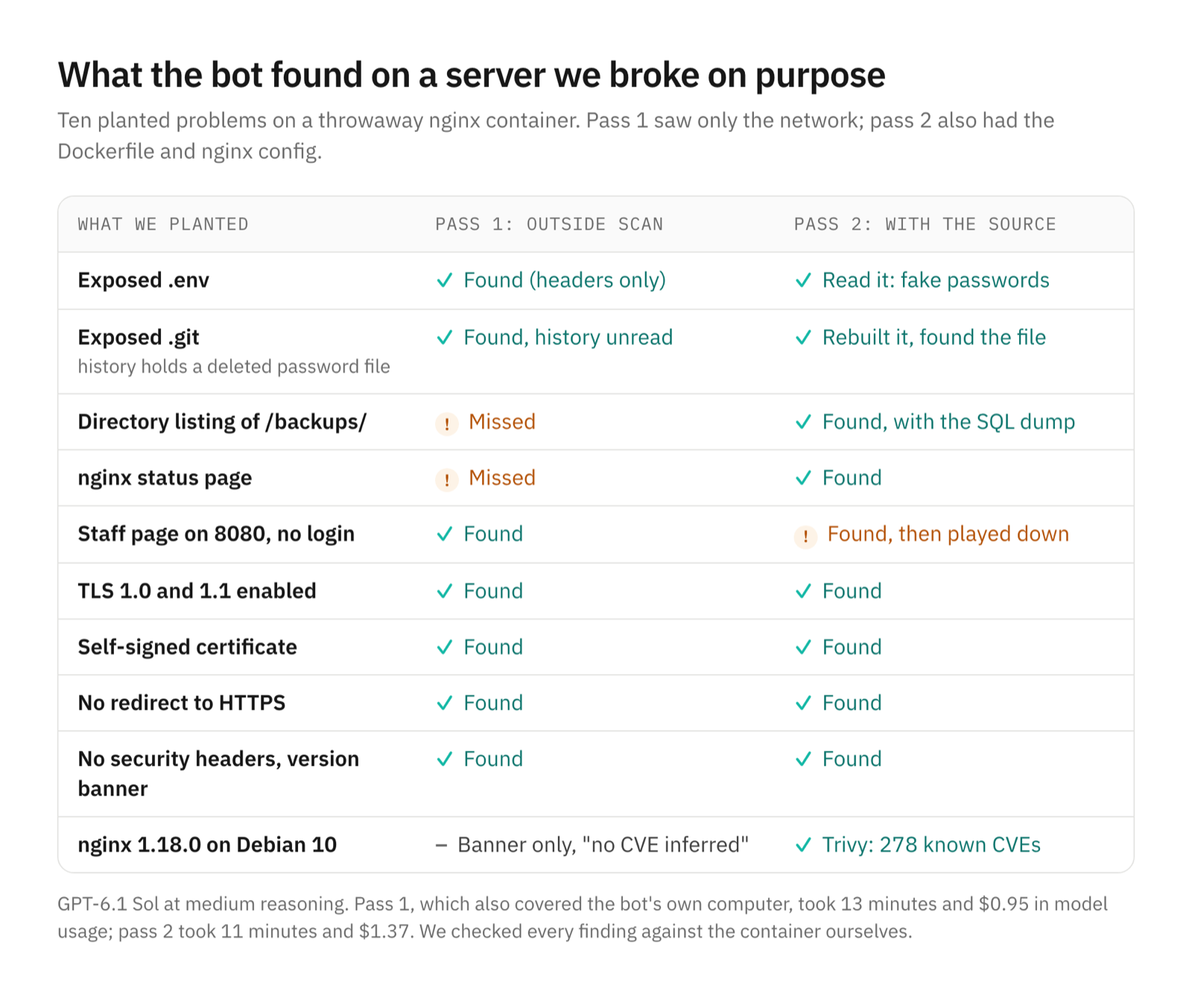
A general AI model can run a useful first-pass security audit of a server you own. We planted ten problems on a throwaway web server and asked a bot in OpenTeam, our open-source app for self-hosted AI agents, to find them. From the network alone it found seven, and all ten once it had the source, for $2.32 in model costs.
We build OpenTeam, so weigh our view accordingly. For this post we built a test container with deliberate, harmless weaknesses and fake data, next to a local OpenTeam server. One bot audited it. We checked every finding ourselves, and we report the model's misses along with the hits.
Why use a general model for a security check
On November 5, OpenAI published the system card for GPT-6 Cyber, "a cyber-specialized variant of GPT-6 Astra designed for authorized security work." It's rated Critical for cybersecurity and is "available only to approved Daybreak Red users and organizations," after identity checks. Anthropic's equivalent is similar: Claude Mythos 5.1 "is available only through our trusted access programs," and the Cyber Verification Program vets each applicant.
Most people who run a home server or a small VPS won't get either. What they do have is a general model, standard open-source tools such as Lynis, Trivy and OpenSSL, and servers they're allowed to test. That's the setup we tried. If you want the bigger picture on what specialized models are finding, see OpenAI's 948 Linux root bugs and what they mean for AI agents.
The test setup
The target was a container we built from the official nginx:1.18.0 image, which runs Debian 10 and dates from April 2021. We put it on the same Docker network as our test OpenTeam server and published no ports to the host. Every password, customer row and config value in it was fake.
| What we planted | Why it matters on a real server |
|---|---|
/.env served as a file | Database and mail passwords readable by anyone |
/.git/ served, history includes a deleted password file | The whole repository, and anything ever committed, can be rebuilt |
Directory listing on /backups/ with a SQL dump | Customer data one click away |
nginx status page at /nginx_status | Traffic counters for anyone |
| A "staff dashboard" on port 8080 with no login | An admin page with no authentication |
| TLS 1.0 and 1.1 enabled | Protocols browsers no longer accept |
| Self-signed certificate | Clients can't verify the server |
| Plain HTTP with no redirect to HTTPS | Traffic readable in transit |
No security headers, version in the Server header | Easier clickjacking, sniffing and fingerprinting |
| nginx 1.18.0 on Debian 10, end of life | Old packages with known vulnerabilities |
The auditor was an ordinary OpenTeam bot using GPT-6.1 Sol at medium reasoning through OpenRouter. Each bot works on its own Linux computer, a Debian 13 desktop on your server, where it can install the tools a job needs (how bot computers work). Our first message set the scope and the rules:
I want a security check of two machines I own. This is defensive work, so stay
strictly in scope.

[...]

2. A test web server I run called blogtest-target. [...] If that name doesn't
resolve from your computer, its IP is 172.25.0.6. Scan only that one host: a
port scan, then HTTP and HTTPS checks (headers, version banners, exposed files
or directories, TLS versions and the certificate).

Scope rules: don't scan or probe any other address, including other containers
on that network, the Docker host, or anything on the internet. No password
guessing, no denial of service, and don't change anything on blogtest-target.
We also asked it to save raw output for every check and to say which findings it was unsure of.
Pass 1: what the bot did from the outside
The bot handed the work to a helper and posted progress while it ran. It used the IP we'd given and nothing else. It wrote its own Python scanner for all 65,535 TCP ports at 150 connections a second. It reported three open ports on the target: 80, 443 and 8080.
For the web checks it used curl and openssl against a list of common paths. It found /.env and /.git/HEAD answering with 200 while a made-up path returned 404. It read only the headers, not the files, because they might hold real secrets. It confirmed TLS 1.0 and 1.1, the self-signed certificate with no subject alternative name, the open staff page, the missing HTTPS redirect, the missing headers and the nginx/1.18.0 banner.
Pass 1 took 13 minutes from our message to the fix list, including a quick check of the bot's own computer; every fact it reported there held up when we repeated the checks. It used 62 model calls across the bot and its helper and cost $0.95, read from the bot's session logs.
Pass 2: with the source, the history and an image scan
Next we told the bot the data was fake, so it could read the exposed files, and gave it the target's Dockerfile and nginx config. We asked for a Trivy scan of the base image and a corrected fix list.
It read /.env and rebuilt the Git repository from the exposed .git folder in 19 requests, checking each object's hash. In the first commit it found the deleted config.php.bak and its fake password: deleting a file doesn't remove it from history. The config then showed it two paths its first pass never tried, /backups/ with the fake SQL dump and /nginx_status. The Dockerfile showed problems no outside scan could see. The TLS private key is generated inside an image layer, the base image tag isn't pinned, and COPY site/ publishes everything in the folder.
For Trivy it downloaded version 0.76.2 from Aqua Security's GitHub release and checked it against the release's SHA-256 checksums, though not its signature. That matters: in March, attackers published a malicious Trivy 0.69.4 and rewrote tags of its GitHub Actions (GHSA-69fq-xp46-6x23). The scan found the base image on Debian 10.9, past end of life, with 423 package matches covering 278 CVEs: 42 critical, 147 high, 180 medium, 45 low and 9 unknown.
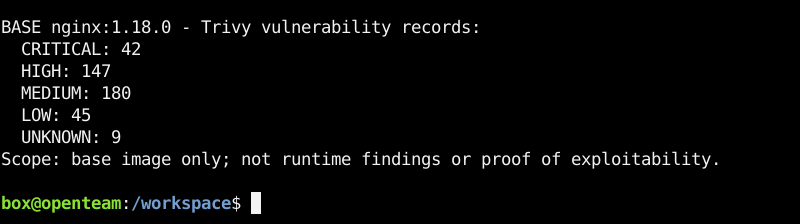
The bot didn't take that number at face value. It checked six of the critical and high matches against installed versions, then explained why most needed a code path this static site never uses. It flagged a mismatch, too: the only CVE Trivy tied to the nginx package is about an OpenResty Lua module this build doesn't have. Pass 2 took 11 minutes and cost $1.37.
Its final fix list put the base image and the file allowlist first, then denying the sensitive paths, then removing the TLS downgrade and the baked-in key. It also corrected itself: publishing port 8080 only on the host's loopback, which it had suggested in pass 1, doesn't stop other containers on the same network.
What the model missed
- Two easy paths, from the outside. Its path list had Apache's
/server-statusbut not/nginx_status, and/backup.zipbut not/backups/. A wordlist tool such as ffuf with a common list would have caught both. Ask for a broader path check if you want one. - Caution that hid the impact. It wouldn't read
/.envor the Git history until we said the data was fake. That's a reasonable default for an agent, but pass 1 alone undersold how bad the exposure was. - A severity call. In pass 2 it withdrew the unauthenticated staff page as a risk because the page says it does nothing. A login-free admin page on a public port is a finding whatever it does today.
- The nginx version. It reported
nginx/1.18.0as a banner and "no CVE inferred." nginx's own security advisories list about two dozen issues whose ranges include 1.18.0. Most need modules or directives this config doesn't use, and Trivy missed some because this nginx comes from nginx.org's repository rather than Debian's.
How a bot's commands reach your server
Every command a bot runs leaves its computer through one tunnel. If you point a bot at your own servers, these are the rules we found in testing and in the code.
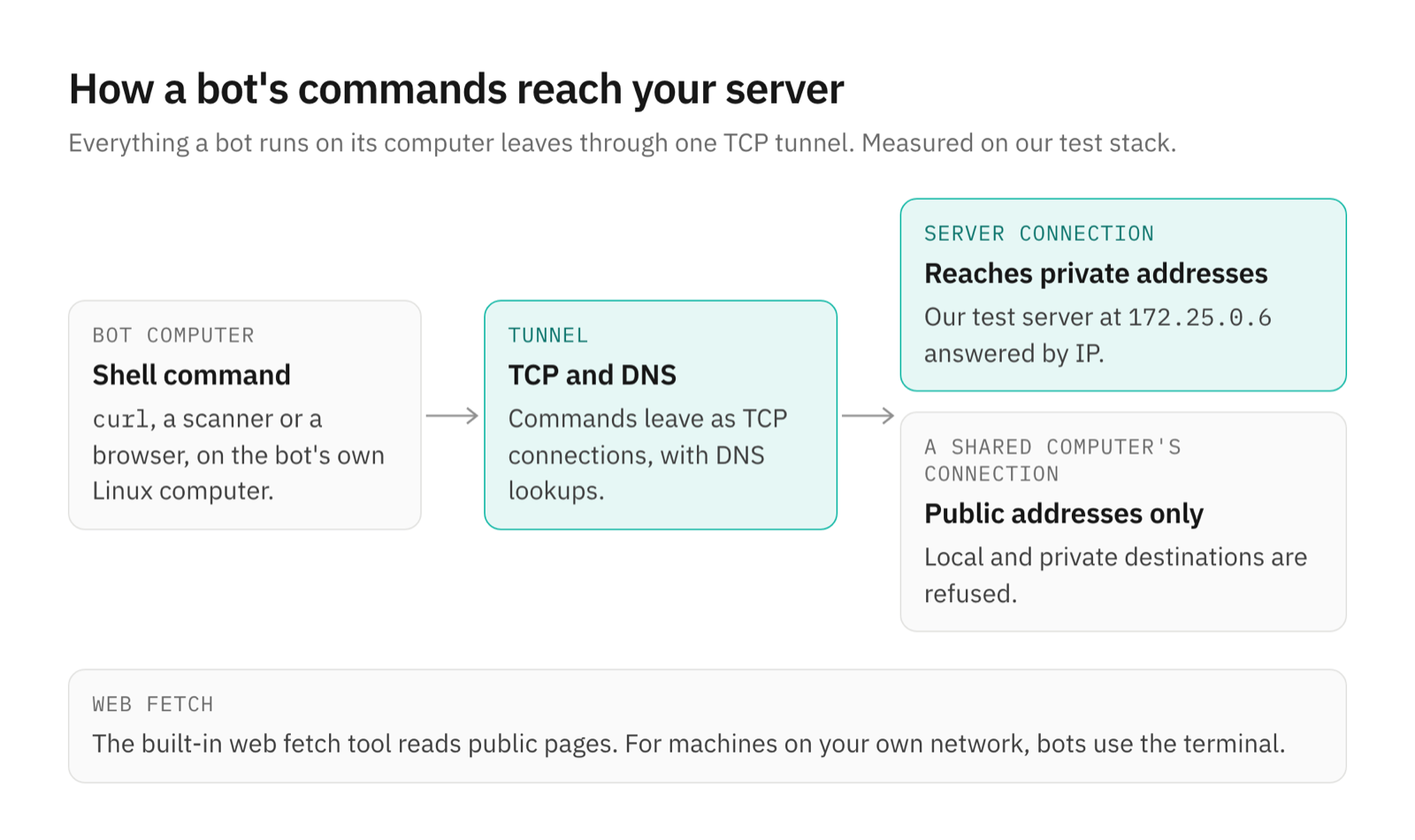
- TCP checks. Commands leave as TCP connections, plus DNS, so
curl,openssland TCP port scans work. - Private addresses. With the server's own connection, the bot reached our test server's private address. When the bot computer uses a connection shared from a Mac or Linux desktop, OpenTeam's code allows public addresses only, so a bot stays off the network your laptop is on.
- Web fetch. The built-in web fetch tool is for public pages. For machines on your own network, the bot uses its terminal.
Use it as a first pass
A general model is not a penetration tester. This bot ran standard checks carefully and reasoned well about evidence, but it didn't fuzz, chain weaknesses or think like an attacker. Treat its report as a checklist to verify, not a verdict.
Only scan machines you own or have written permission to test. In the US, the Computer Fraud and Abuse Act covers anyone who accesses a computer "without authorization or exceeds authorized access." In the UK, the Computer Misuse Act makes "unauthorised access to computer material" an offence. Your hosting provider's terms may add rules of their own.
How to run this on your own server
- Check reachability first. From the bot's terminal,
curl -I http://<server-ip>/should answer. For private addresses, use the server's own connection; a shared desktop connection reaches public addresses. - Write the scope into the request. Name the hosts, the ports and what's off limits, and ask for raw output saved per check.
- Do two passes. One from the outside, then one with your configs, Dockerfiles and permission to read what it finds.
- Verify before fixing. Repeat any finding you plan to act on, and read hedged fixes twice.
- Clean up. Ask the bot to remove the tools and caches it installed. Ours had 3.4 GB to delete.
Frequently asked questions
Can an AI agent do a security audit of my server?
Yes, a first-pass one. In our test it built its own port scanner, checked TLS and headers, rebuilt an exposed Git history and ran Trivy. You still need to check its findings and its severity calls.
Is it legal to scan my own server with an AI agent?
Yes, if you own it or have written permission. Scanning or accessing systems you aren't authorized to test can be a crime under laws such as the US Computer Fraud and Abuse Act and the UK Computer Misuse Act.
Can I use GPT-6 Cyber or Claude Mythos for this?
Only if you're approved. GPT-6 Cyber is limited to vetted Daybreak Red users and organizations, and Mythos 5.1 to Anthropic's trusted access programs. Everything in this post used a general model.
Does an AI security audit replace a penetration test?
No. It's a good way to find misconfigurations and outdated packages on your own machines. A penetration tester looks for ways to chain small problems into a breach, and our bot didn't try.
How much does an AI security audit cost?
Our two passes cost $2.32 in model usage with GPT-6.1 Sol through OpenRouter, about 24 minutes in all. The tools were free. A bigger server, or a stronger model, will cost more.
Which tools did the bot use?
For the target it used curl, openssl, a Python port scanner it wrote itself and Trivy, which it downloaded and checked against the release's checksums.
Try OpenTeam
Install the server with curl -fsSL https://openteam.so/install | sh on macOS or Linux, or follow the quickstart. Create a bot, give it the scope, and point it at a machine you own.