OpenAI's 948 Linux root bugs, and what they mean for AI agents
OpenAI built 948 Linux root exploits that need code already running on the machine. Why that matters for AI agents, and how to patch the host under them.
On November 4, 2026, OpenAI said an automated pipeline built working exploits for 948 Linux bugs that each turn an ordinary local account into root. Every one needs code already running on the machine. AI agents run code by design. If you host them, as with OpenTeam, our self-hosted AI agent app, the fix that matters is a patched kernel under the bots.
We build OpenTeam, so weigh our view accordingly. OpenAI's numbers come from its post, A thousand fewer paths to root. For this post we also checked which kernel a running OpenTeam bot computer uses, on a Mac with Docker Desktop.
What OpenAI found
OpenAI's pipeline uses "an upcoming cyber model" in stages: agents pick the parts of the kernel worth auditing, scan them, reproduce each finding, try to exploit it and write a patch. Human researchers review the results before anything is reported. The run in mid-October scanned "the latest Linux kernel master branch."
| Stage | Result | API cost |
|---|---|---|
| Pick audit targets | 5,034 targets, about 2.8 million lines, roughly 7% of the kernel | $3,426 |
| Scan for bugs | 2,308 candidate findings in 12 hours | $316,549 |
| Reproduce each one | 1,724 reproduced (74.7%) in 30 hours | $73,330 |
| Screen for impact | 1,238 privilege escalation and 313 information leak candidates | $44,194 |
| Build exploits | 1,169 working root exploits and 291 information leaks | $775,929 |
| Group by root cause | 948 distinct patches, so 948 unique bugs | Included above |
The total was $1,213,430 in API credits, or $1,279 per root exploit. A successful exploit cost $359 on average. The exploits ran against virtual machines with "a stock desktop operating system, not a weakened target," with the usual protections on: SMEP, SMAP, KASLR and HARDENED_USERCOPY.
The jump from earlier models is the headline. In late July, a GPT-5.6 Sol run found 166 unique root bugs for $513,690. On Google's kernelCTF, a kernel with a smaller attack surface, the pipeline produced 21 root exploits for about $32,936. OpenAI says the agents used at least 10 exploitation techniques that outside experts hadn't seen, and it withheld their details "for safety reasons."
The condition: code already running on the machine
None of these bugs let someone break in over the network. They're local privilege escalations: exploits "that could allow an unprivileged local user to gain root access." OpenAI only validated findings that were "reachable by a low-privileged user" and "required no special capabilities."
OpenAI's own takeaway is blunt. "For the near and medium term, having access to a low-privileged account on an operating system, that isn't up-to-date on its latest available patches should be considered functionally equivalent to root access for a well-resourced threat actor." It recommends defense in depth, "using sandboxes and isolation approaches like Firecracker and gVisor."
That foothold is what an AI agent is for. It runs commands, installs packages and opens web pages, so a prompt injection, a poisoned package or a browser bug is all an attacker needs to start. Our Claude Code extension backdoor guide covers one such package from a few days earlier.
What's patched so far
Not most of them, yet. When the scan and manual analysis finished after 10 days, "61 LPEs had already been patched upstream, 43 had staging patches, and 299 were being reported and discussed publicly." OpenAI says it has "already sent out hundreds of reports and patches for critical vulnerabilities" and is sending the rest gradually through its Patch the Planet partners.
Fixes reach you only when your kernel updates. OpenAI's advice is the obvious one: "keep software up to date." It also says it found and helped patch bugs in "Kata, Moby/Docker, gVisor, and other projects" while testing its own infrastructure.
Where the kernel is under an OpenTeam bot computer
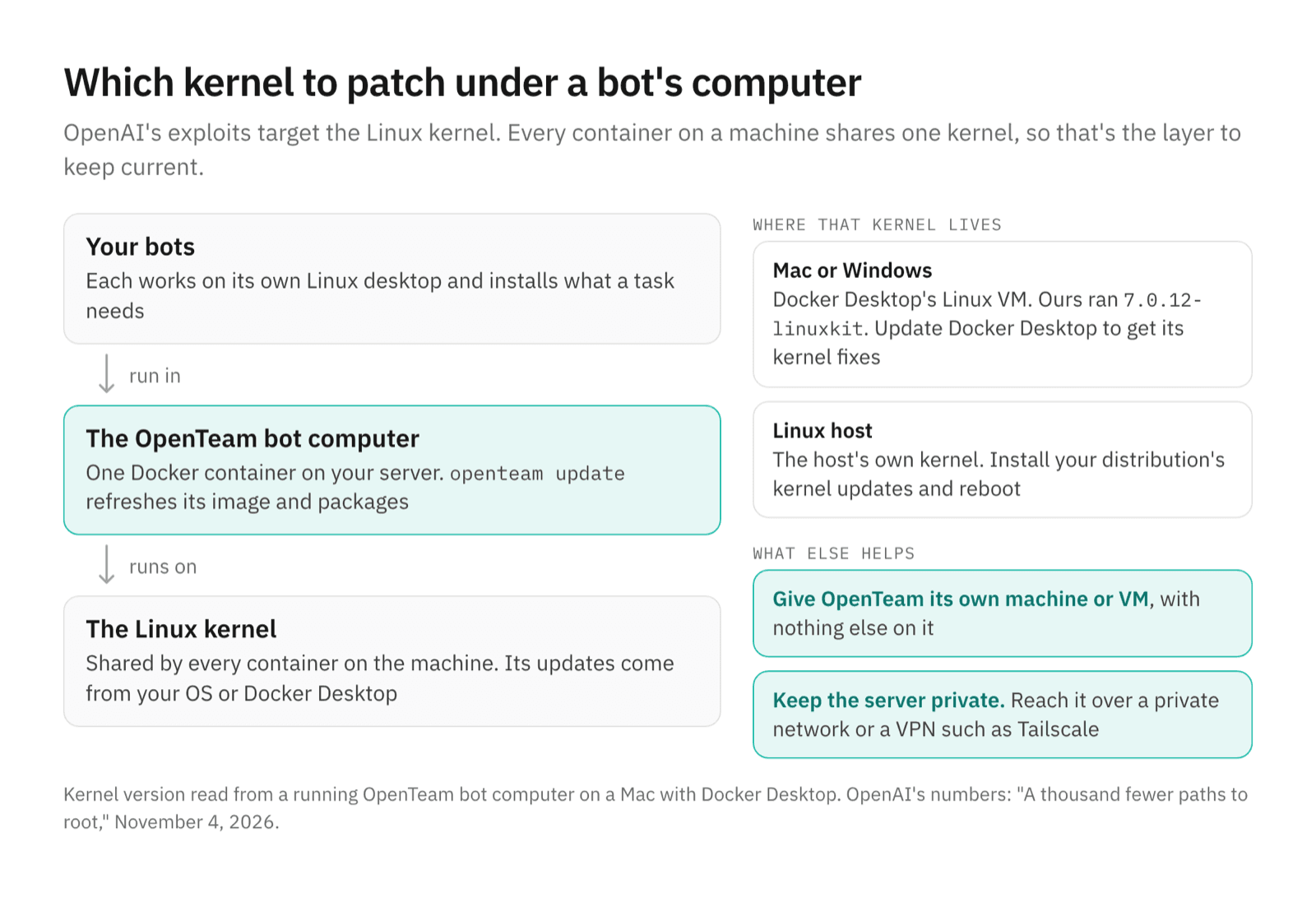
Each OpenTeam bot works on its own Linux desktop inside one Docker container on your server (how the bot computer works). Bots install software there with sudo, by design, so they can set up whatever a task needs (computer docs). Every container on a machine shares that machine's kernel, so the kernel is the layer to keep patched.
On a Mac or Windows PC, Docker Desktop runs containers inside its own Linux virtual machine. The kernel we saw, 7.0.12-linuxkit, belongs to that VM, not to macOS. Docker Desktop's settings docs note that, by default, "the /Users, /Volumes, /private, /tmp and /var/folders directory are shared" with that VM. OpenTeam's compose file uses only Docker volumes, not folders from your Mac.
That VM's kernel comes with Docker Desktop's own releases. The Mac we used for this post was on Docker Desktop 4.90.0, from September. Docker's release notes show 4.93.0 moving to kernel 7.0.14. Version 4.97.0, on October 26, fixed a kernel bug where "a container could exploit bad IPv4 checksum metadata via TUN or AF_PACKET." And 4.98.0, on November 3, fixed "a use-after-free in the Linux kernel's IPv4 TCP handling." Updating Docker Desktop is how those fixes reach you.
On a Linux host, the container shares the host's own kernel, so your distribution's kernel updates are the ones that count.
What to do
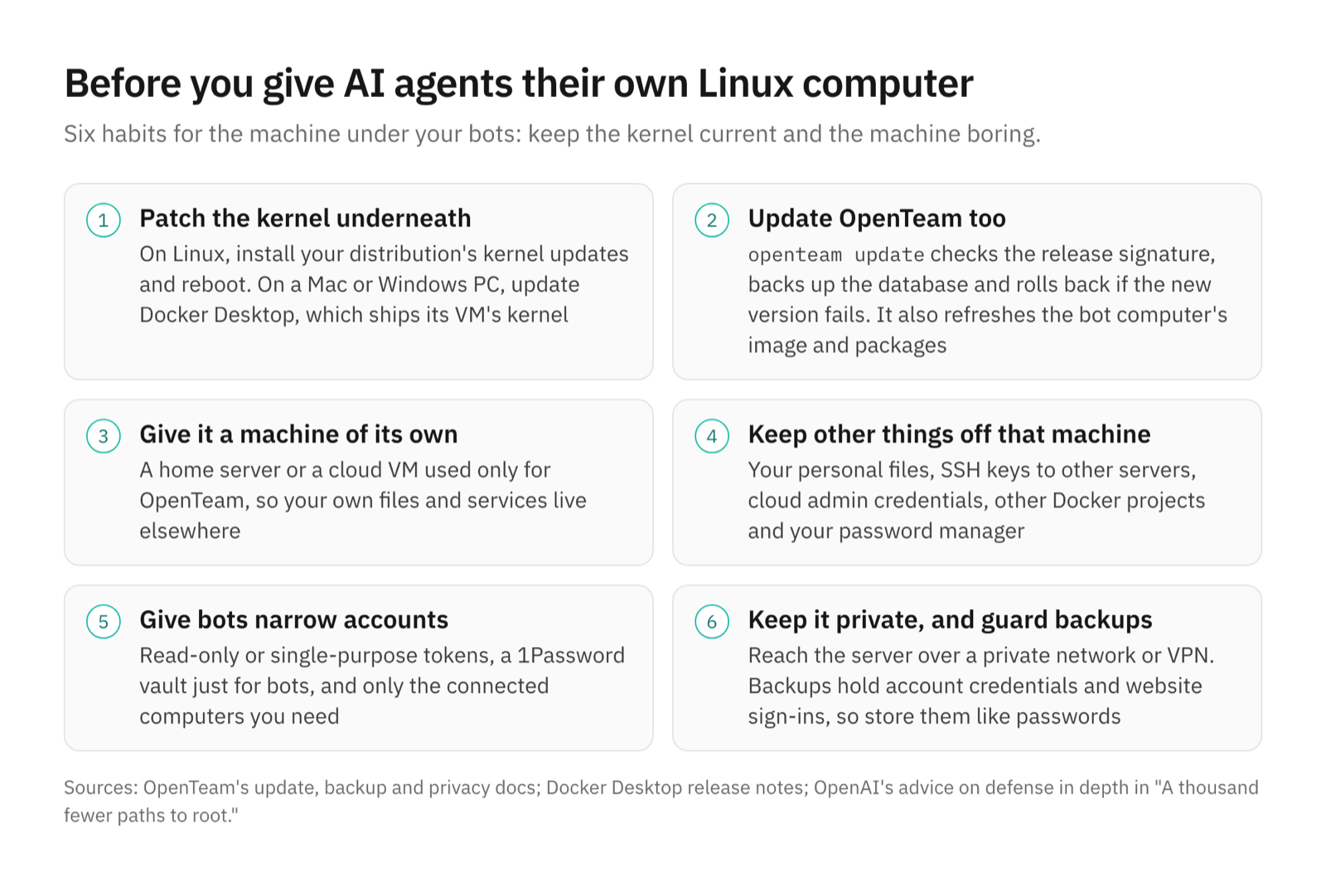
- Patch the kernel underneath. On Linux, install your distribution's kernel updates and reboot, since a new kernel doesn't run until you do. On a Mac or Windows PC, update Docker Desktop.
- Update OpenTeam as well.
openteam updatechecks the release signature, backs up the database, restarts on the new version and rolls back if it fails (updates). Useopenteam update --when-idleto wait until no bot is working. It refreshes the bot computer's image and packages, while kernel updates come from your OS or Docker Desktop. - Give OpenTeam a machine or VM of its own. A cloud VM or a home server you use for nothing else both work, so your own files and services live elsewhere (self-hosting guide).
- Keep other things off that machine. No personal files, SSH keys to other servers, cloud admin credentials, other Docker projects or password manager.
- Give bots narrow accounts. Use tokens that do one job, a 1Password vault only for bots, and connect only the computers bots need.
- Keep the server off the internet, and guard backups. Reach it over a private network or a VPN such as Tailscale (remote access). Backups hold connected-account credentials and website sign-ins, so store them like passwords (privacy).
Frequently asked questions
Can a Linux privilege escalation bug let an AI agent escape its container?
It can. An exploit that runs code in the kernel isn't stopped by a container, because every container shares that kernel. That's why the kernel under any agent's container is the layer to patch.
What does openteam update do?
It downloads the new release and checks its signature, backs up the database, restarts on the new version and rolls back if it doesn't start (updates). It also refreshes the bot computer's image and packages. Use openteam update --when-idle to wait until no bot is working.
Are OpenAI's 948 Linux vulnerabilities patched?
Not all of them. OpenAI said 61 were patched upstream and 43 had staging patches when its analysis finished, with 299 being reported and discussed, and the rest going out gradually. Keep your kernel updated as fixes land.
Did OpenAI release the exploits?
No. The post gives counts and costs, describes the pipeline, and withholds the details of its new techniques "for safety reasons." Reports and patches go to Linux maintainers.
Do I need to update my Mac?
Update Docker Desktop, if that's where OpenTeam runs. Containers on a Mac use Docker Desktop's Linux kernel, not macOS's, and that kernel only changes with Docker Desktop releases.
Should I run AI agents in a virtual machine?
If they hold anything you care about, yes. Give OpenTeam a VM or a machine of its own, so your own files and other services live elsewhere. OpenAI recommends defense in depth for the same reason.
Try OpenTeam
Install it on a machine or VM you set aside for it with curl -fsSL https://openteam.so/install | sh, and keep it updated with openteam update. The installation guide lists the requirements, and the apps are on the download page.