The Claude Code extension backdoor: what it did and how to check
Tampered Claude Code builds in Cursor's marketplace planted an SSH key on Macs and PCs on October 29. What they did, how to check, and how to clean up.
On this page
For about 11 hours on October 29, 2026, Cursor's extension marketplace served tampered copies of Anthropic's Claude Code extension, versions 2.1.312 and 2.1.313, for macOS and Windows. They added an attacker's SSH key labeled svc-telemetry and set up a startup task that outlives the extension. Check your authorized_keys file now; uninstalling isn't enough. We build OpenTeam, self-hosted AI agents on their own computers, and the end of this post covers where we run agent work and what to install where.
This is a defensive guide. Cursor's security notice is the primary source, and every other fact links to the company or researcher that published it, as of October 31. We ran the macOS checks below for this post against a throwaway folder; we didn't run the Windows commands.
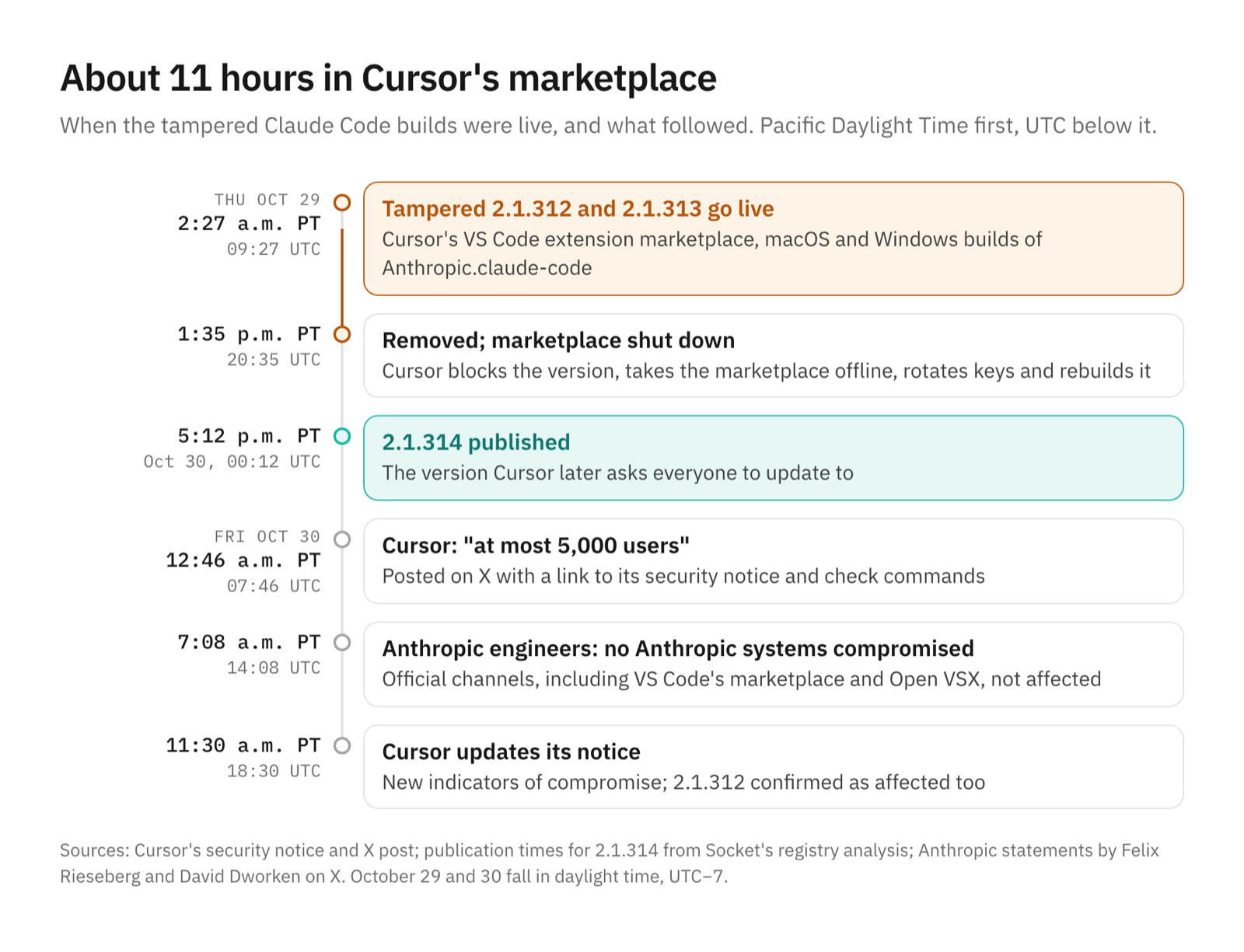
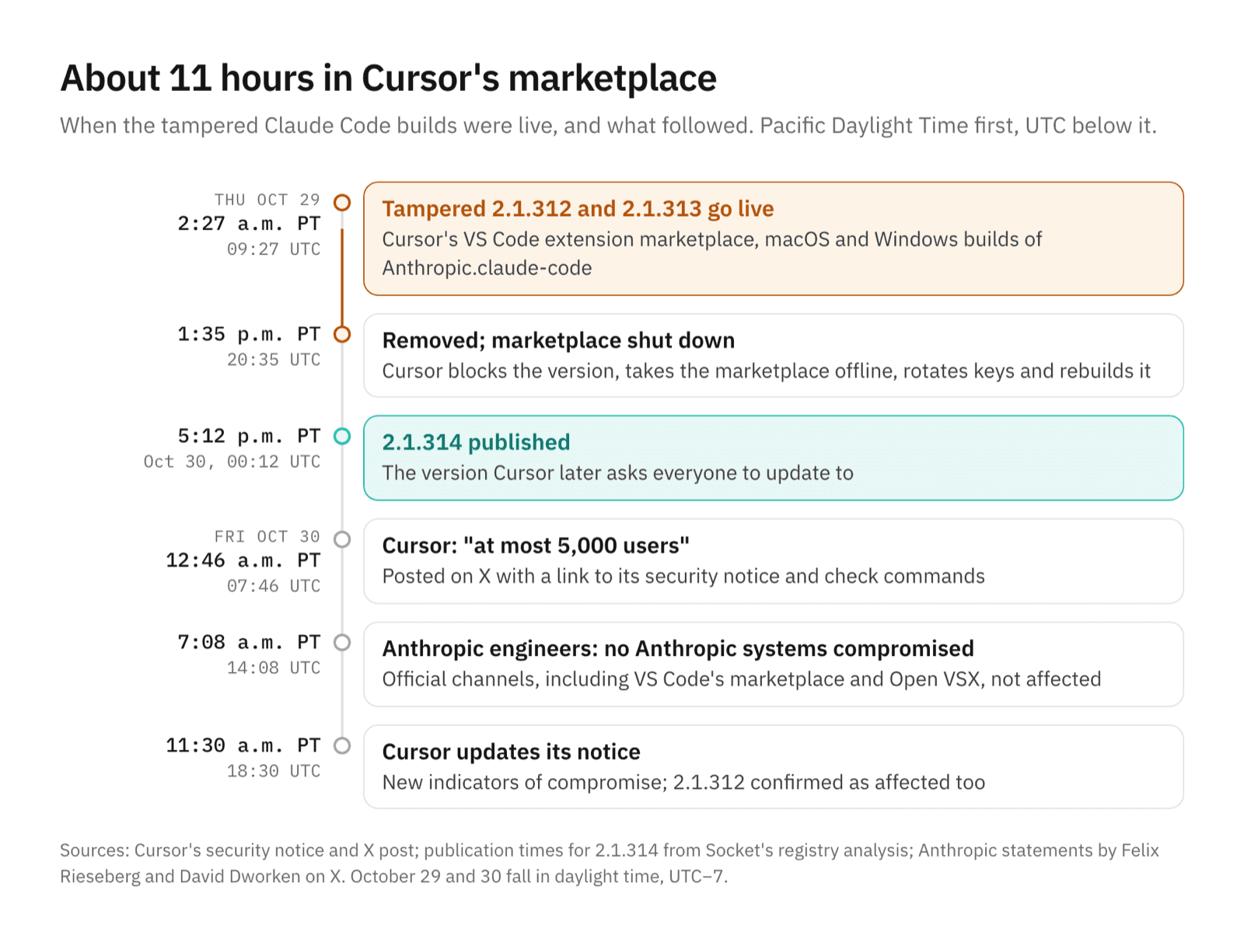
What happened, in Pacific and UTC time
Times come from Cursor's notice and X post, Anthropic engineers' posts on X, and Socket's registry analysis. October 29 and 30 were in daylight time, so UTC is seven hours ahead.
| Pacific time | UTC | What happened |
|---|---|---|
| Oct 29, 2:27 a.m. | 09:27 | Tampered 2.1.312 and 2.1.313 go live in Cursor's marketplace |
| Oct 29, 1:35 p.m. | 20:35 | Removed; Cursor shuts the marketplace, rotates keys and rebuilds it |
| Oct 29, 5:12 p.m. | Oct 30, 00:12 | Anthropic's 2.1.314 appears on npm |
| Oct 30, 12:46 a.m. | 07:46 | Cursor says "at most 5,000 users" and asks everyone to update to 2.1.314 |
| Oct 30, 7:08 a.m. | 14:08 | Anthropic engineers say Anthropic's systems weren't compromised |
| Oct 30, 11:30 a.m. | 18:30 | Cursor updates the indicators and confirms 2.1.312 was affected too |
Cursor says the attacker's server is offline, so the tunnel and the beacon no longer connect. It still asks everyone who installed or updated the extension from its marketplace in that window to check and clean up.
What's confirmed and what's only reported
Confirmed by Cursor. The affected builds, the window, the payload and the indicators are in its notice. The 5,000-user ceiling and the 2.1.314 advice are in its X post. Cursor says the malicious versions "were not developed by Anthropic" and that Grok Bot, Grok and its other products weren't affected.
Confirmed by Anthropic staff. We found no company post, but two Anthropic engineers spoke on X. Felix Rieseberg wrote that "it wasn't a compromise of Anthropic's systems or employee laptops." David Dworken, who works on security at Anthropic, added: "The versions on our official channels including VS Code and OpenVSX are not affected and this only impacts Cursor users."
Confirmed by Microsoft. Its analysis says the versions "were never published nor distributed" through the Visual Studio Marketplace or the @anthropic-ai/claude-code npm package.
Reported, then corrected. Phorion, a Mac security firm, published a technical analysis early on October 30 that named Open VSX as the source, and corrected it to Cursor's marketplace about four hours later. Socket found no trace of 2.1.313 in Open VSX's change feed or npm's records.
Not known. How the attacker got the access to publish on Cursor's marketplace. The Hacker News says that "remains unclear," and neither company had explained it by October 31.
What the tampered extension did
Microsoft says the injected code "runs when the extension module loads," ahead of the real extension's code, so it needed no action from the user. According to Cursor's notice, it:
- Sent the host name, user name, operating system, home and working folders, Git email and public IP to the attacker. It also sent the names, not the values, of up to 40 environment variables that looked like keys or tokens, per Microsoft.
- Appended the attacker's SSH key, labeled
svc-telemetry, to~/.ssh/authorized_keysand tried to turn on the computer's SSH server. - Opened a reverse SSH tunnel to the attacker and kept it alive with a LaunchAgent on macOS (
com.apple.sysmond) or a scheduled task namedSysMonon Windows, retrying about every 60 seconds.
Turning on SSH needs administrator rights, which the extension usually didn't have. Cursor says that on most Macs and PCs that step failed, so the attacker couldn't log in through the tunnel. Phorion found the cause on macOS: the script runs systemsetup -getremotelogin without admin rights, gets an error instead of "Off," and skips the step.
That isn't a defense, Phorion's Calum Hall told Help Net Security. On a Mac where Remote Login was already on, or gets turned on later, the key and the tunnel are ready to use. The key and the startup task were installed either way.
What svc-telemetry in authorized_keys means
authorized_keys lists the keys allowed to log in to your account over SSH. A line ending in svc-telemetry is the attacker's key, and Cursor's notice gives its fingerprint, SHA256:0Z6R+DF64Do2nwQic8a7kkfDLNNk4IiK+2U2Rci4htk. Cursor's cleanup script notes the key was appended "without a leading newline, so it may share a line with a real key." Don't delete the whole line by hand without looking.
How to check your Mac
You're only at risk if you installed or updated Claude Code from Cursor's marketplace during the window. VS Code with Microsoft's marketplace, the npm package and Open VSX weren't affected, per Anthropic and Microsoft. These commands only read; they work in the default zsh shell.
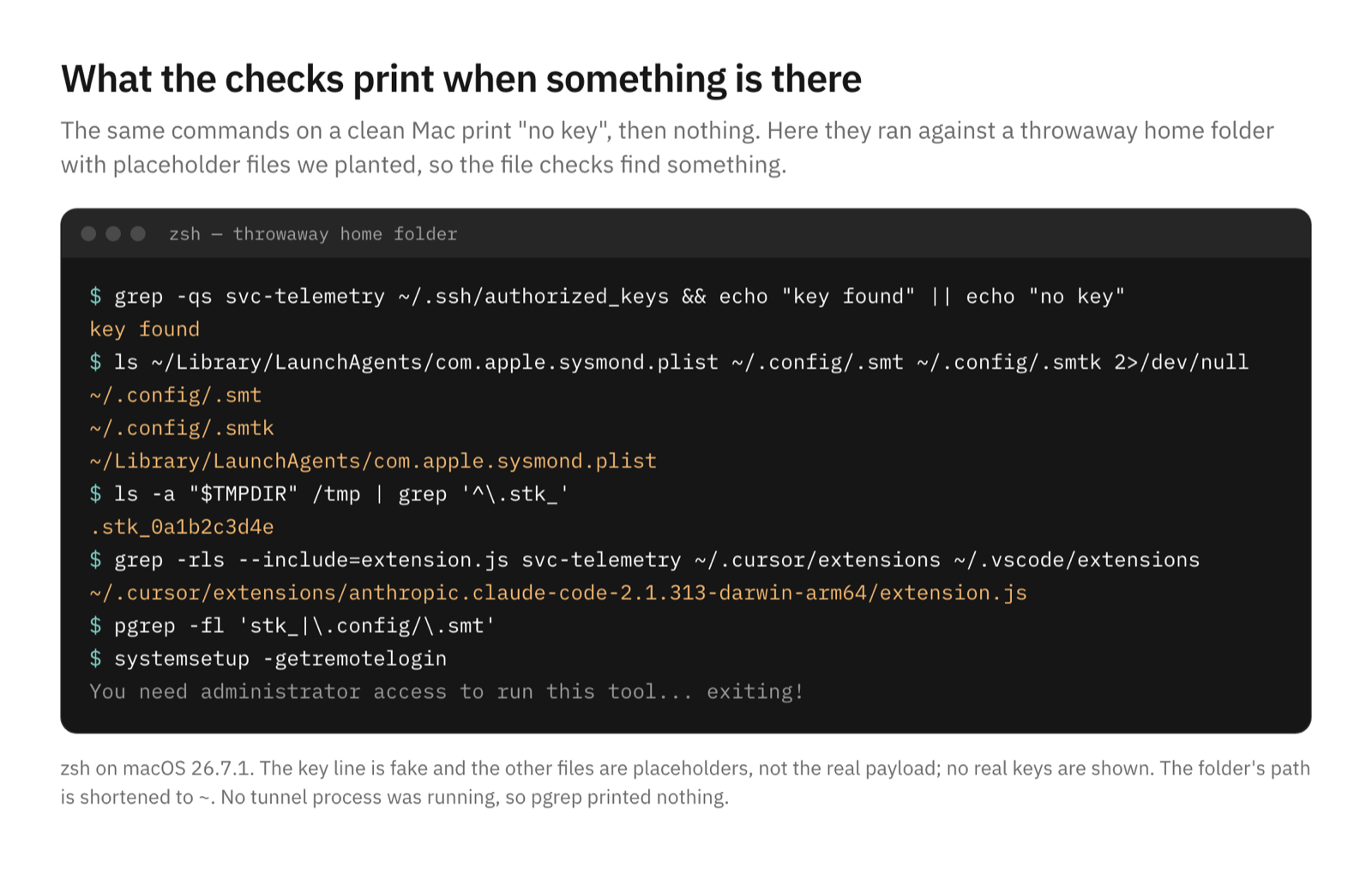
# 1. The attacker's key
grep -qs svc-telemetry ~/.ssh/authorized_keys && echo "key found" || echo "no key"

# 2. Persistence and dropped files (no output means none)
ls ~/Library/LaunchAgents/com.apple.sysmond.plist ~/.config/.smt ~/.config/.smtk 2>/dev/null
ls -a "$TMPDIR" /tmp | grep '^\.stk_'

# 3. Tampered copies of the extension in Cursor or VS Code
grep -rls --include=extension.js svc-telemetry ~/.cursor/extensions ~/.vscode/extensions

# 4. A tunnel that's still running
pgrep -fl 'stk_|\.config/\.smt'
The first command is Cursor's own, with shorter messages. On a clean Mac it prints "no key" and the rest print nothing. The tampered builds were for macOS and Windows, but the payload also carried a Linux path, a @reboot cron entry; crontab -l | grep smt finds it.
Check the extension by content, not by number. Cursor's cleanup script says "The tampered bundle keeps the real version number," and 2.1.312 is also a real Anthropic release, so a 2.1.312 folder can be either. Then update to 2.1.314 or later, as Cursor asks.
Last, check whether SSH is on: System Settings → General → Sharing → Remote Login. In Terminal, systemsetup -getremotelogin only answers with sudo; without it, you get the same admin error that tripped up the malware. If the key turned up and Remote Login is on, treat the Mac as reachable.
How to check a Windows PC
The first block is Cursor's PowerShell check. The rest follows the paths in Cursor's notice and its Windows cleanup script. We had no Windows machine for this post, so we didn't run these.
# 1. The attacker's key (Cursor's check)
$files = "$HOME\.ssh\authorized_keys", "C:\ProgramData\ssh\administrators_authorized_keys" | Where-Object { Test-Path $_ }
if ($files -and (Select-String svc-telemetry $files)) { "svc-telemetry key found" } else { "No key found" }

# 2. Persistence and dropped files
(Get-ScheduledTask -TaskName SysMon -ErrorAction SilentlyContinue).Actions | Select-Object Execute, Arguments
Test-Path "$HOME\.config\smt.cmd", "$HOME\.config\smtk", "$env:APPDATA\Microsoft\Windows\Start Menu\Programs\Startup\sysmon.cmd"
Get-ChildItem $env:TEMP -Filter '.stk_*' -Force -ErrorAction SilentlyContinue

# 3. Tampered copies of the extension
Get-ChildItem "$HOME\.cursor\extensions", "$HOME\.vscode\extensions" -Recurse -Filter extension.js -ErrorAction SilentlyContinue | Select-String svc-telemetry -SimpleMatch -List | Select-Object Path

# 4. Is an SSH server installed?
Get-Service sshd -ErrorAction SilentlyContinue
A task called SysMon isn't proof by itself, because Microsoft's own Sysmon tool uses that name. Microsoft warns that "names alone are not sufficient." The malicious task runs .config\smt.cmd, which is what its cleanup script checks for.
If you find it: Cursor's cleanup steps
Cursor's notice lists these steps for any machine with the key:
- Take the machine off the network.
- Run Cursor's cleanup script from the notice:
remediate-macos.shas the affected user, not as root, orremediate-windows.ps1from an Administrator PowerShell. Both scripts are short, so read them first. They remove the extension, the startup entries, the tunnel processes and the key, and exit with an error if anything is left. - Decide whether to rebuild the machine.
- From a different, trusted device, rotate the passwords, tokens and sessions the machine could reach. Cursor's reason: "The limited env-var collection does not rule out later credential access over the backdoor."
If Remote Login was on, Phorion suggests checking SSH logs for logins from localhost that used the svc-telemetry key. Then turn Remote Login off unless you need it.
Why uninstalling the extension isn't enough
The payload copied its scripts outside the extension's folder and registered them to start on their own. Cursor says the payload "drops standalone persistence scripts that keep running," and Microsoft puts it plainly: "Removing or updating the extension does not remove artifacts written outside its installation directory." Updating to 2.1.314 replaces the extension but leaves the key, the LaunchAgent or task, and the scripts in place.
What this says about tools that install code for you
The publisher was real, and the extension updated itself. Ax Sharma of Manifold Security made that point in Help Net's update: "Checking the publisher name doesn't help when the publisher is real." He added, "Increasingly, it's agents and automatic updates installing these things, not humans."
Cursor already offers controls for teams. Its extension help page describes a Marketplace Install Cooldown that delays new versions by a number of hours, an extensions.installCooldownHours setting for individuals, allowlists of approved publishers, and signature checks. Cursor's page says a cooldown "gives a buffer against short-lived malicious uploads," which is what this was.
Where AI agents fit, and why we keep ours off our laptops
OpenTeam runs each bot on its own Linux desktop on your server, inside a Docker container (how the bot computer works). When a bot installs a CLI, a package or a coding tool, it lands there, not on the laptop where you keep your SSH keys and browser. That's the main reason we run agent work on a separate machine.
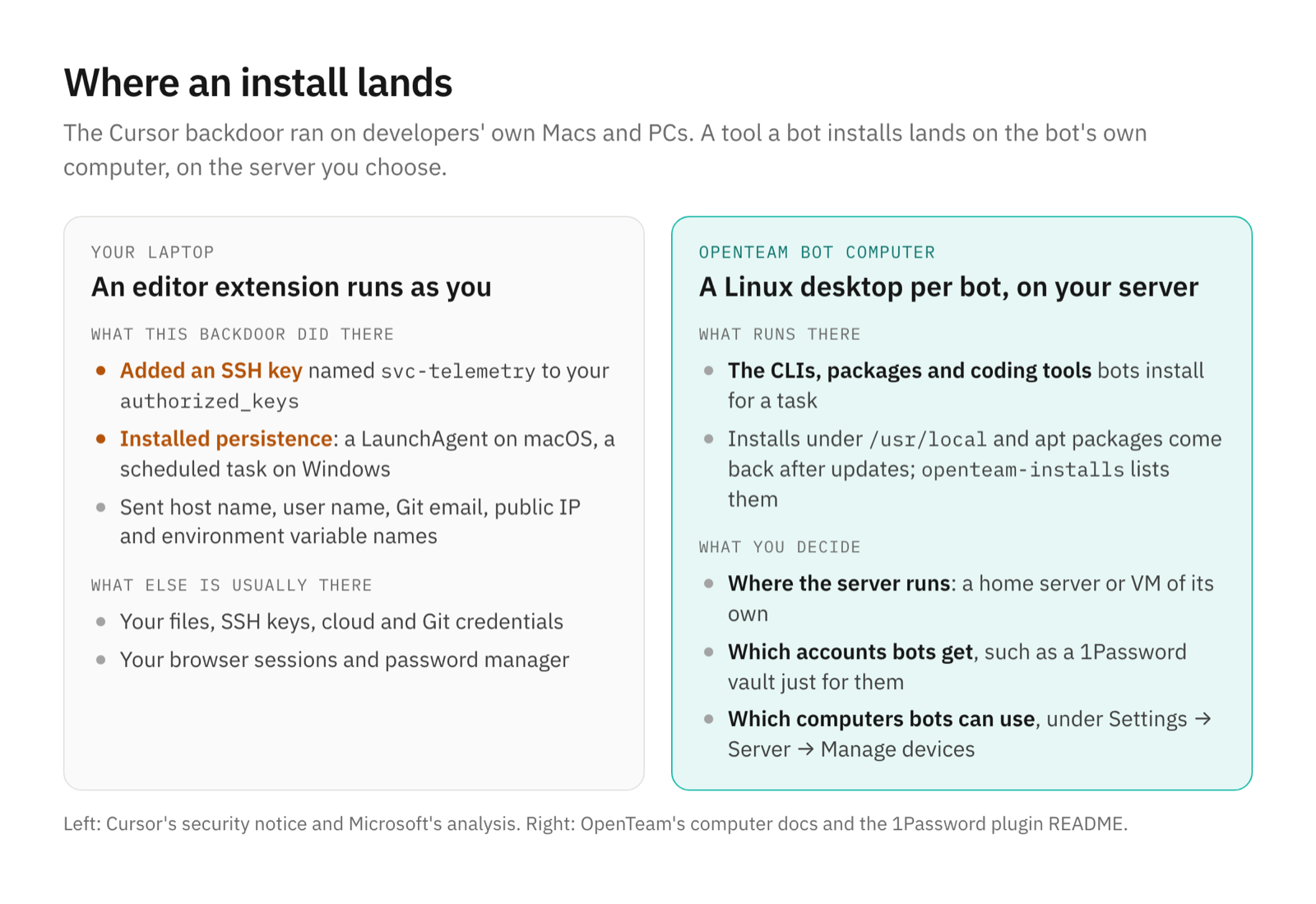
What to install on your laptop, and what on a bot's computer
- Your laptop: your editor, with the few extensions you need. Turn on an install cooldown where your editor offers one.
- The OpenTeam server: a home server or VM of its own (self-hosting on a home server or VM). Keep its operating system and Docker updated, and update OpenTeam with
openteam update. - A bot's computer: the CLIs and packages a task needs. Ask a bot to run
openteam-installsto see what's recorded and will come back after updates. - Accounts you give bots: the narrowest token that works, such as a 1Password service account that can read one vault. Disconnect what you don't use.
- Connecting your laptop: only if bots need its files or tools. To turn a computer off for bots, open Settings → Server → Manage devices on another device and choose Disable for it.
Frequently asked questions
Was the official Claude Code extension in VS Code affected?
No. Anthropic's David Dworken said versions on official channels, "including VS Code and OpenVSX," weren't affected, and Microsoft said the tampered builds never reached the Visual Studio Marketplace or npm. Only installs and updates from Cursor's marketplace during the window are at risk.
Was Anthropic hacked?
No, according to Anthropic and Cursor. Anthropic's Felix Rieseberg said it "wasn't a compromise of Anthropic's systems or employee laptops." Cursor says the versions "were not developed by Anthropic." How the attacker got publishing access to Cursor's marketplace hasn't been explained.
How do I know if I installed the bad version?
Run Cursor's svc-telemetry check above, then look for the startup files and a tampered extension.js. Don't rely on the version number: the tampered bundle reused real version numbers.
Does uninstalling Cursor or the extension remove the backdoor?
No. The key, the LaunchAgent or scheduled task, and the scripts live outside the extension's folder. Run Cursor's cleanup script, then rotate credentials from another device.
Should I update the Claude Code extension?
Yes. Cursor asks everyone to update to 2.1.314, and Anthropic says its own channels were never affected. Run the checks first, because updating doesn't remove anything the tampered build left behind.
Can an AI agent install malware like this?
Yes. Agents install packages and tools as part of their work, and a poisoned package doesn't care who installed it. Run agents on a machine or VM of their own, give them narrow accounts, and keep that machine and Docker updated.
Try OpenTeam
If you want agents that install their tools on a separate Linux computer instead of your laptop, run curl -fsSL https://openteam.so/install | sh on a home server or VM. The installation guide covers Windows and the requirements, and the apps are on the download page.