What Grok Bot costs under The X Subscription, vs running your own
Grok Bot needs The X Subscription's $30 Premium plan or higher, not the $8 Plus. What the weekly pool covers, Claude and GPT billing, and self-hosting costs.
On this page
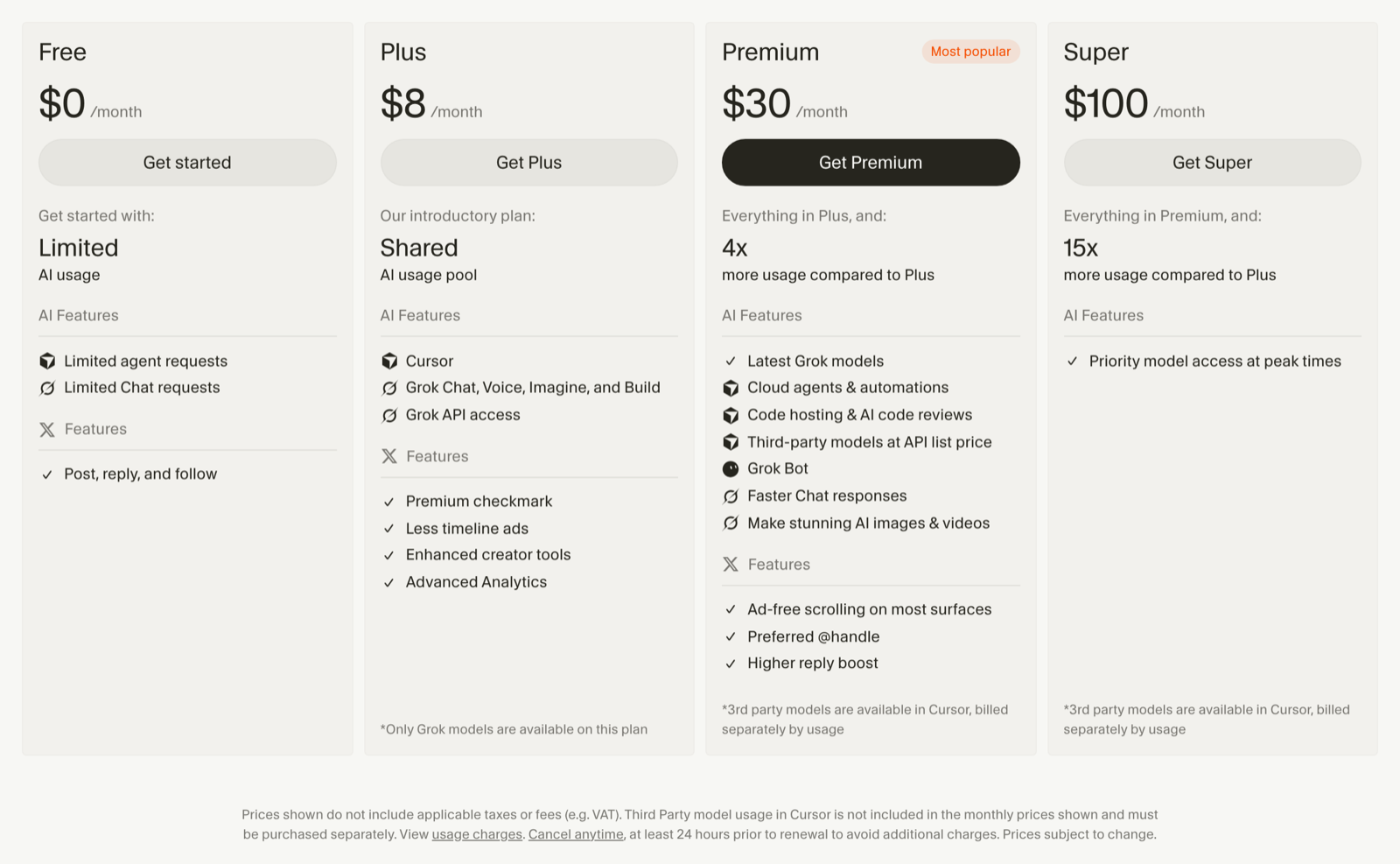
Since October 12, Grok Bot has come with The X Subscription's Premium plan at $30 a month, or $300 a year, and the higher Super and Ultra tiers. The $8 Plus plan doesn't include it. Its usage comes out of one weekly pool shared with Cursor and the Grok apps, and xAI doesn't publish how big that pool is. OpenTeam, our self-hosted AI agent app, is free; in our estimates, a machine and a model cost about $23 to $68 a month.
We build OpenTeam, so weigh our view accordingly. Grok Bot prices come from xAI's and Cursor's own pricing pages and docs, which read the same on November 1 as when we checked them for this post. We didn't buy a plan. OpenTeam's numbers come from tasks we ran on its current release, and the machine prices from each provider's public price list.
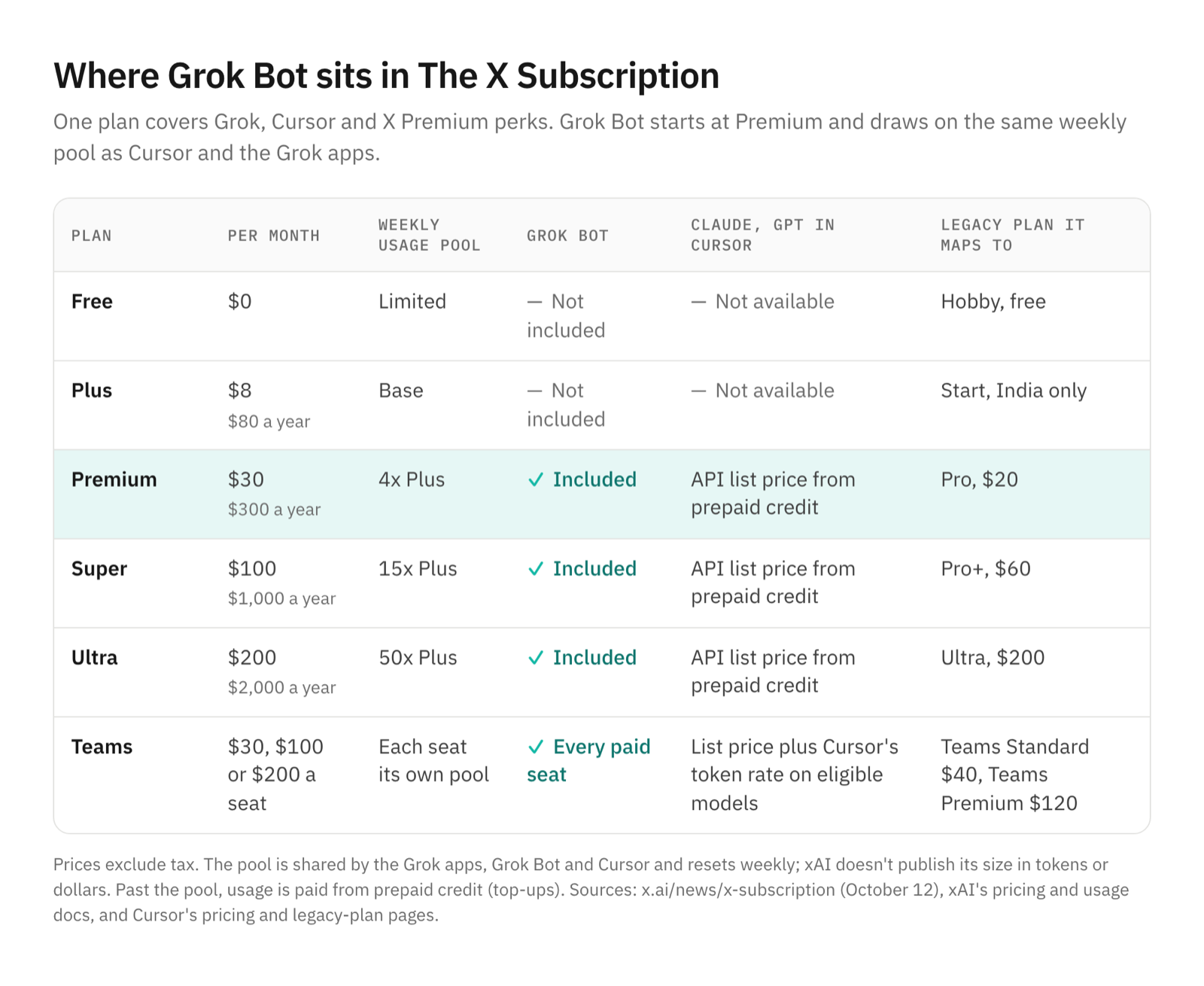
Grok Bot pricing at a glance
xAI announced The X Subscription on October 12: "Grok, Grok Bot, Cursor, and X Premium in one plan," available to everyone "over the next few days." Cursor's pricing help described it by October 17, and nothing about the plans or prices had changed by November 1. New customers start there. Its pricing docs put Grok Bot "on Premium, Super, and Ultra," and say "Plus does not include Grok Bot."
| Plan | Monthly | Annual | Grok Bot | Included usage |
|---|---|---|---|---|
| Free | $0 | $0 | No | Limited |
| Plus | $8 | $80 | No | Base |
| Premium | $30 | $300 | Yes | 4x Plus |
| Super | $100 | $1,000 | Yes | 15x Plus |
| Ultra | $200 | $2,000 | Yes | 50x Plus |
| Teams | $30, $100 or $200 a seat | Not listed | Every paid seat | Matches the seat's tier |
Prices exclude tax. There's no standalone Grok Bot plan. New accounts get a trial that Cursor's Grok Bot help calls "a usage credit rather than a set number of days, though a 7-day window also applies."
What changed from the old Cursor plans
Existing Cursor, SuperGrok and X Premium subscribers keep their plans unless they switch, and switching is permanent. Cursor's legacy plan page maps each old plan to its nearest new one:
| Legacy Cursor plan | Price | Grok Bot | Nearest X Subscription plan |
|---|---|---|---|
| Hobby | Free | No | Free |
| Pro | $20 | Yes | Premium, $30 |
| Pro+ | $60 | Yes | Super, $100 |
| Ultra | $200 | Yes | Ultra, $200 |
| Teams Standard | $40 a user | Yes | Premium seat, $30 |
| Teams Premium | $120 a user | Yes | Super seat, $100 |
So a new customer now pays $30 for Grok Bot where Pro used to cost $20. In exchange, xAI says Premium carries "the benefits of SuperGrok, Cursor Pro, and X Premium+, previously $90/month combined." Cursor says each new tier "includes at least twice as much coding usage with Cursor models as the legacy plan it replaces."
The billing model changed as well:
- One weekly pool, not two monthly ones. Legacy plans had separate Cursor Models and Other Models pools that reset monthly. The new pool resets weekly and covers Grok too.
- Prepaid credit, not a bill afterwards. Past the pool, you pay from prepaid credit with optional Auto Top-up and a monthly cap (prepaid balance). Legacy plans bill on-demand usage at the end of the month.
- No included third-party allowance. The new plans drop the Other Models pool, so Claude and GPT in Cursor are paid separately.
- Account links are legacy-only. Linking a SuperGrok or X Premium+ subscription to get Grok Bot usage works on legacy Cursor accounts. On The X Subscription, "a SuperGrok or X Premium+ link isn't part of" it.
What the weekly pool covers
The pool is shared "across everything on your subscription: Agent in the editor, CLI, Cloud Agents, Grok Bot, and the Grok apps," according to Cursor's models and pricing page. It resets weekly. "Usage rates vary by product," and the Grok API is billed separately.
What you can't find is the size. The plans are described only relative to each other, Plus as "Base" and Premium as "4x Plus," with no token or dollar figure. That makes it impossible to say in advance how many Grok Bot tasks $30 buys. A busy week of Cursor use can also leave less for your bots, since both draw on the same pool.
For usage beyond the pool, Cursor lists its own model rates. Grok 4.7, for example, costs $2 per million input tokens, $0.50 for cached input and $6 for output.
Where Claude and GPT usage is billed
In Cursor's editor, third-party models "like Claude, GPT, and Gemini aren't part of the included pool." On Premium and above, they cost "the model's API list price from the first request, paid from your prepaid credit." Plus and Free can't use them at all, and team plans add Cursor's token rate on eligible models.
In Grok Bot, you don't pick a model. Cursor's Grok Bot models page says each task goes to "a first-party xAI model or a third-party model," and usage views record it "as Grok Bot usage, not by provider or model name." It all comes out of the same weekly pool.
What it costs to run your own team
OpenTeam is free and open source (GPL-3.0). You pay for a machine that stays on, a model provider and any services you connect. It runs in Docker on macOS, Windows or Linux and recommends 8 GB of RAM (installation).
The model is the part that varies. You choose it for your bots in Settings → Model (model providers). You can sign in with a ChatGPT or Claude subscription, use an OpenAI, Anthropic or OpenRouter key, or point it at a model server of your own.
To price the API route, we ran five everyday tasks on OpenTeam's current release through OpenRouter at medium reasoning. They were a browser login and data pull, a research table with sources, a data analysis with a chart, setting up a weekday routine and a small coding job with tests. We added up the recorded cost of every model call, helpers included.
| Model, via OpenRouter | List price per million tokens | Cost per task | Average |
|---|---|---|---|
| GPT-6.1 Sol | $2 input, $10 output | $0.12 to $0.26 | $0.19 |
| GPT-6.1 Terra | $1 input, $5 output | $0.08 to $0.16 | $0.11 |
Nearly all the tokens were cached input that bots reread on every step, billed at a twentieth of the input price. The biggest share of the bill, about 60% across Sol's five tasks, was for writing new context into that cache, at $2.50 per million tokens for Sol and $1.25 for Terra (Sol and Terra on OpenRouter).
The machine is either one you already own or a cloud VM. A Mac mini with an M4 chip draws 4 W idle and 65 W at most, by Apple's figures. At an assumed 20 W average and the US average of 18.16 cents per kWh in August (EIA), that's about $3 a month. DigitalOcean's 8 GiB, 4 vCPU Basic droplet costs $48 a month.
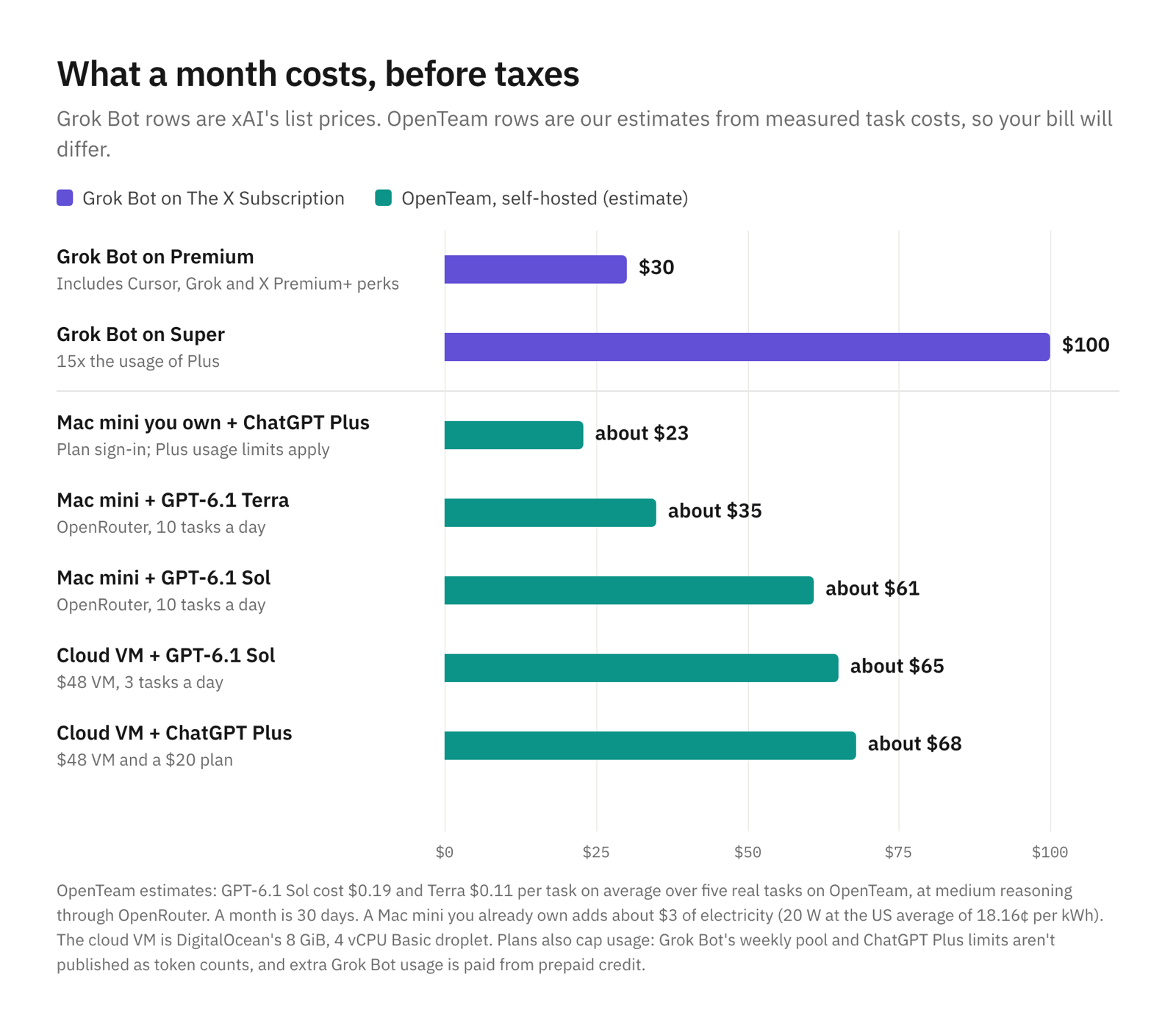
These are estimates for a 30-day month. Your tasks will be bigger or smaller than ours.
A computer you already own, with a ChatGPT plan
About $23: $20 for ChatGPT Plus and $3 of power. You don't pay per token; the plan's usage limits apply instead, and OpenAI doesn't publish them as token counts either. OpenTeam's ChatGPT sign-in uses the same connection as Codex. OpenAI's help center says that "Starting in December, Plus, Pro, and Business plans' usage allowance will be shared across ChatGPT and Codex." Your own chats and your bots will then share one allowance, much like Grok Bot and Cursor do.
The same computer, paying per task
At 10 tasks a day, GPT-6.1 Terra comes to about $32 and Sol about $58, plus power: roughly $35 and $61. You pay for each call, so there's no pool to run out of, and you can see what each task cost.
A cloud VM
With Sol at 3 tasks a day it's about $65, or $68 with ChatGPT Plus. A VM suits you when you want bots running on a machine that isn't in your house.
Where running your own makes sense
- You already have the hardware. A spare Mac mini or home server plus a $20 ChatGPT plan costs less than Premium, and our self-hosting guide covers the setup.
- You want to choose the model. OpenTeam works with any provider, including a local model. Grok Bot picks the model for you.
- You want to see every token. Pay-per-use providers show what each task cost. Grok Bot's pool is a relative number.
- You want the data on your machine. Conversations, files, memory and website sign-ins stay on your server, and only what each task needs goes to your model provider (privacy).
Our open-source Grok Bot alternative comparison covers the features side by side.
Which should you pick?
- Choose OpenTeam with a ChatGPT or Claude plan if you have a computer that stays on and want a flat monthly cost.
- Choose OpenTeam with pay-per-use if you want to pick the model and see each task's cost.
- Choose Grok Bot if you already pay for Cursor or Grok and want it in the same bundle.
Frequently asked questions
How much does Grok Bot cost?
$30 a month at the lowest, on The X Subscription's Premium plan, or $300 a year. Super is $100 and Ultra $200 a month, with larger pools. Teams seats cost the same per seat, and taxes are extra.
Is Grok Bot included in the $8 Plus plan?
No. Plus covers Cursor with xAI's own models, the Grok apps and some X features, but not Grok Bot or third-party models. Grok Bot starts at Premium.
Is Grok Bot free?
No, but there's a trial. It's a usage credit with a 7-day window, and it ends when either runs out.
Does Grok Bot use Claude or GPT, and do I pay extra for it?
Grok Bot picks the model itself, which can be a third-party one, and its work counts against your weekly pool like any other Grok Bot usage. Choosing Claude or GPT yourself in Cursor's editor is different: that's billed at API list price from prepaid credit, on Premium and above.
Can I keep my old Cursor Pro plan?
Yes. Legacy plans, including Pro at $20 with Grok Bot, keep working until you switch or cancel. Switching to The X Subscription can't be undone.
Is there a free alternative to Grok Bot?
Yes, if you can run it yourself. OpenTeam is free and open source; you pay for the machine and the model, which in our examples starts at about $23 a month with a computer you already own.
Try OpenTeam
Install the server on a computer that stays on with curl -fsSL https://openteam.so/install | sh, then connect a ChatGPT or Claude plan, an API key or a local model in the app. The quickstart walks through your first bot, and the apps are on the download page.