Open-source Grok Bot alternatives, tested on one Mac
We installed Rakazo, MausBot, Open Duet, OpenTeam and two more self-hosted Grok Bot alternatives, gave each the same task and model, and logged what broke.
On this page
We installed six open-source and source-available Grok Bot alternatives on October 26, 2026, and four finished our test. Rakazo is the closest all-round copy, and MausBot suits bots on CLIs you already use. Open Duet asks before acting; OpenTeam, our self-hosted AI agent team, gives each bot its own Linux desktop on a server. Two stopped at required accounts.
We build OpenTeam, so weigh our view accordingly. This post is the hands-on follow-up to our open-source Grok Bot alternative comparison and the broader best self-hosted AI agents list. It covers only projects that copy Grok Bot's shape: always-on bots that each get a computer, work together, run routines and come with apps. Facts we didn't test link to each project's repo or docs, checked October 26, 2026.
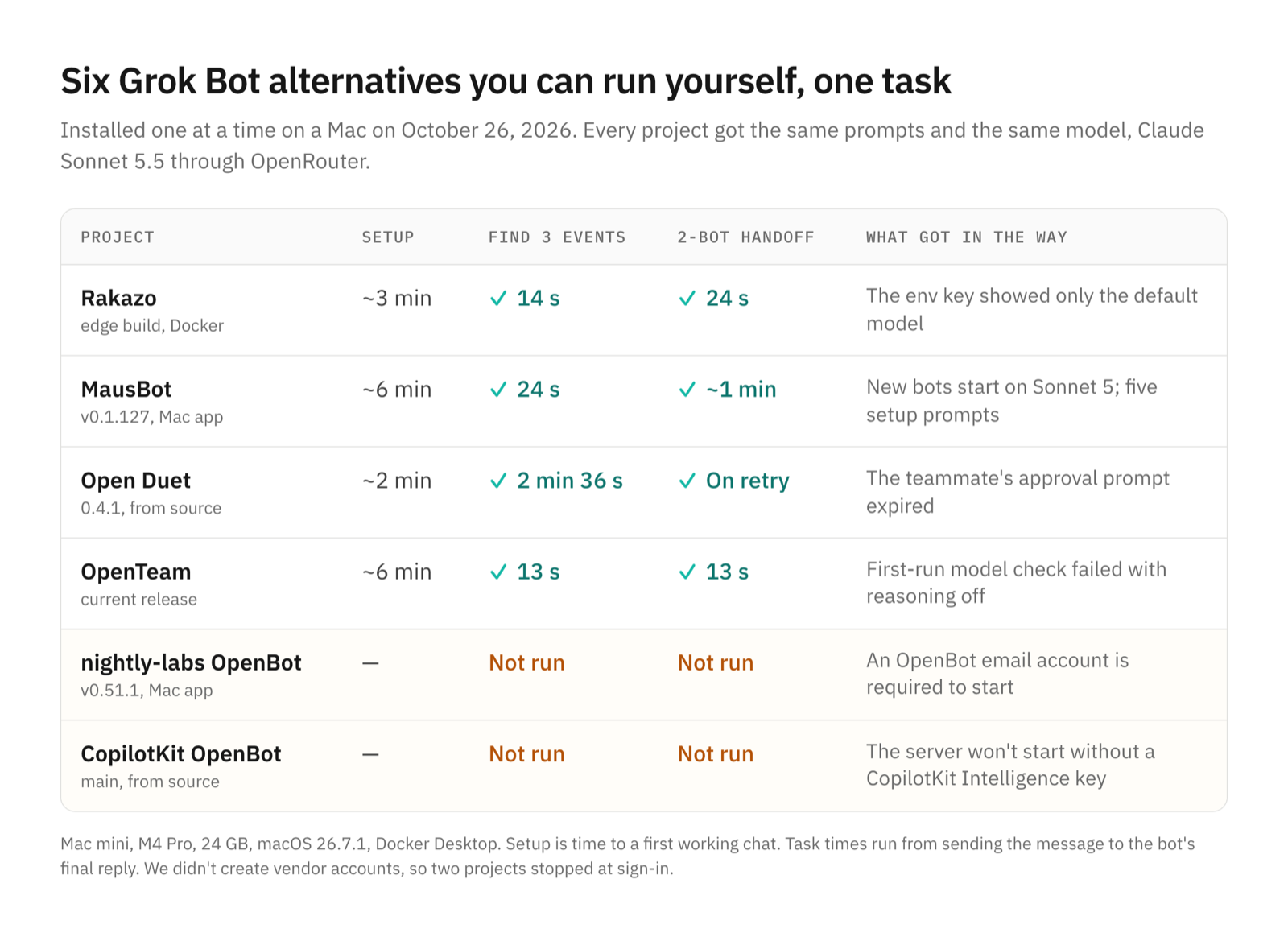
Open-source Grok Bot alternatives at a glance
Features come from each project's README and docs, checked October 26, 2026. Setup and task rows are what we measured, and star counts below come from the GitHub API that day, rounded. "Default" means the setting a new install or new bot starts with.
| Rakazo | MausBot | Open Duet | nightly-labs OpenBot | CopilotKit OpenBot | OpenTeam | |
|---|---|---|---|---|---|---|
| License | Apache-2.0 | Apache-2.0 core | Apache-2.0 | PolyForm Noncommercial | MIT template | GPL-3.0 |
| Computer per bot | Docker desktop, shared or private | Cloud, Docker VM, VPS or your Mac | Optional Docker computer, experimental | Embedded browser; computer use on your computer | Chromium container | Linux desktop |
| Bots working together | Peers and subagents | Rooms, bot-to-bot messages | A lead delegates to a team | Agent-to-agent messages | Group channels | Group chats of up to 6, bot-to-bot messages |
| Models | Many providers, local too | A model per bot via CLIs or OpenAI-compatible | Claude or Codex CLI; OpenRouter is chat-only | Many CLIs, local too | Your OpenAI-compatible endpoint | One per server, any provider, local too |
| Approvals (default) | Asks before changes | New bots act without asking | Asks first | None per action | Policy gate on every action | Email and Slack drafts only |
| Apps | Web, desktop, iPhone, Android | macOS, Windows, Ubuntu | Desktop, from source | Desktop, iPhone, web | Web, plus Slack and Teams | macOS, Linux, iPhone beta |
| Always-on server | Yes | Paid cloud, or a VPS | Experimental | Yes | Yes | Yes |
| Our setup time | About 3 min | About 6 min | About 2 min | Stopped at sign-in | Stopped at account | About 6 min |
| Our test | Passed both | Passed both | Passed, handoff on retry | Not run | Not run | Passed both |
How we tested
We ran everything on one Mac mini (M4 Pro, 24 GB, macOS 26.7.1) with Docker Desktop, on October 26, 2026. Each project got its latest release, or its main branch where the README installs from source. We followed each project's own install path and kept its defaults apart from the model, including approval modes. Then we removed it completely before starting the next.
Every bot used the same model, Claude Sonnet 5.5, through one OpenRouter key. Two projects needed a detour to get there. Open Duet's own OpenRouter engine can't use tools, and MausBot drives command-line agents, so for both we pointed the real Claude Code CLI at OpenRouter's Anthropic-compatible endpoint. Both projects document that route: MausBot's Set CLI option takes "a wrapper script", and Open Duet's launcher takes a Claude path.
Each project got the same two prompts, word for word, sent to a bot named Scout:
Find three AI or developer conferences in Austin, Texas between November 1
and December 15, 2026. Save their names, dates and URLs to a file named
austin-conferences.md, then tell me where you saved it.Ask Ada to find one more AI or developer event in Austin between November 1
and December 15, 2026 that isn't already in austin-conferences.md, and have
her add it to that file. Tell me when it's done.A run passed if the file held three entries whose pages loaded and showed an Austin event in that window; we checked every URL. The handoff passed if Ada, a second bot, did the work and the file gained a valid fourth entry. Times run from sending a message to the bot's final reply. We allowed one retry and approved any prompt a bot raised.
We didn't create vendor accounts. Two projects require one before you can chat, so they stopped there.
Rakazo: the closest all-round copy
Rakazo calls itself "an open source, self-hosted alternative to Grok Bot, Meta Muse, OpenAI Dots, Instinct, OpenClaw, Hermes Agent, and Claude Duet." It's Apache-2.0, in beta, with about 5,900 GitHub stars. It ships web, desktop, iPhone and Android apps, and its bots get computers in local Docker or from E2B, Daytona, CreateOS, Boat or Railway.
What we ran. We used the published edge images (commit ccbfe31), the installer's documented default, through the README's two-line quick start. Pulling and starting the stack took 71 seconds, and the images take about 8 GB of disk. We signed up in the browser and were chatting with its built-in "Chief" bot about three minutes after the first command.
What went well. Scout finished in 14 seconds with three AI events: CoRL 2026, the AI Engineering Summit and the TomorrowX Summit. It also flagged that one organizer's page disagreed with the ticket site on the date. Web search worked with no extra key. For the handoff, Scout "Messaged Ada", Ada ran on her own, added a November 5 Bluehost AI event and reported back, all in 24 seconds. The bot's screen panel shows its Chromium live, with its routines below.
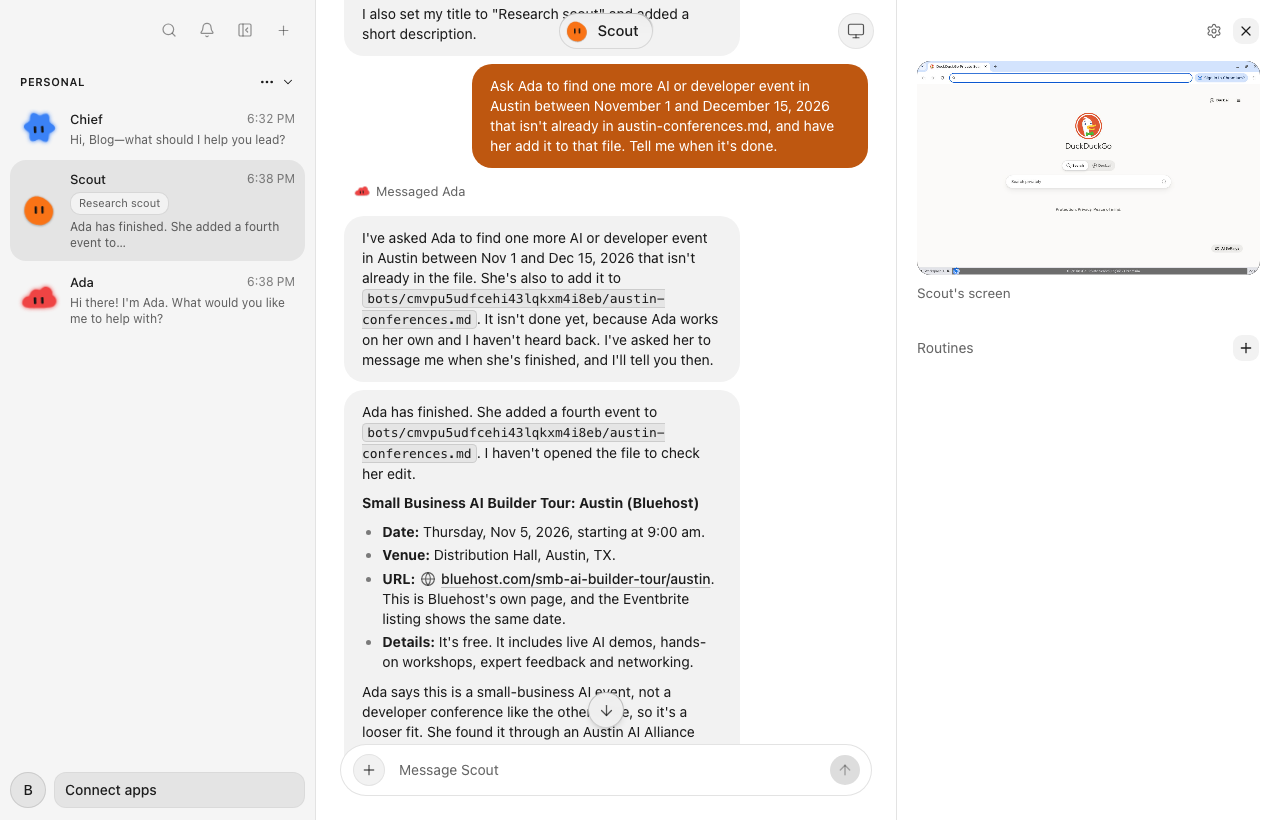
What got in the way. Nothing stopped it. The OpenRouter key in its config file exposed only the default model, GPT-6 Luna. To choose Sonnet 5.5, we added OpenRouter again as a personal provider in Settings. Its approval checker stayed on Luna. Its docs say a new space starts in Ask mode, which asks before any change (self-hosting guide); our task raised no prompts.
Who it suits. Anyone who wants Grok Bot's full shape, phone apps on both platforms and a choice of sandbox providers.
MausBot: bots on the CLIs you already use
MausBot, whose repo is OpenMausBot, is "the open-source Grok Bot alternative: your own team of AI bots, in a chat app." It's Apache-2.0 apart from a source-available enterprise/ folder, with about 5,700 stars. Bots run on the claude, codex or grok CLIs, or on an OpenAI-compatible service, and each bot can have its own model.
What we ran. We installed the signed v0.1.127 Mac app. It opened in under a minute, then walked us through two tours, a customize dialog, a MausBot Cloud trial offer and an email opt-in. It also found the Claude and ChatGPT sign-ins already on our Mac. We pointed its Claude engine at our OpenRouter route with Set CLI instead. New bots started on Claude Sonnet 5, so we switched them to Sonnet 5.5 in each bot's panel. That took about six minutes in all.
Our first run went out on Sonnet 5 before we noticed, so it didn't count. On the rerun, in a new thread, Scout said it had "already researched this earlier today" and copied the old file. We counted a third run on a fresh bot.
What went well. Scout returned three events in about 24 seconds: the AI Engineering Summit, MLOps World and the TomorrowX Summit. It noted that its dates came from search snippets. The handoff was the smoothest we saw: "Sent to Ada", "Ada replied", and Scout opened the file itself before telling us it was done, about a minute in all. Ada added State of AI in Texas on November 17.
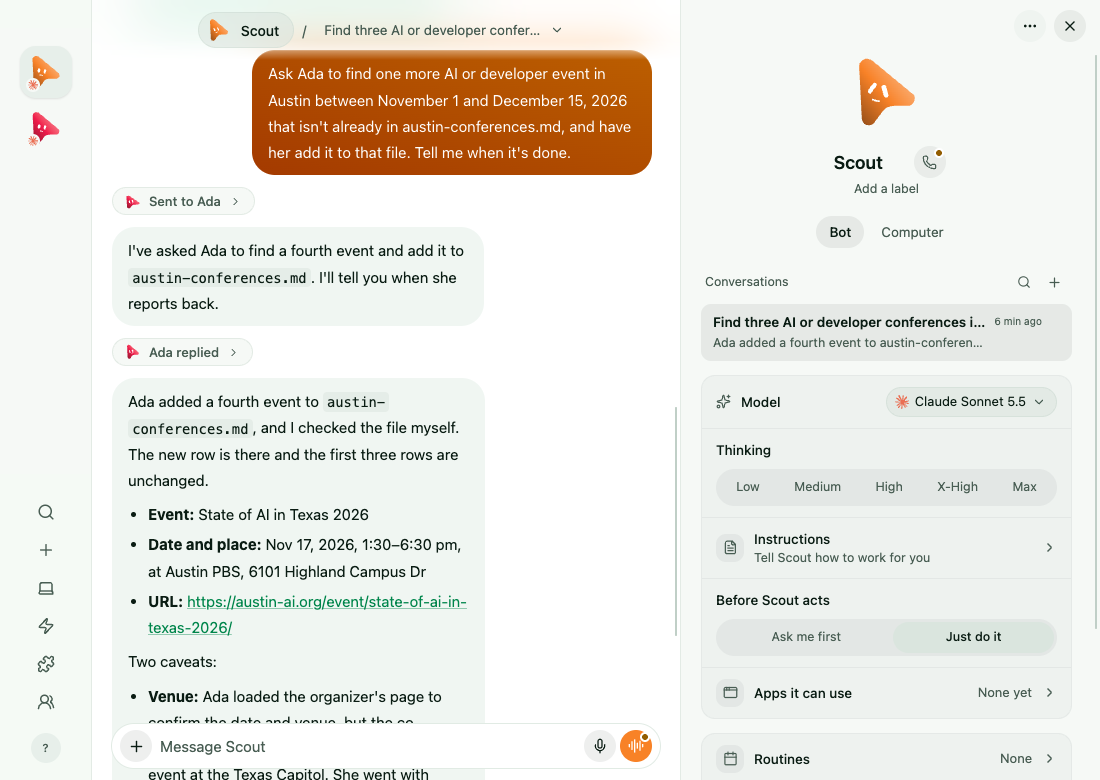
What got in the way. No blocker. New bots default to "Just do it", so they act without asking; "Ask me first" is one click away. On the free plan, bots work only while your computer is on. Cloud plans that keep them running cost $15 to $99 a month for one person (pricing).
Who it suits. People who already pay for Claude or ChatGPT and want a different model per bot, on Windows and Intel Macs too.
Open Duet: asks first, with a lead that delegates
Open Duet is "your own team of AI coworkers, running on your computer or a server you control." It's Apache-2.0. Its repo shows about 6,200 stars, but it was created in 2023 and renamed, so the count predates this project. The desktop app runs from a source checkout; its self-hosted server is experimental and meant for one owner.
What we ran. We cloned commit 743d014 (app version 0.4.1) and ran npm run app, which needs Node.js and uv. Installing and building took 30 seconds, and we had a working chat about two minutes after cloning. Its engine table lists no tools, approvals or computers for OpenRouter, and team leads must use Claude or Codex. So Scout and Ada ran on its Claude engine, through our OpenRouter route.
What went well. Scout handed the research to Ada without being asked, then wrote the file after one approval card. Its three picks were checked on official sites: CoRL 2026, the AI Engineering Summit and MLOps World. It was the slowest pass, at 2 minutes 36 seconds, and the most careful.
What got in the way. On the handoff, Ada's first request to read the file appeared in her own conversation, expired unanswered, and she stopped with a question. We were watching Scout's thread. On our retry, we answered in Ada's thread and approved 14 prompts for commands and an edit. She added Texas Linux Fest (November 6–7) about 76 seconds later, and Scout relayed the result.
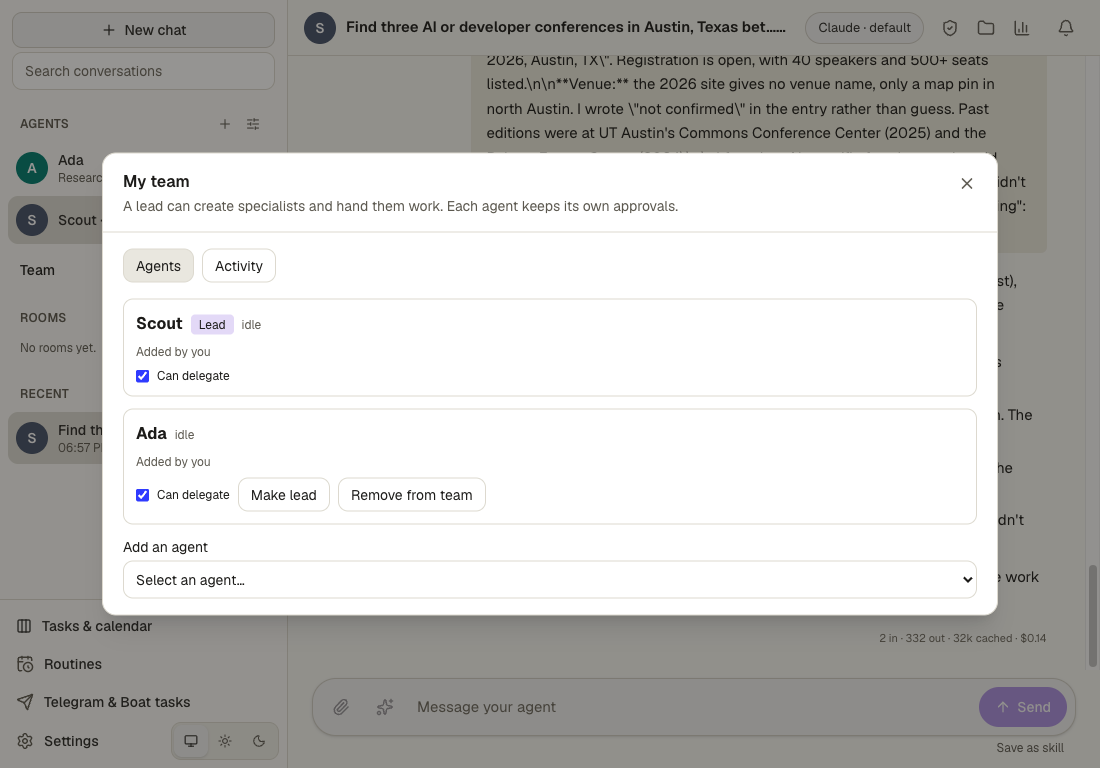
Who it suits. People who want an agent to ask before every write and command, and a lead that splits work. Its README says computers are experimental and there's no built-in app catalog yet.
OpenTeam: a desktop per bot on your own server
OpenTeam is our project: open-source (GPL-3.0), self-hosted AI agents that run in Docker on macOS, Windows or Linux. Each bot gets a persistent Linux desktop with Chromium and a terminal, and bots share a /workspace folder and website sign-ins (how the bot computer works). Apps cover macOS on Apple silicon, Linux x64 and an iPhone TestFlight beta. There's no Windows or Intel Mac desktop app, no Android app and no web app.
What we ran. We installed the current release with the one-line installer, in a separate folder and Docker project beside our own install. Setup asked how to connect and for an account, and moved to a free port by itself. A second copy on one machine can't bind the fixed screen-viewer ports, so we turned them off for the test. That's specific to running two copies, but it meant we couldn't watch bot screens live this time. Then we signed in from the desktop app.
What broke. The first-run model step. OpenRouter's Auto Router passed its check, but Claude Sonnet 5.5 failed with "Inference provider rejected the configuration or request". The app had sent it with reasoning off, and OpenRouter answers that "Reasoning is mandatory for this endpoint." The app saved the model anyway, so the first bot's welcome runs failed too. Choosing a reasoning level in Settings → Model fixed it (models). Allowing for that, setup took about six minutes.
What went well, and what didn't. Both prompts finished in 13 seconds each. Scout listed three Austin developer events, Texas Linux Fest and two November 12–13 conferences, all valid. Web search is off until you add a search key (web search), so it read a listing site instead. It found no AI-specific conference and linked listing pages rather than official sites, so its answer was the weakest of the four. For the handoff, Scout messaged Ada, and Ada added a November 3 testing conference and reported back.
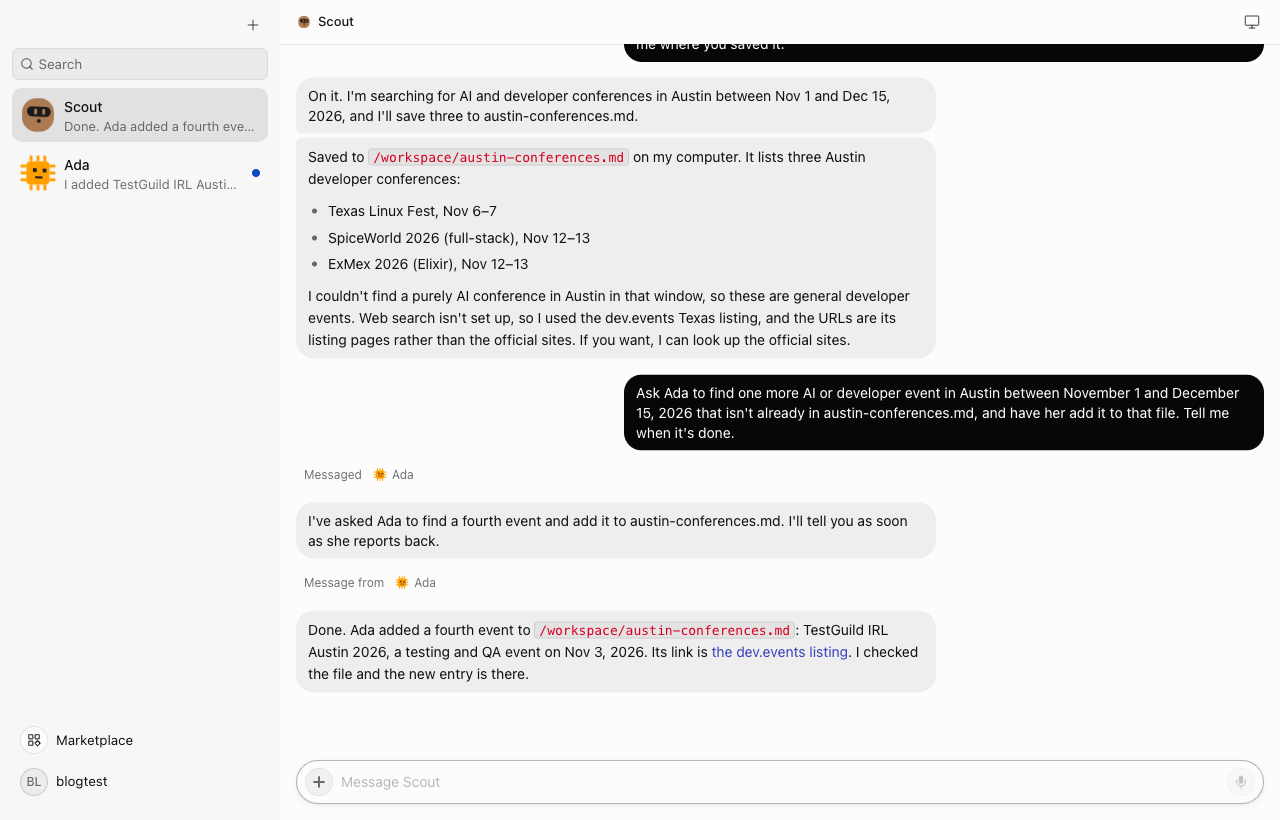
Limits to know. One model serves every bot, each server has one human account, and bots act without approval prompts apart from email and Slack drafts.
Who it suits. People who want an always-on server where every bot keeps its own desktop, with any provider including a local model.
nightly-labs OpenBot: installed, stopped at sign-in
nightly-labs OpenBot is "a local-first desktop workspace for persistent AI teammates." It runs Codex, Claude Code, Grok CLI, OpenCode, Gemini, Cursor and Cline, plus OpenAI-compatible endpoints. It also offers agent-to-agent messages, channel chats, an embedded browser, a headless Linux server and an iPhone app. It can even import agents from Grok Bot. It has about 1,400 stars.
Its license is PolyForm Noncommercial 1.0.0, so it's source-available, not open source, and commercial use needs a separate license. Its README warns that agents run with danger-full-access and no per-action confirmations.
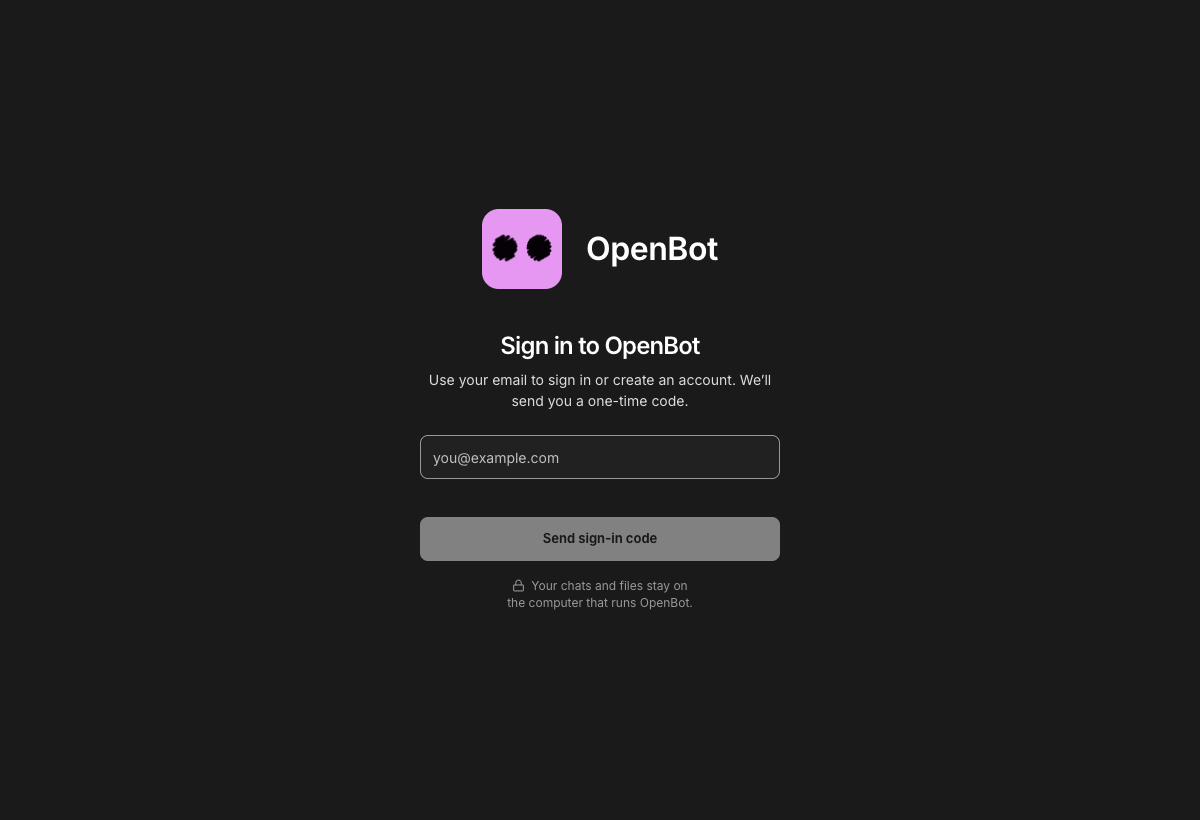
What we ran. The v0.51.1 Mac app, checksum verified, reached its first screen in about a minute. That screen asks for an email address and a one-time code to sign in or create an OpenBot account, with no way to skip it. The README calls accounts optional, but its server and Docker paths start with openbot login too. We didn't make an account, so we stopped. The app also offered to update the Claude and ChatGPT CLIs it found on our Mac.
Who it suits. Noncommercial users who want the widest range of agent CLIs and don't mind an account.
CopilotKit OpenBot: a template behind an account
CopilotKit's OpenBot offers "open-source AI coworkers that each get a computer of their own." Its README is frank: "A template, not a product," and alpha. It's MIT, with about 7,200 stars. Each bot gets a container with Chromium, and a gateway decides every action against your policy and records it before it runs.
What we ran. We cloned main (3592f85) and installed its 2,371 packages with Bun in 15 seconds. Step two of the quick start is a CopilotKit login, through its free Developer plan, to create an Intelligence project. Without one, its API server stops with "CopilotKit Intelligence is required and is not configured." The model side would have worked, since it accepts any OpenAI-compatible endpoint. We stopped there, and it has no screen to show without that account.
Who it suits. Developers building their own agent product who want a policy gate and an audit trail from day one.
Projects we left out
- Cua Spaces and Cua Bots. Cua Bots is an example Mac app built from source with Rust and Swift (docs). We couldn't drive a native app without granting this Mac Accessibility or screen-recording access. Spaces' setup connects it to coding agents you already use, such as Claude Code or Codex (quickstart).
- Xiryn. A newer project, created October 11. Its one-command setup can install Git, Node.js and Docker on your machine, which we didn't want on a shared test Mac.
- nanoMuse. One personal agent by design, not a team of bots.
- Lorca. Its README lists no OpenRouter option, so it couldn't use our test model.
- Coworkers. It runs on Cloudflare's platform rather than on hardware you control.
Where the others beat OpenTeam
- Answer quality out of the box. Rakazo, MausBot and Open Duet searched the web with no extra key and found real AI conferences. OpenTeam needs a search provider key, and without one its answer was weaker.
- Approvals. Open Duet asks before writes and commands, Rakazo starts in Ask mode, and CopilotKit gates every action. OpenTeam has no approval step outside email and Slack drafts.
- A model per bot. MausBot, Open Duet and nightly-labs OpenBot let each bot use a different model. OpenTeam uses one model for every bot on a server.
- Platforms. Rakazo has Android, iPhone and web apps, and MausBot runs on Windows and Intel Macs. OpenTeam's desktop apps are for macOS on Apple silicon and Linux only.
- Setup. Rakazo and Open Duet reached a working chat faster, and our model-step bug cost several minutes.
If one of these decides it for you, pick that project.
Which Grok Bot alternative should you pick?
- Choose Rakazo if you want the closest open-source copy of Grok Bot, with web, desktop, iPhone and Android apps.
- Choose MausBot if you want each bot on its own model through Claude, Codex or Grok CLIs, including on Windows.
- Choose Open Duet if you want approval before each change and a lead that delegates to specialists.
- Choose OpenTeam if you want a server that keeps a Linux desktop for every bot and works with any provider, and you can live without approval prompts.
- Choose nightly-labs OpenBot if your use is noncommercial and you want the most agent CLIs.
- Choose CopilotKit OpenBot if you're building a product and want a policy gate on every action.
- Stay with Grok Bot if you want zero setup and apps on every device, iPad included (xAI).
Frequently asked questions
Is there an open-source Grok Bot?
No. Grok Bot is a proprietary xAI service. Rakazo, MausBot and Open Duet (Apache-2.0), CopilotKit OpenBot (MIT) and OpenTeam (GPL-3.0) are open-source projects with the same shape. nightly-labs OpenBot is source-available under a noncommercial license.
Can I self-host Grok Bot?
No. Grok Bot's computers run in xAI's cloud, and there's no self-hosted edition. Rakazo, OpenTeam, nightly-labs OpenBot's server and CopilotKit OpenBot run on hardware you control. Our self-hosting guide covers OpenTeam on a home server or VM.
Which Grok Bot alternative is easiest to install?
In our test, Open Duet reached a working chat fastest, in about two minutes, but it needs Node.js and uv. Rakazo took about three minutes with Docker. MausBot is a signed Mac app that's ready in a minute if you already use the claude or codex CLI.
Which works with local models?
All four we ran can, by their docs. Rakazo and MausBot accept OpenAI-compatible servers such as Ollama, and Open Duet does too, but only for chat. OpenTeam takes any compatible endpoint; see running self-hosted AI agents on local models. We didn't test local models here.
Which is free?
All six are free to self-host; you pay your model provider. MausBot sells cloud plans from $15 a month, CopilotKit OpenBot needs a free CopilotKit plan, and nightly-labs OpenBot needs a separate license for commercial use.
Is there an open-source alternative to OpenAI dots, Meta Muse or Claude Duet?
Yes, the same projects. Rakazo names all three as targets, Open Duet is named for Claude Duet, and MausBot names Muse and dots. For OpenTeam, see our Claude Duet alternative and is Meta Muse safe.
Try OpenTeam
Install the server with curl -fsSL https://openteam.so/install | sh on macOS or Linux, or irm https://openteam.so/install.ps1 | iex in Windows PowerShell, and guided setup follows. The quickstart walks you through your first bot, and the apps are on the download page.