Perplexity Teammates vs OpenTeam: hosted or self-hosted work agents
Perplexity Teammates are always-on work agents for $200-a-month Max subscribers. We ran their headline jobs on OpenTeam, a self-hosted AI agent team.
On this page
Perplexity Teammates are hosted agents that own ongoing work, each with its own computer, for Max subscribers at $200 a month. OpenTeam, our open-source, self-hosted AI agent team, does the same kind of work on hardware you control, with no subscription. OpenTeam's case is cost, model choice and where your data lives, and it handled all four jobs we gave it.
We build OpenTeam, so weigh our view accordingly. We didn't test Teammates: it needs the Max plan, and we didn't buy it or sign in. Its side of this post comes from Perplexity's launch post, its help center and Aravind Srinivas's announcement, as they stood on November 5, 2026. Our side is hands-on: we gave OpenTeam four of the jobs Perplexity says Teammates are for.
What Perplexity Teammates are
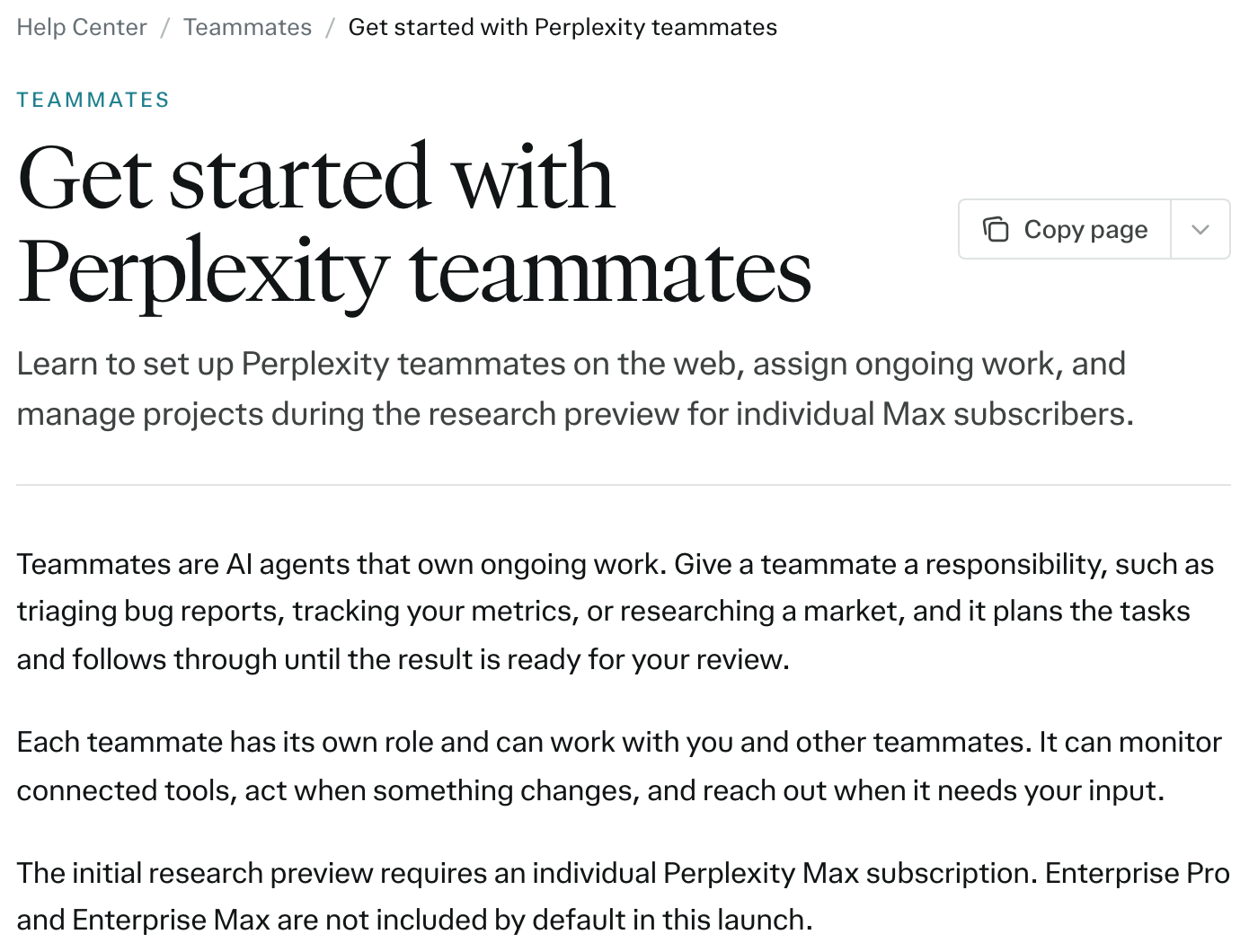
Perplexity launched Teammates on November 4 as "personal agents that can take on that long-running work." Srinivas put it as a change "from writing prompts in a session to giving high-level goals." The help center describes the idea plainly: "Give a teammate a responsibility, such as triaging bug reports, tracking your metrics, or researching a market, and it plans the tasks and follows through until the result is ready for your review."
Here's what Perplexity says a teammate gets:
- A computer. "Each teammate has its own desktop computer and browser," and you "can take over and steer its work." Browsing sessions and cookies stay with that teammate.
- Helpers. A teammate breaks a goal into tasks and "starts additional agents," each with its own computer.
- Triggers. It watches connected tools such as Slack, GitHub and Linear and "can start work when something arrives." Schedules work too.
- Memory and Projects. It keeps memory between conversations, and teammates in the same Project share context, files and instructions.
- Models. You pick a model per teammate. New ones start on Claude Opus 5.5.
- Coworkers. "Add a teammate to a Slack channel and colleagues can hand it work or ask for updates on a task." Teammates can also pass work to each other.
- Credentials. Saved credentials "are encrypted and entered securely. Teammates cannot view them."
It's a research preview for individual Max subscribers, on the web. Enterprise Pro and Enterprise Max aren't included by default, and native apps are "coming soon." Max costs $200 a month or $2,000 a year, and the pricing page lists 10,000 monthly credits. Teammates draw on those credits, and the help center warns that parallel agents, large files and frequent automations use more.
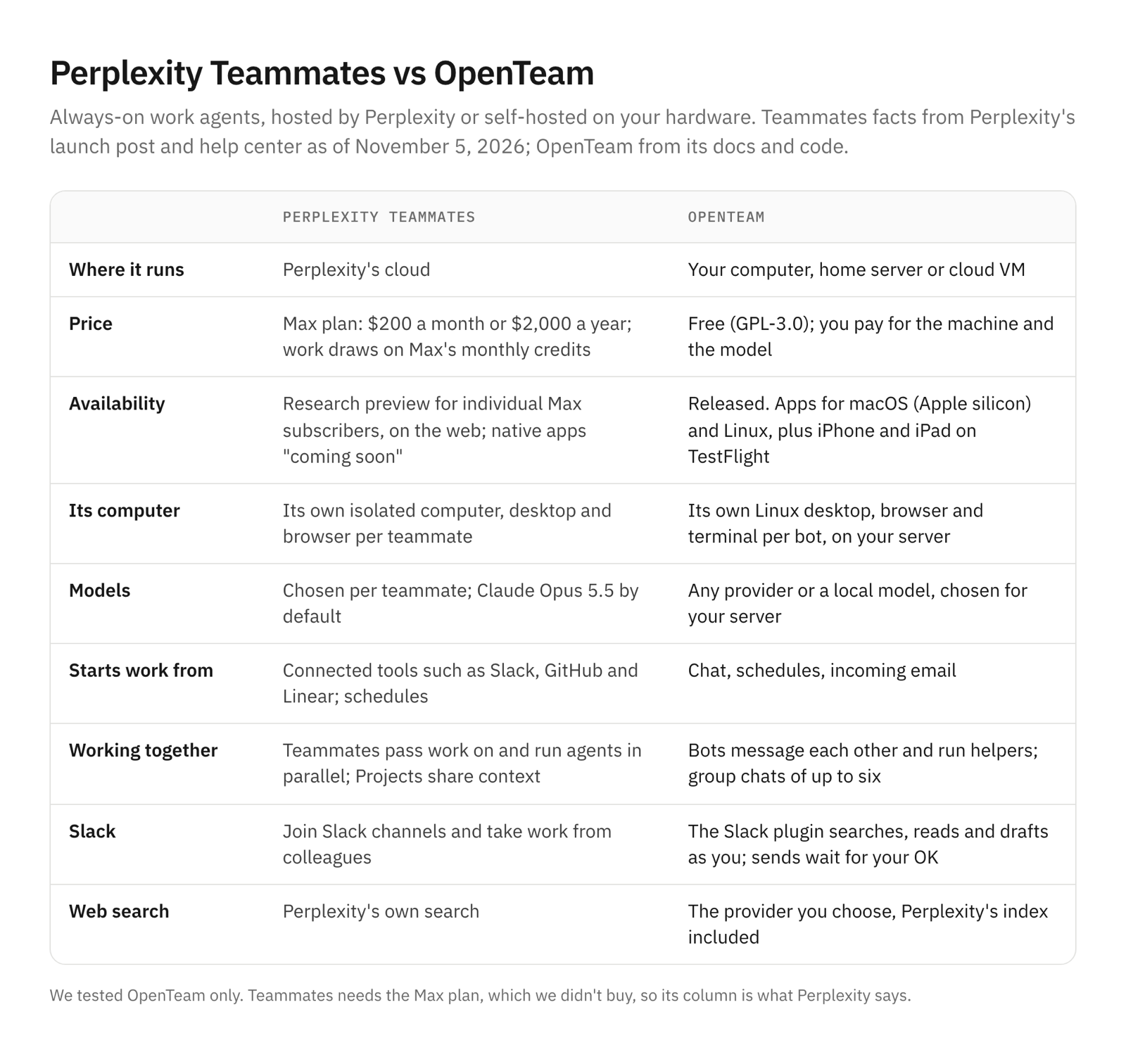
Perplexity Teammates vs OpenTeam at a glance
Teammates facts are from Perplexity's pages above, as of November 5, 2026. OpenTeam facts are from its docs and code.
| Perplexity Teammates | OpenTeam | |
|---|---|---|
| What it is | Hosted agents that own ongoing work | Self-hosted bots that each get a Linux computer |
| Price | Max plan, $200/month; uses Max credits | Free; you pay for the machine and the model |
| Status | Research preview, Max subscribers only | Released |
| Where it runs | Perplexity's cloud | Your computer, home server or VM |
| Computer | One isolated computer per teammate | A Linux desktop per bot, on your server |
| Models | Per teammate; Opus 5.5 by default | Any provider or a local model, chosen for your server |
| What starts work | Chat, schedules, new Slack, GitHub or Linear activity | Chat, schedules, incoming email |
| Team of agents | Hand-offs, parallel agents, Projects | Bot-to-bot messages, helpers, group chats |
| Slack | Colleagues can work with it in Slack | Slack plugin searches, reads and drafts as you |
| Search | Perplexity's search | The provider you choose, Perplexity's index included |
| Apps | Web; native apps announced | macOS (Apple silicon), Linux, iPhone and iPad on TestFlight |
| Source | Proprietary | GPL-3.0 |
How we tested OpenTeam
We ran one OpenTeam server on a Mac, in Docker, on the current release. Every bot used GPT-6.1 Sol at medium reasoning through OpenRouter, at $2 and $10 per million input and output tokens. Web search was off, the default (web search settings). Each job got fresh bots, and we created no outside accounts.
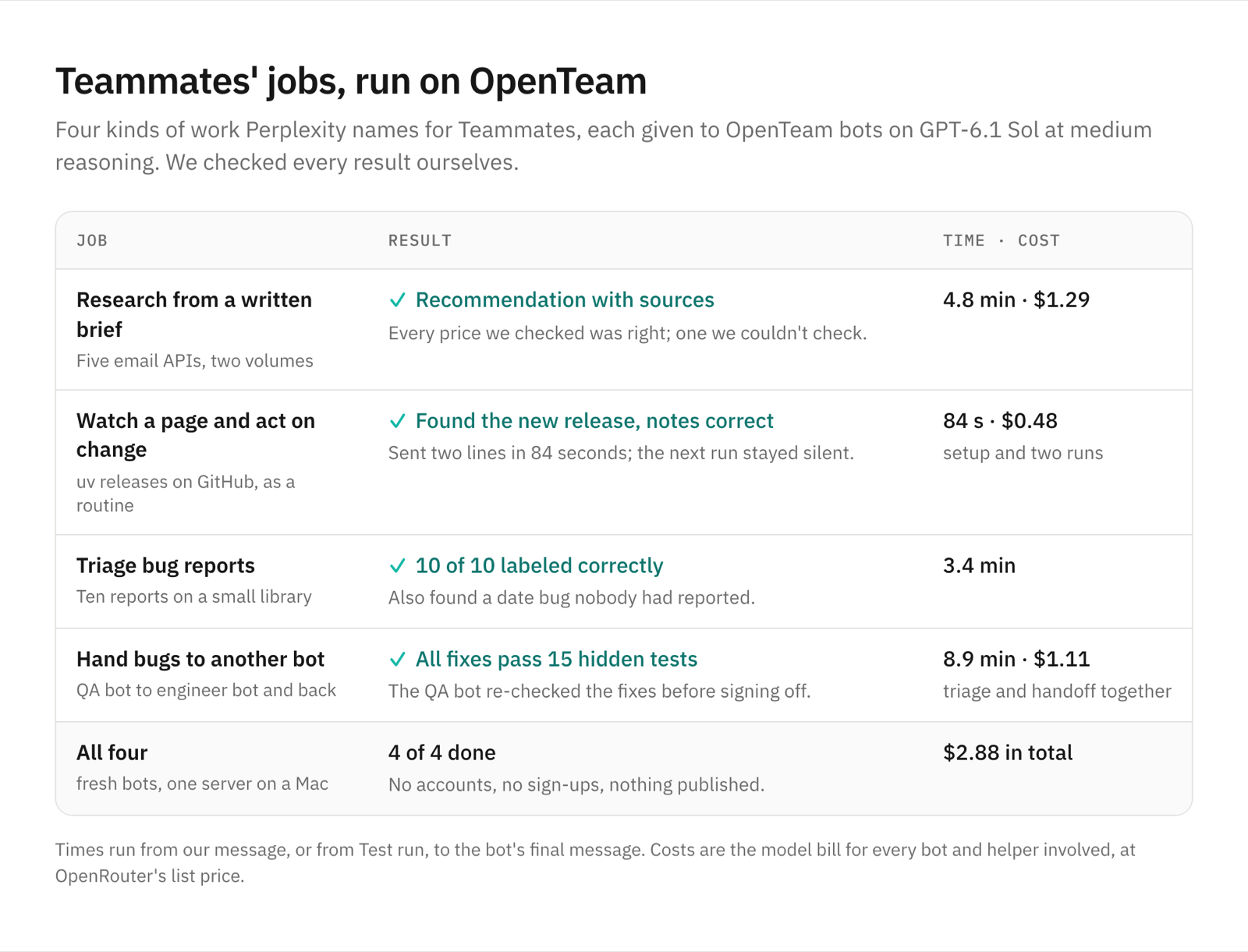
We picked four jobs from Perplexity's own examples. They were research from a brief, monitoring something and acting when it changes, and triaging bug reports. The fourth was a handoff: "one teammate finds bugs ... and passes its findings along to another to prepare fixes." Times run from our message, or from Test run, to the bot's final message. Costs are the model bill for every bot and helper involved, at OpenRouter's list price.
Job 1: research from a written brief
We saved a one-page brief in the bots' shared /workspace folder: a six-person startup choosing a transactional email API. It asked for Amazon SES, Postmark, SendGrid, Mailgun and Resend compared at 50,000 and 200,000 emails a month. It also asked for free tiers, dedicated IPs, log retention and Python SDKs, with a vendor link for every number. Our whole message was "Please pick up the research brief in /workspace/research/brief.md and deliver what it asks for."
The bot split the work between two helpers. They made 31 page reads and used the browser where a pricing calculator needed clicks.
Four minutes and 50 seconds later it recommended Postmark, at $55 a month now and $224 at the higher volume. SES was the cheapest alternative at $5 and $20, "but needs more operational work." It noticed that new SES accounts default to a pricier plan unless you switch.
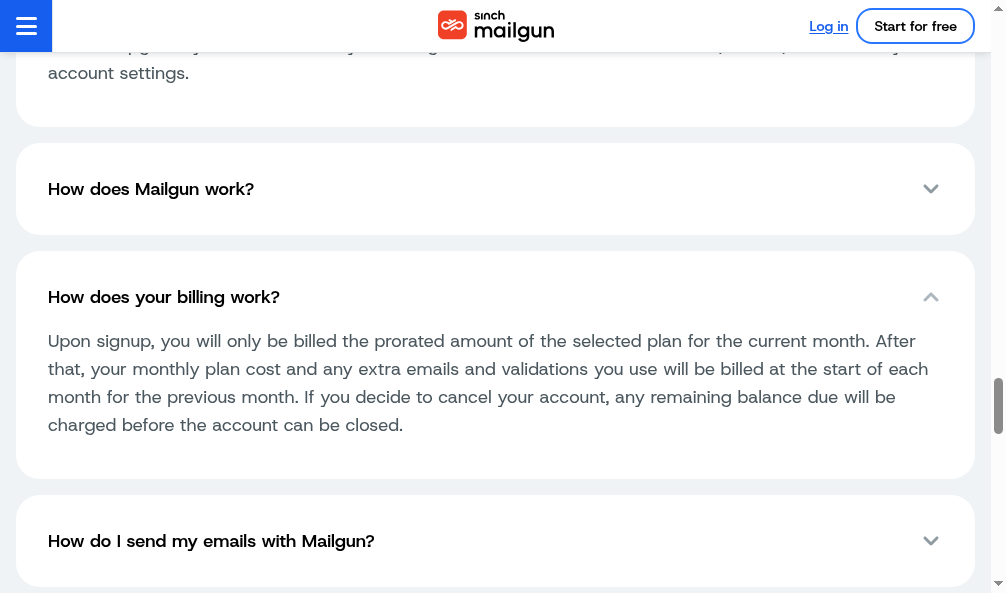
We checked the prices against each vendor's page and pricing data. Every figure we checked was right, including Postmark's tier math, SendGrid's overage rate and Resend's 100,000-email Pro tier. The one we couldn't confirm ourselves was Mailgun's 100,000-email tier, which hides behind a selector our own browser couldn't operate.
Our brief named the vendors, so the bot could read their own pages directly. The job cost $1.29.
Job 2: watch for a change and act on it
Next, a monitoring job as a routine: watch uv's GitHub releases, and when a newer one appears, write an upgrade note for the team and send a two-line summary. If nothing's new, say nothing. We told the bot we were on 0.13.6 and not to check yet, so the first routine run would have something to find.
The bot saved the routine in 29 seconds. On our first Test run, it found 0.13.7 and wrote a note to /workspace. Eighty-four seconds after the run started, it sent:
uv 0.13.7 adds workspace-path fixes, preview metadata schema selection, and
audit deduplication.
No breaking changes or required migration called out; notes saved in
/workspace/monitor2/uv-upgrade-notes.md; release notes.
The note matched the release, item for item. A second Test run stayed silent, as asked, and only recorded the time of the check. Setup and both runs cost $0.48.
A separate run with another bot showed a nice touch. To fake a new release, we rolled back the bot's saved state file by one version. The bot read its own chat history, saw it had already told us about that release, and put the file back without messaging us twice.
Say "around the clock" if you mean it. For "every hour," both bots scheduled checks from about 8 AM to 7 PM, Monday to Friday. That's OpenTeam's default for loosely worded schedules, and the bot says so in the chat.
Job 3: triage bug reports
We gave a QA bot a small billing library and ten bug reports. We knew the answers: three real bugs, two duplicates, a feature request, two "works as designed," one we couldn't reproduce and one about code that isn't in the library. The bot was to reproduce each, label it, rate severity, point to the cause, and not touch the code.
It labeled all ten correctly in 3.4 minutes, with the failing inputs and line numbers for each bug. It also found a date bug nobody had reported, in the 15- and 60-day payment terms, and folded it into the right report instead of crediting the reporter with it.
Job 4: hand the bugs to another bot
Then came the handoff. Perplexity's example is one teammate finding bugs and passing them to another to prepare fixes. We asked the QA bot to send its confirmed bugs to an engineer bot, check the fixes and tell us what shipped. Bots can message each other in OpenTeam (how AI agents talk to each other), and the chat shows each message as it goes.
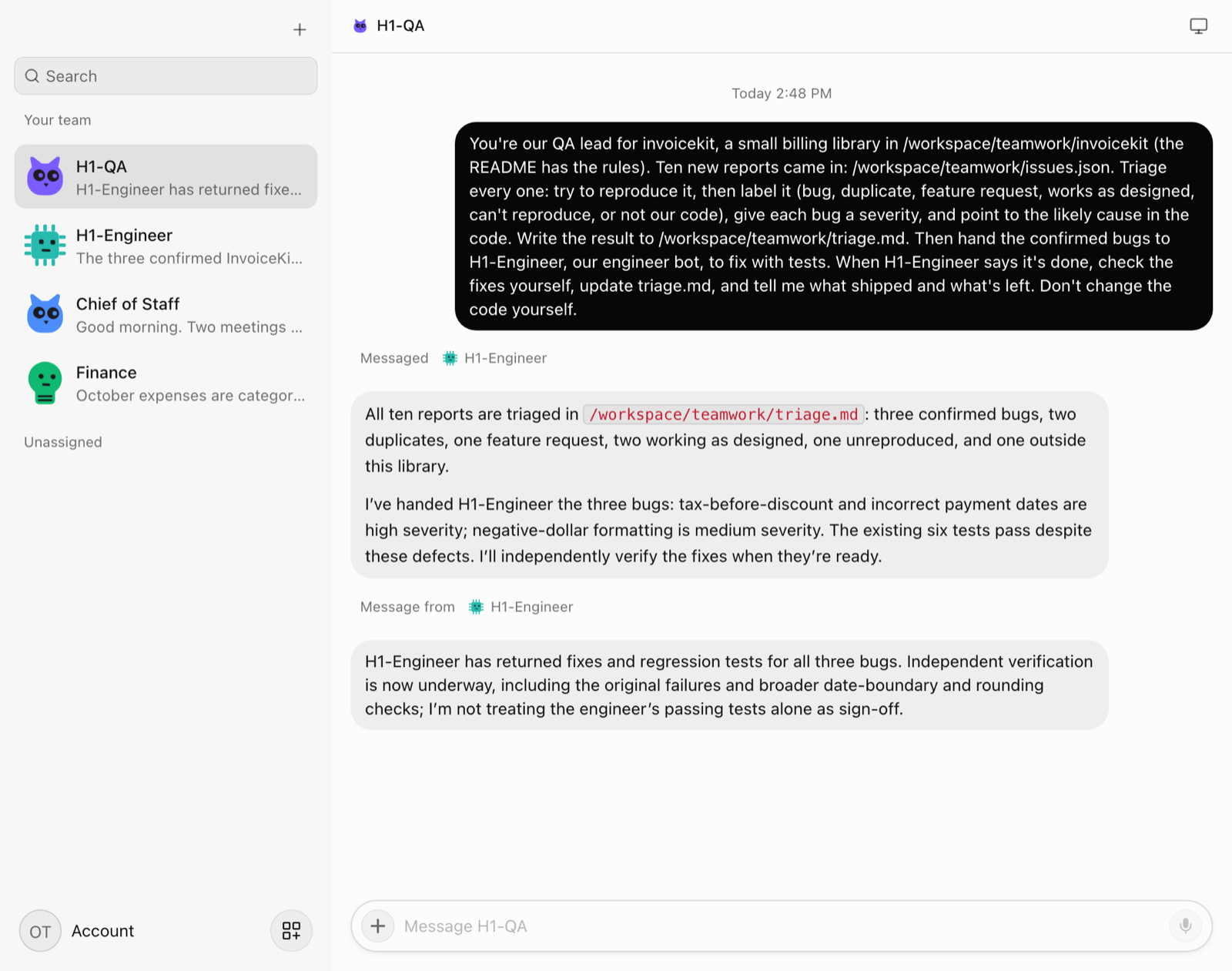
The engineer bot fixed all three bugs with regression tests in under two minutes. The QA bot didn't take its word for it: "I'm not treating the engineer's passing tests alone as sign-off." It ran its own checks and only then reported what shipped and what was left. That list was right: the euro request and two reports that need more information from their reporters.
Our 15 hidden tests, which neither bot saw, all pass on the fixed code. From our message to the QA bot's sign-off took 8 minutes 54 seconds, and both bots together cost $1.11.
We used a local folder for this test. OpenTeam also has a GitHub plugin, which we didn't connect here.
Which should you choose?
- Choose OpenTeam if you want always-on agents on your own hardware, with any model, local ones included, no subscription, and code you can read. Our guide on how to self-host AI agents covers the setup.
- Choose Perplexity Teammates if you already pay for Max and your work lives in Slack, GitHub or Linear with colleagues.
Our four jobs cost $2.88 on OpenTeam, plus $0.82 for the separate monitoring run. That's model spend, on a server you already own. Max is $200 a month whether you use it lightly or heavily.
Frequently asked questions
What are Perplexity Teammates?
They're Perplexity's always-on work agents, launched November 4, 2026. Each teammate owns an ongoing responsibility, works on its own computer with a browser, remembers past work, and can pass work to other teammates or take requests in Slack. It's a research preview for Max subscribers on the web.
How much do Perplexity Teammates cost?
They come with Perplexity Max, which costs $200 a month or $2,000 a year. Teammates use Max's monthly credits, 10,000 on the pricing page, and heavy work uses more. Free and Pro subscribers have to upgrade.
Is there a self-hosted Perplexity Teammates alternative?
Yes. OpenTeam is a GPL-3.0, self-hosted AI agent team where each bot gets its own Linux computer, runs routines and hands work to other bots. It runs on your machine with the model provider you choose. Our open-source Grok Bot alternatives test covers others with the same shape.
Can AI agents work in Slack?
Teammates can join Slack channels and take requests from colleagues. OpenTeam bots can search, read and draft Slack messages as you, through the Slack plugin, and by default each message waits for you to send it.
Can OpenTeam bots hand work to each other like Teammates?
Yes. In our test, a QA bot sent three bugs to an engineer bot, the engineer bot fixed them, and the QA bot checked the fixes before reporting back. Bots can also start helpers and join group chats of up to six.
Can I use Perplexity search in OpenTeam?
Yes. Perplexity is one of OpenTeam's web search providers. Add a Perplexity API key in Settings → Providers, and bots search Perplexity's index.
Try OpenTeam
Install the server with curl -fsSL https://openteam.so/install | sh on macOS or Linux, and guided setup follows. The quickstart walks you through your first bot, and the apps are on the download page.