Text your AI agent: OpenAI dots vs a bot on your own iMessage
ChatGPT Pro users in the US can now text their dot. How that compares with OpenTeam, whose self-hosted bots send texts from Messages on your own Mac.
On this page
Since October 28, ChatGPT Pro users in the US can text their OpenAI dot over iMessage or RCS, and the dot texts them first when something comes up. OpenTeam, an open-source, self-hosted AI agent team, works the other way round. Its bots read and send texts through Messages on your own Mac, from your own number, and you talk to them in the OpenTeam app.
We build OpenTeam (GPL-3.0), so weigh our view accordingly. The dots facts below come from OpenAI's release notes, help center, docs and posts, checked for this post. We didn't try dot texting: it needs a US ChatGPT Pro account. OpenTeam's side comes from the desktop app's source and our computer docs, and its screenshots are staged with sample data.
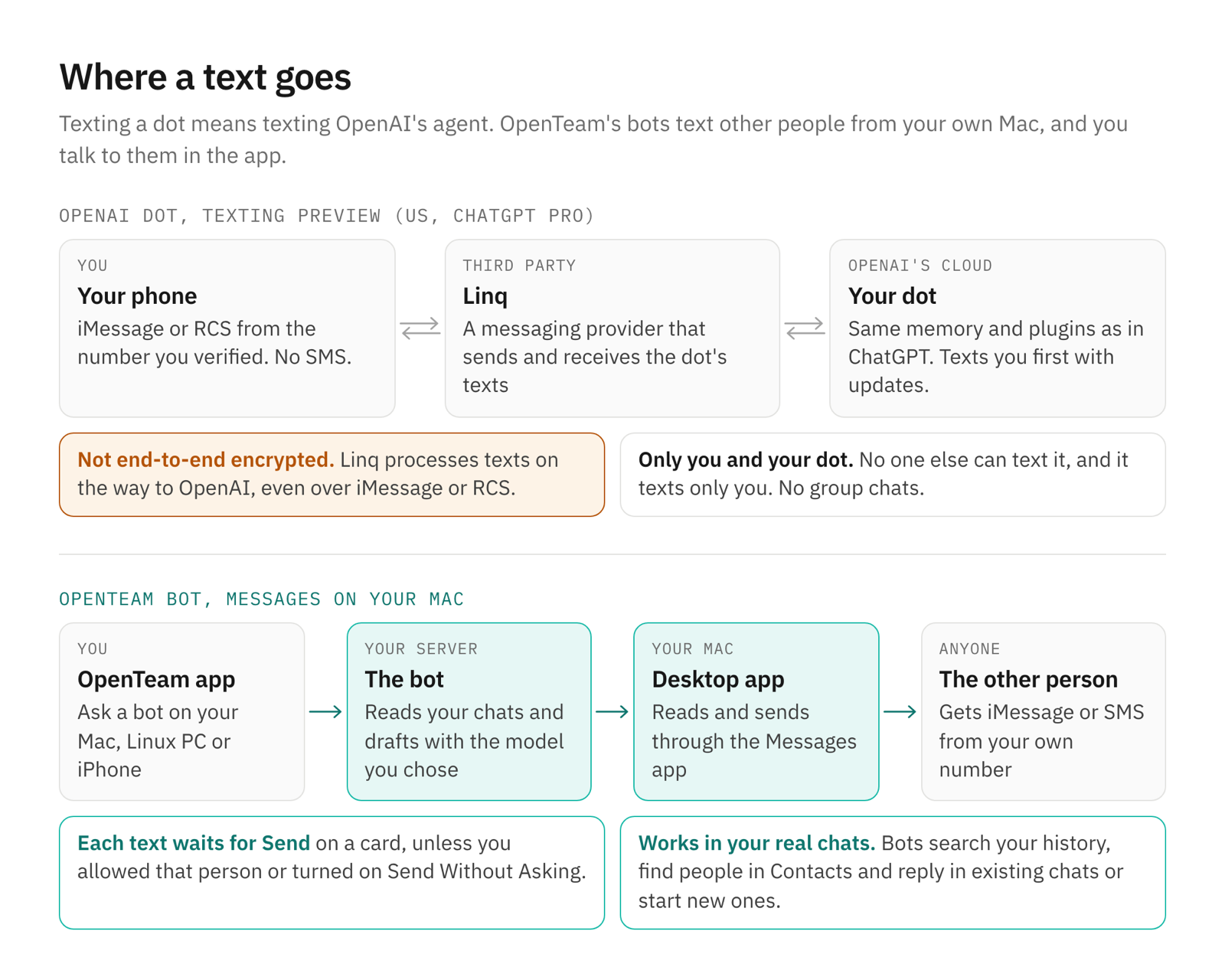
Dot texting vs OpenTeam at a glance
Dots facts from OpenAI's pages linked below, as of October 29, 2026. OpenTeam facts from its code and docs. "Not stated" means OpenAI's pages don't say.
| OpenAI dot texting | OpenTeam with Messages | |
|---|---|---|
| What it is | You text your dot, an agent in OpenAI's cloud | Bots on your server read and send texts through your Mac |
| Who can use it | ChatGPT Pro users in the US, as a preview | Anyone who runs the server, with a Mac signed in to Messages |
| How you reach it | Text it from the phone number you verify | The OpenTeam desktop and iPhone apps |
| Who it texts | Only you | Anyone, from your own number |
| Updates for you | Texts you first with updates it thinks you need | Bots message you in the app, for example from a routine |
| Channels | iMessage or RCS; no SMS or group chats | iMessage and SMS through the Messages app, groups included |
| Before it sends | Your dot texts only you | A Send this message? card, unless you allowed that person |
| In between | Linq, a third-party relay; not end-to-end encrypted | Your server, your Mac and your model provider |
| Setup | A profile setting and a code | A server, the desktop app on a Mac, three macOS permissions |
| Price | Included in ChatGPT Pro, from $100 a month | Free; you pay for the machine and the model |
| Open source | No | Yes, GPL-3.0 |
How texting your dot works
OpenAI launched dots on September 29, "always-on agents" in ChatGPT with their own cloud computers (OpenAI). On October 28 it added texting: "Texting your dot is starting to roll out in beta to Pro users in the U.S." (release notes). Dots are for users 18 and older, and Pro plans cost $100, $200 or $500 a month (pricing).
Setup. You open your dot's profile, choose Texting, enter your phone number and type the code it sends (help center). The dot sends a contact card to save. On an iPhone you text from the number you verified; on Android you turn on RCS (OpenAI).
What it keeps. "Texting your dot shares the same memory and plugins as your dot in the ChatGPT app, so context carries over," OpenAI says. You can send text, photos and voice notes, and give it "a task to take off your plate or something to keep an eye on" (ChatGPT on X). When the dot needs your approval, it sends a link that opens the request in ChatGPT.
It texts you first. "Your dot will also text you proactively with updates that may be relevant for you." It picks where to reach you from your conversations, and you can tell it to text only for urgent things.
Only you. "Your dot can only text you, and you're the only one who can text your dot." Group chats, phone calls and FaceTime aren't supported over text. Texting also "doesn't give your dot or OpenAI access to your other text conversations" (ChatGPT on X).
The relay. OpenAI uses Linq, a third-party messaging provider, to send and receive the dot's texts. Because Linq processes them on the way, "the conversation is not end-to-end encrypted between you and your dot, even when you use iMessage or RCS" (help center). OpenAI stores the texts with your dot's ChatGPT conversations. SMS isn't supported, carrier rates may apply, and replying STOP ends it.
OpenAI publishes no limits on message length or response time for texting.
How OpenTeam bots use Messages
OpenTeam bots live on your server, each with its own Linux computer. Messages lives on a Mac. The desktop app joins the two: it connects that Mac to your server with an outgoing connection, then reads the Mac's Messages database and sends by scripting the Messages app. Apple has no API for this, which is why it needs a Mac at all.
Turning it on
Messages is off until you turn it on in the app on that Mac, under Settings → Computer. Until then, bots don't get Messages tools for it, and the server can't switch it on remotely.
- Turn on Use Messages.
- A window lists three macOS permissions: Automation to send through Messages, Contacts to find people by name, and Full Disk Access to search your texts. Choose Allow next to each. macOS doesn't prompt for Full Disk Access, so that button opens System Settings.
- Ask a bot what's new in your texts.
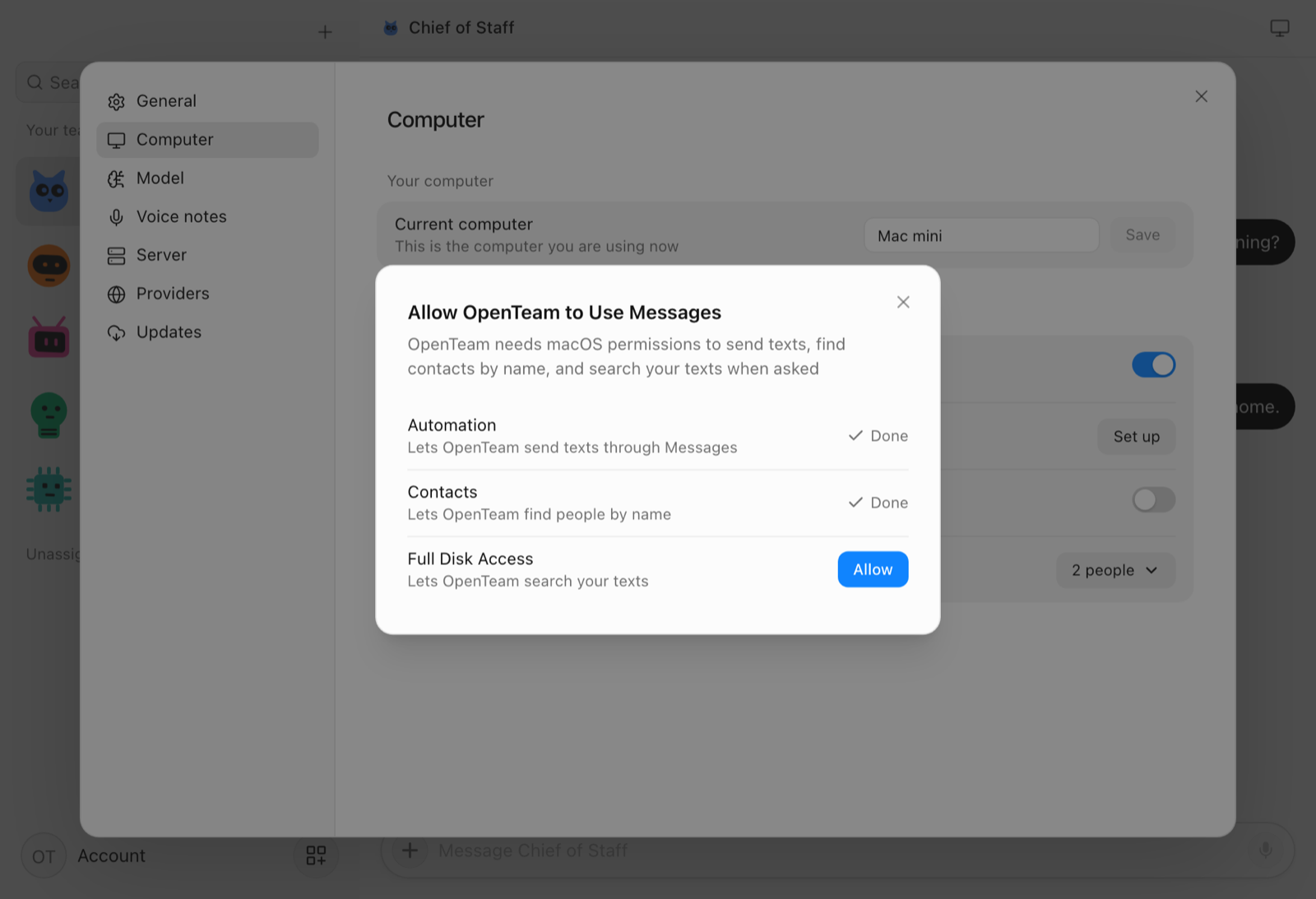
For SMS from a Mac, turn on Text Message Forwarding for that Mac on your iPhone. Keep the app open on a Mac that stays awake, such as a Mac mini.
Every text waits on a card
When a bot wants to send a text, a Send this message? card appears in its chat, on the desktop and iPhone apps. It shows the recipient, the exact text and the Mac it will go out from.
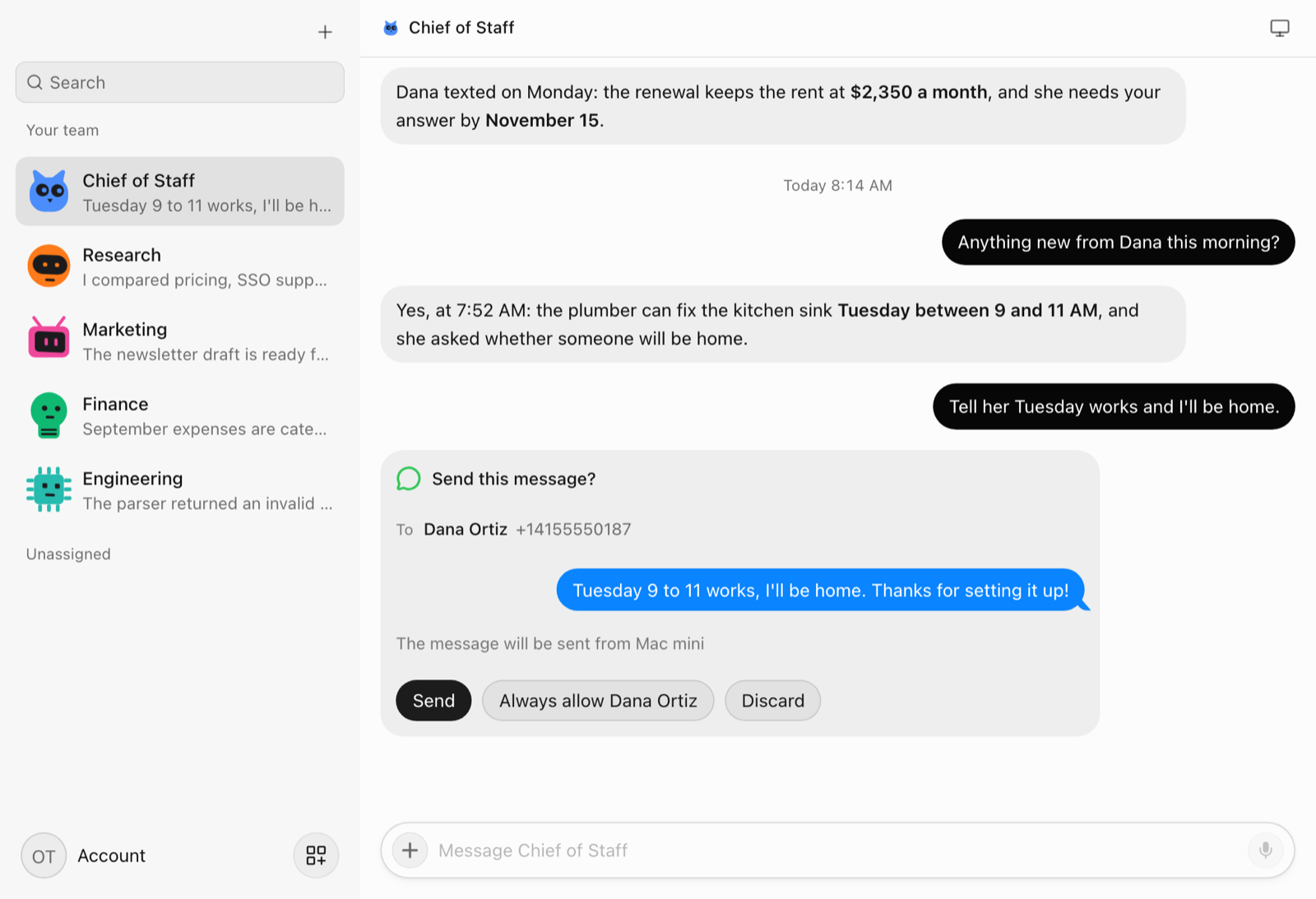
- Send sends it once, from that Mac. If the Mac is offline, the card stays open with the reason, and pressing Send again never texts twice.
- Discard drops it, and the bot is told not to send it another way.
- Always allow sends it and lets bots text that person from that Mac without a card from then on. It appears only for a text to one person, not a group.
In OpenTeam's code, a bot's send tool always creates the card, and the server delivers the text only after you press Send or when one of your rules allows it.
Rules per Mac
Send Without Asking skips the card for every text, and Allowed recipients lists the people you've allowed, with a button to remove each. Both belong to one Mac, and turning Messages off and on again clears them.
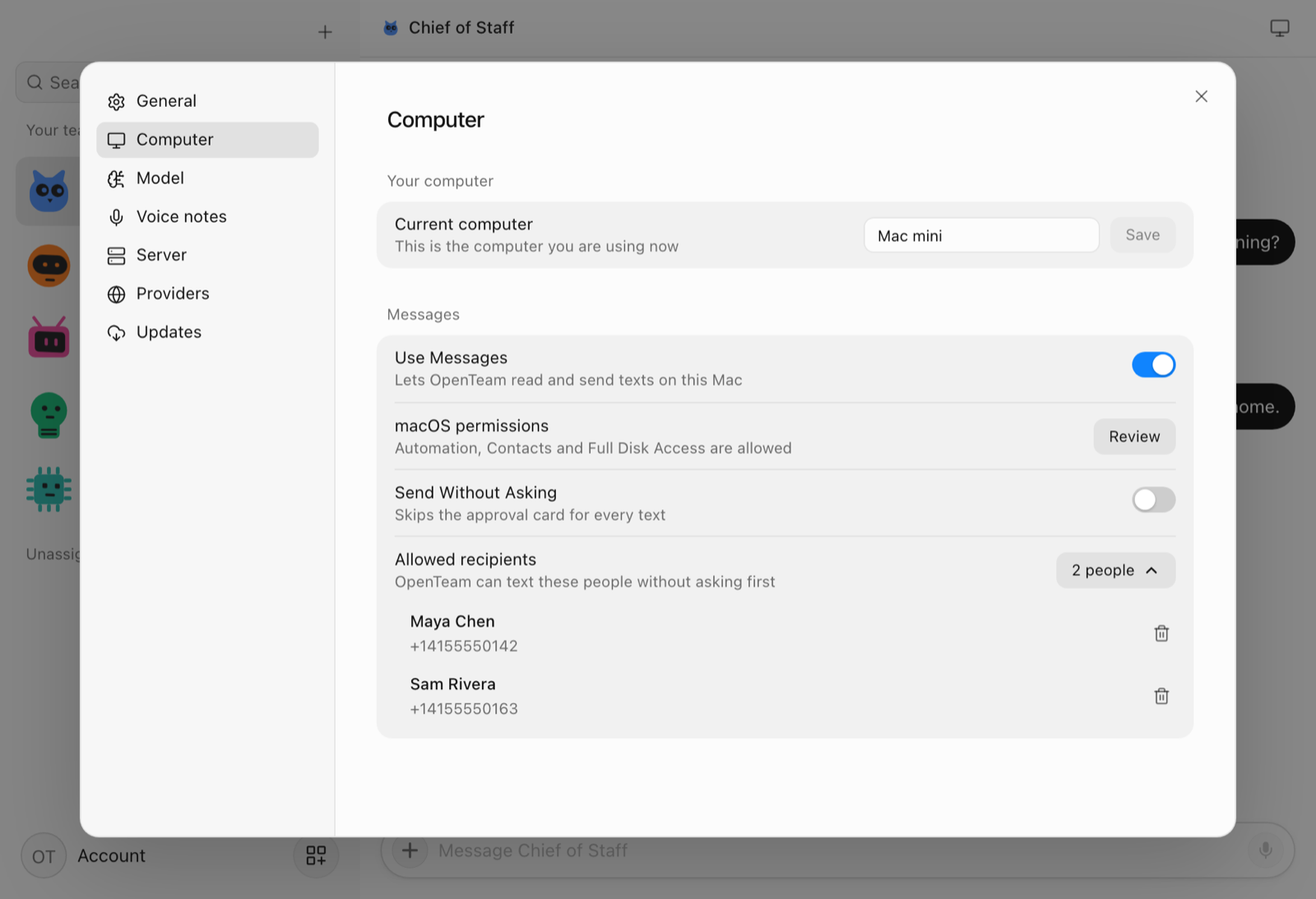
With Messages on for more than one Mac, a bot uses the Mac you last wrote to it from, or the only one online. Close a MacBook and a Mac mini that's awake takes over. Settings → Server → Manage devices shows which Macs are online and which have Messages on.
Reaching your bots from your phone
You talk to your bots in the OpenTeam apps. On the go, that's the iPhone app, on TestFlight, over your home network or a VPN such as Tailscale. Bots can message you in the app at any time, for example with a routine's results, and the desktop apps show a banner when they do.
Where OpenTeam fits
The two products answer different questions. A dot is an assistant you text. OpenTeam's Messages support lets your own agents work inside your existing conversations, with each outgoing text under your eye.
Its bots read your history on the Mac, find people in Contacts, open photos people sent and reply in existing chats or start new ones, from your own number. Several bots share the same Macs, and you choose the model, including a local one. Our guide to replying to iMessages with a self-hosted AI agent covers that side in depth.
Which should you use?
- Choose OpenTeam if you want agents that read and answer your own Messages from your Mac, with a card before each text, open source and on your own server.
- Choose a dot if you're a US ChatGPT Pro user and want to text an assistant from any phone.
Frequently asked questions
Can I text ChatGPT?
Yes, if you're a ChatGPT Pro user in the US. Since October 28, 2026, you can text your dot over iMessage or RCS after verifying your number in its profile (OpenAI). Plain SMS isn't supported.
Is texting a ChatGPT dot end-to-end encrypted?
No. OpenAI's help center says Linq processes the texts on the way to OpenAI, so the conversation "is not end-to-end encrypted," even over iMessage or RCS (OpenAI).
Can a dot text other people for me?
No. A dot texts only you, and only you can text it. OpenTeam bots can text other people from your Mac, and each text waits for you to press Send unless you've allowed that person.
How do I reach my OpenTeam bots from my phone?
Use the OpenTeam iPhone app, on TestFlight, over your home network or a VPN such as Tailscale. Bots can message you there at any time, for example with a routine's results.
Does an OpenTeam bot send texts without asking?
Not unless you say so. Each text waits on a Send this message? card with the recipient, the exact text and the Mac it goes out from. Always allow skips the card for one person on that Mac, and Send Without Asking skips it for every text from that Mac.
Does dot texting work outside the US?
Not as of October 29, 2026. Texting is a preview for ChatGPT Pro users in the US. OpenTeam runs anywhere you can run Docker, but Messages needs a Mac.
Try OpenTeam
Install the server with curl -fsSL https://openteam.so/install | sh on macOS or Linux, then follow the quickstart. Get the Mac app from the download page and turn on Use Messages in its settings.