Is Meta Muse safe? What it can see, and what self-hosting changes
Muse has strong guardrails, training on by default and a rocky first month. What it sees, what self-hosted AI agents like OpenTeam change, and a checklist.
On this page
Meta Muse is reasonably safe to try if you connect it carefully, but it asks for more trust than most apps. Its agent lives in a dedicated cloud VM behind a gatekeeper it can't override. Meta still trains on your chats by default and can reach your data. OpenTeam, an open-source, self-hosted AI agent team, moves that data to your own server, with fewer guardrails than Muse, not more.
We build OpenTeam (GPL-3.0), so weigh our view accordingly. On October 25, 2026, Muse was offered in the US, Canada and, since October 23, Japan (Meta). We haven't tested it ourselves.
Meta Muse vs a self-hosted agent team at a glance
Muse facts come from Meta's launch post, engineering post, help center and privacy policy, checked October 25, 2026. OpenTeam facts come from its docs and code.
| Meta Muse | OpenTeam (self-hosted) | |
|---|---|---|
| Where it runs | A Linux VM per person, in Meta's cloud | Docker on your computer, home server or cloud VM |
| Who stores your data | Meta, in your VM, backed up continuously | Your server; backups are yours |
| Who else can reach it | Meta, "when necessary to support, secure or operate the service" | Anyone who gets into your server |
| Training on your data | On by default; opt out in Data controls | None by OpenTeam; your model provider's terms apply |
| Approvals | Sentinel allows, denies or asks, per your settings | Email drafts wait for Send; no general approval step |
| Sign-ins | A store the agent can't read | Secure forms for passwords; 1Password values and 2FA codes appear in the conversation |
| Prompt-injection defenses | Trained model, classifiers, Sentinel, egress checks | Untrusted-content labels and prompt rules |
| Open source | No | Yes, GPL-3.0 |
| Who patches it | Meta | You |
| Price and regions | Free tier, $20 and $100 plans; US, Canada, Japan | Free; you pay for hardware and model use; any country your provider serves |
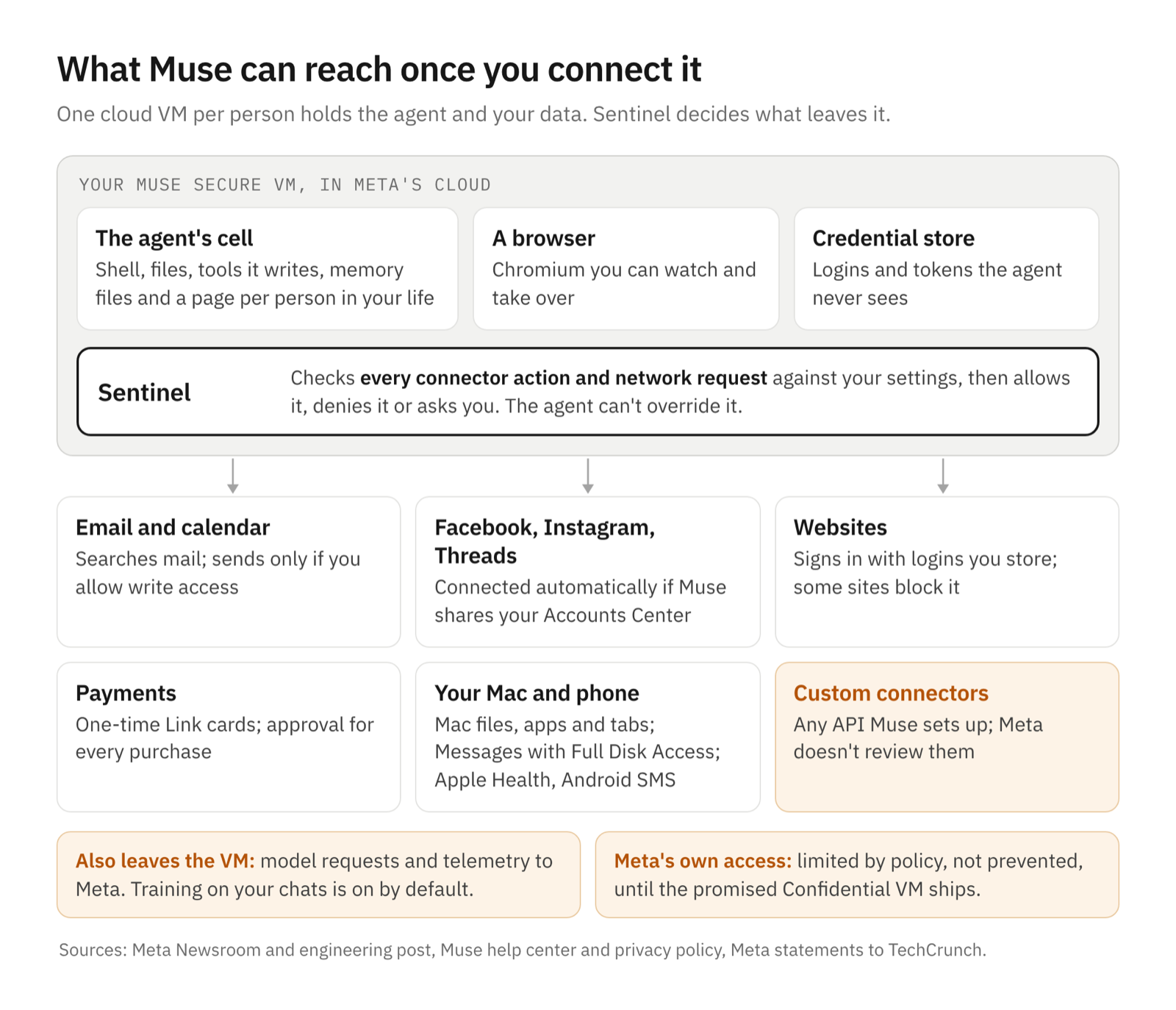
What Muse can see and do once you connect it
Meta launched Muse on September 8. It can "open a browser, fill out forms, and negotiate on their behalf," and keeps working after you close the app (Meta). Its reach depends on what you connect:
- Your accounts. Connectors cover email, calendars, payments, health, the smart home, dining and shopping (TechCrunch). Facebook, Instagram and Threads "are connected automatically if you have your accounts in the same Accounts Center" (Meta). Muse can also build connectors for services with an API, and "Meta doesn't review custom connectors."
- The web. A Chromium browser in its VM that you can watch and take over.
- Your Mac. The Mac app "works with your desktop computer files, apps and browser tabs" (Meta). Reading Messages needs Full Disk Access plus a Messages connector, Meta says (TechCrunch).
- Your money. Checkout can run through Link by Stripe, which issues a single-use card number per purchase.
- What it remembers. Memory files such as MEMORY.md, which you can edit (Meta), and "a page for every person in the user's life," refreshed hourly (Wired).
Connecting email "won't download your whole inbox (unless you tell it to)," and the email connector filters out one-time codes and password-reset links (Meta).
How Meta says it protects you
"The right mental model is two isolated security domains on one box, not an LLM powered agent with root," Meta's engineering post says. The agent runs in a locked-down container inside your VM. Credentials sit outside it, and the agent sees only stand-in tokens, swapped for real ones at the network edge.
The centerpiece is Sentinel, a separate agent that "is the sole permission authority for connector actions and network egress." It allows a request, denies it or asks you in a dialog outside the chat. Under Settings → Permissions, you choose whether Muse asks for "some actions" or every one, and grant each approval once, per task, per site or always (Meta). There's an Activity log, a forget skill and a Reset that deletes everything. A bug bounty pays up to $300,000.
On data, in Meta's words:
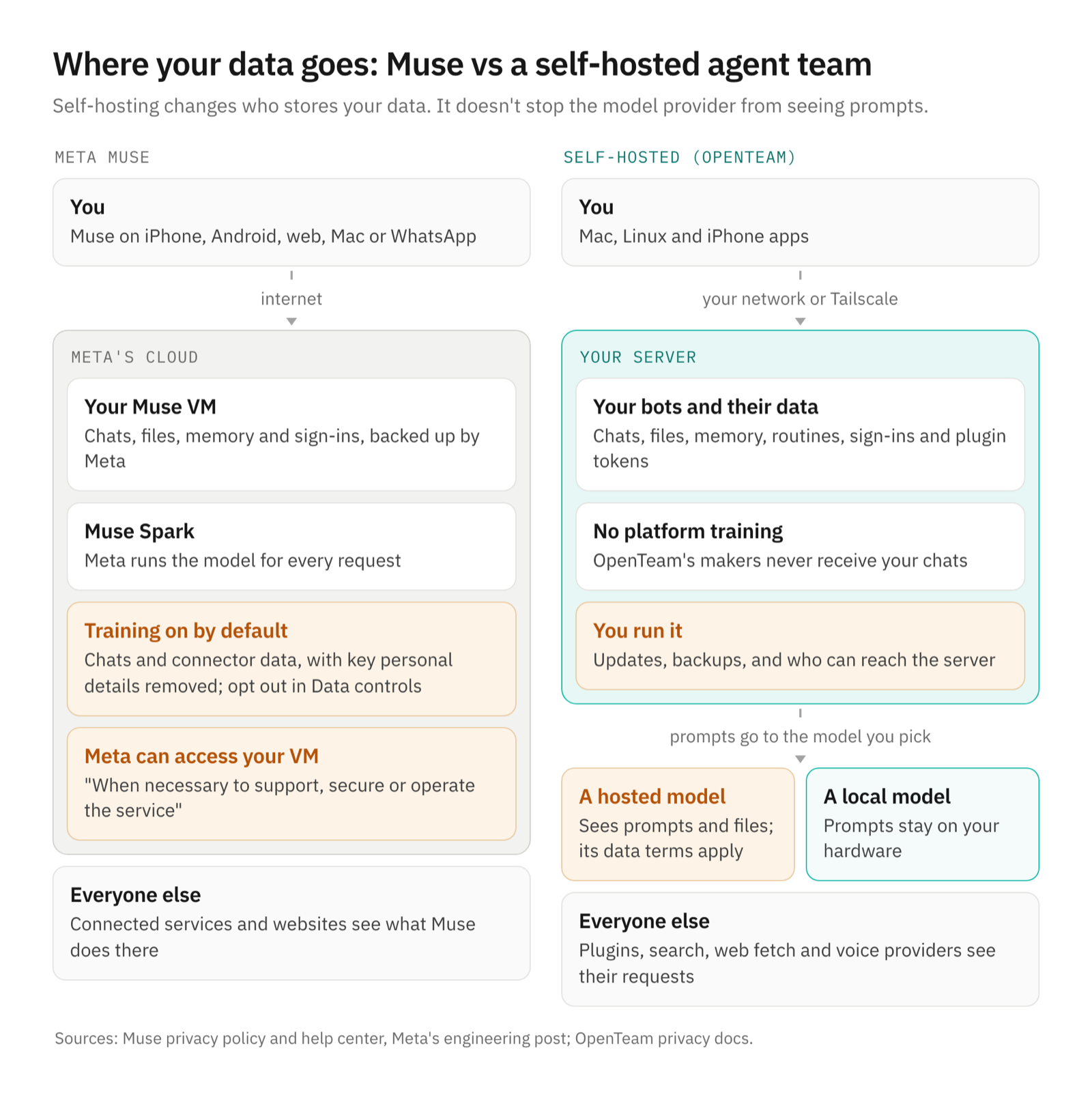
- Training. "This setting is on when you first use Muse." Meta first strips personal details "like names, email addresses, phone numbers and Social Security Numbers," and connector data used in tasks falls under the same switch (privacy policy).
- Ads. "Muse doesn't share your conversations or the data in your virtual machine with Meta ad systems." But sites see Muse's visits "as your activity," so a shop could still retarget you.
- Meta's access. Policy "restricts access to your data by Meta personnel" but "does not prevent Meta from accessing data when necessary to support, secure or operate the service." A Confidential VM that even Meta can't open was promised for "later this year"; on October 25, the privacy policy still said "in the future."
- Retention. Muse's pages give no retention period, and Meta "may access and retain logs of actions taken by Muse" (terms). The privacy policy lists no regional differences.
The terms put the risk on you: you "will maintain meaningful human oversight over all actions taken."
Muse incidents and criticism, with dates
- September 20. Amazon began blocking Muse, saying shopping agents "should operate openly and respect service provider decisions about whether or not to participate" (The Star, via Bloomberg). It objected that Muse doesn't identify itself as an agent (SiliconANGLE).
- September 21. Patrick Wardle disclosed a Mac app zero-day: any local app could redirect Muse's transcription endpoint and capture the account's token (Ars Technica). Meta said it shipped a hotfix, and called the flaw "not a remote exploit."
- September 22. A developer asked Muse to archive its files to Google Drive and got 6.8 GB, including SSH key files he couldn't confirm were active. Meta's bug bounty marked the report "Not Applicable" (Mouse).
- September 28. A YouTuber's Muse sent his address to Marketplace buyers. He'd chosen "Allow Always," "thinking it would still send approvals to accept offers later down the line (it didn't so be careful)" (his update, via Mike Masnick).
- September 30. Meta disputed columnist Jason Aten's report that Muse read his Messages unasked: "You have to enable both Full Disk Access and the Messages connector" (TechCrunch). On October 2, Apple tightened Full Disk Access, warning that as AI agents grow more capable, "the risks associated with this level of access will grow substantially." It named no app (Apple).
- October 5. 404 Media reported a pre-launch "mad dash" to fix "a sudden spike in reported KVM escapes" (404 Media). Meta cited "agentic red teaming and our bug bounty program."
- October 6. Techdirt called Muse "an adorable privacy and security dumpster fire" (Techdirt), drawing 392 points and 290 comments on Hacker News.
On October 9, Sierra published a draft Personal Agent Protocol, built with Meta, for agents to identify themselves to businesses (Sierra). We found no regulator action aimed at Muse by October 25.
What Meta says, and what independent experts say
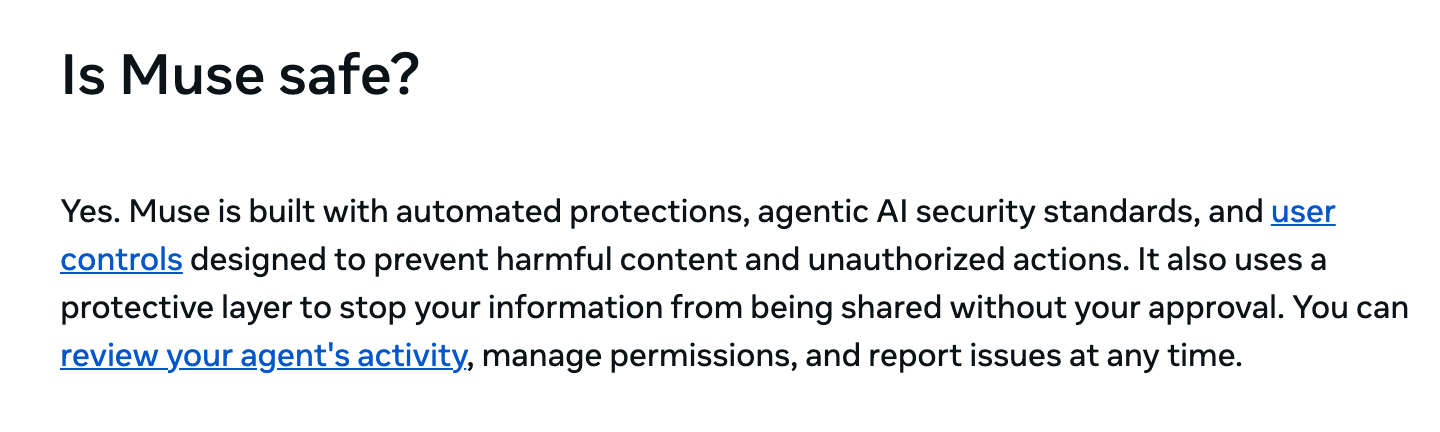
Meta's FAQ answers "Is Muse safe?" with "Yes." Its engineers hedge: "Prompt injection remains an open problem in the industry — and Muse will sometimes make mistakes."
Wardle told 404 Media that "having access to production environment literally one KVM escape away, is plain irresponsible." Miranda Bogen of the Center for Democracy and Technology told Wired that agents solicit "dramatically more information than people might have otherwise given." The most-answered Hacker News comment: "I just do not trust any of them, not with my money or with access to my conversations" (HN). A defender countered that "any content on the VM is yours" (HN).
What self-hosting changes
- Who stores it. OpenTeam keeps conversations, files, memory, routines, website sign-ins and plugin tokens on your server (privacy). No AI company holds a copy, though a cloud host holds the disk if you rent a VM.
- Who trains on it. OpenTeam has no model to train, and its makers never receive your chats. Your model provider's terms still apply. Use a local model to keep prompts at home, or a zero-data-retention route for hosted ones.
- Who can read the code. It's GPL-3.0, so you can check where every request goes (GitHub). Muse's agent is closed.
OpenTeam's guardrails, as they are today
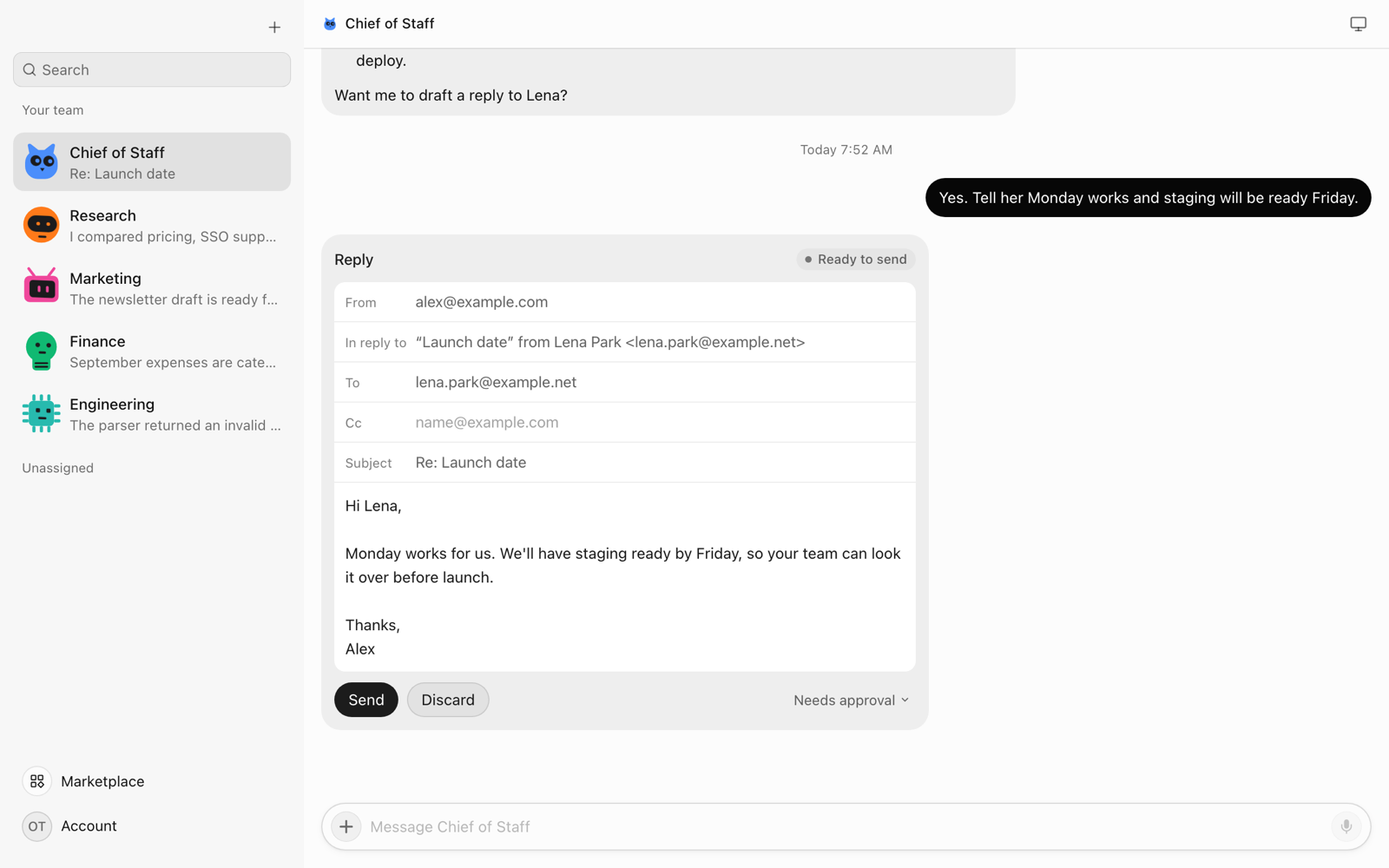
OpenTeam bots act directly, with no general approval step and nothing like Sentinel. What exists:
- Email waits for Send, enforced in code. Bots draft emails as cards. The send tool is hidden from bots and runs on the server only after you press Send (code, email). You can let chosen recipients skip the card or turn drafts off for a bot. Slack replies get the same card, but by prompt rule: bots can see Slack's send tool.
- Secure forms. You type a password or card into a form in the chat, OpenTeam fills the page, and the values never come back to the model.
- A handoff card when a step needs you, such as a passkey, a 3-D Secure check or a CAPTCHA the bot couldn't pass (computer).
- Prompt rules for the rest. Bots are told to show you messages to other people before sending, and the built-in purchases skill says "nothing is created or charged unless they approve that exact purchase." Tool results are fenced as untrusted data the model is told not to act on. None of these rules is enforced in code.
What self-hosting doesn't change
- The model provider still sees prompts, plus every page and file a task needs. Searches, fetched URLs and voice notes reach their providers too.
- Prompt injection still applies. OpenTeam's untrusted-data labels rely on the model obeying them, with no classifier or egress gate behind them.
- Sites can still block agents. OpenTeam's web fetch introduces itself as
OpenTeam-WebFetch/1.0, then retries as a browser when blocked. A bot's Chromium looks like any Chromium, and bots are told to solve CAPTCHAs themselves (code). Expect Amazon's objection here too. - Bots still make mistakes in your accounts. Bots are told to ask before messaging anyone, but if one misreads "handle this listing," nothing in code stops it messaging a buyer.
- Your secrets sit closer to the agent. All bot desktops share one Docker container with passwordless sudo, which "gives them access to all container files, including provider credentials" and "does not provide a separate VM security boundary" (computer; how bot computers work). Bots fetch 2FA codes from your mail, texts and password manager, and the codes appear in the conversation.
- Full Disk Access is still Full Disk Access. OpenTeam's Mac app needs it to read Messages, so Apple's warning applies.
- You become the security team. Run
openteam update, keep backups, and reach the server over your network or Tailscale, not a public port.
Where Muse is ahead
- Enforced approvals. Sentinel checks every connector action and network request outside the model. OpenTeam enforces one approval: email.
- Credential isolation. Muse's agent never sees real tokens, and its email connector hides one-time codes. OpenTeam's bots can reach container credentials with sudo and read your codes.
- Defense in depth. A VM per person, injection classifiers, red-teaming and a public bug bounty. OpenTeam is a young project with one shared container and no bounty.
- Safer payments. Single-use cards with purchase protections. OpenTeam fills your real card into checkout.
- No setup. Muse is an app on iPhone, Android, web, Mac and WhatsApp. OpenTeam needs Docker and an always-on machine. Its desktop apps are macOS (Apple silicon) and Linux x64 only, the iPhone app is a TestFlight beta, and there's no Android app. A server runs one model for one human account.
If you want stronger built-in guardrails and live where Muse is offered, Muse has the more protective design today. Self-hosting suits people who'd rather hold the data themselves and accept the work and the gaps.
How to use any personal AI agent safely
- Give it separate accounts. For Muse, sign up with an email not tied to your other Meta accounts (terms).
- Pay with a limited card: virtual, single-use or low-limit, never your main debit card.
- Connect only what the task needs, read-only first. "Start small," a security executive told Time.
- Keep send, pay and delete behind approval. Avoid "Always allow" until you've watched it finish a task.
- Watch its screen and read its activity for the first few weeks.
- Turn off training you don't want, in the agent and at your model provider.
- Be stingy with system permissions like Full Disk Access, and give password managers a vault with only the logins needed (accounts).
- Treat what it reads as untrusted. Don't let it act on strangers' email or pages unchecked.
- Revoke access you don't use. Disconnecting stops new reads, not old ones: that data "may remain in Muse's memories," Meta says.
- Keep it patched, and keep self-hosted servers off the public internet.
Frequently asked questions
Is Meta Muse safe?
Safe enough to try with care, not to connect to everything. Muse has strong guardrails: Sentinel, a credential store and per-purchase approvals. Its first weeks also brought a patched Mac zero-day and permission mix-ups, and Meta trains on your chats unless you opt out.
Does Meta train on Muse conversations?
Yes, by default. Turn off Help improve our AI models under Settings → Data controls; Meta says the change applies to past interactions too (Meta).
Is Meta Muse open source?
No. The Muse agent and apps are proprietary. Meta publishes some open-weight models, such as Muse Glimmer under Apache-2.0 (Meta), but not the agent. OpenTeam is an open-source alternative under GPL-3.0.
Can I self-host Meta Muse?
No. Muse runs only in Meta's cloud, and the promised Confidential VM would still run on Meta's servers. To self-host, you need a different agent, such as OpenTeam.
Is OpenTeam safer than Muse?
No, not in the ways most people mean. Muse has enforced approvals, credential isolation and a security team; OpenTeam has an enforced email draft and prompt rules. It offers control instead: your data on your server, the model you choose and code you can read.
Try OpenTeam
Install the server with curl -fsSL https://openteam.so/install | sh on macOS or Linux, or irm https://openteam.so/install.ps1 | iex in Windows PowerShell. The quickstart covers your first bot, and the apps are on the download page.