Grok Bot 1.0? What shipped in October, and an open-source alternative
A Grok Bot 1.0 build was reported on October 30, but xAI hasn't announced one. What did ship in October, and how OpenTeam, an open-source option, compares.
On this page
xAI hasn't announced a Grok Bot 1.0. On October 30, TestingCatalog reported a "first stable" 1.0 desktop build, but xAI's own changelog ends at version 0.78.1 on October 27. What did ship this month is real: phone-app actions, Pages, a Vault and shopping cards, with phone calls announced by Elon Musk. OpenTeam is an open-source, self-hosted AI agent team for people who want that kind of bot on their own hardware.
We build OpenTeam, so weigh our view accordingly. Grok Bot facts come from xAI's changelog, docs and posts, Cursor's help pages and the App Store, as of October 30, 2026; we didn't use Grok Bot for this post. OpenTeam facts come from its code and docs. Our open-source Grok Bot alternative comparison and the six alternatives we installed and tested cover the background; this post covers what changed.
Is Grok Bot 1.0 out?
Not officially. TestingCatalog, which tracks unreleased features, posted on October 30: "The first stable Grok Bot version is now available!" (TestingCatalog on X). Its write-up adds that the 1.0.0 build can be downloaded "although it has not officially rolled out to users" (TestingCatalog).
xAI hasn't said so. Its Grok Bot changelog lists versions and dates, and the newest entry is 0.78.1 on October 27. No entry mentions 1.0, a stable release or an end to the beta, which is what xAI called Grok Bot at its August launch (xAI).
Version numbers alone don't settle it either. The iPhone app has been numbered 1.x since its first release on August 11, and version 1.19.0 shipped on October 28 (App Store). So "1.0" can only refer to the desktop app, and until xAI publishes release notes, there's no list of what 1.0 changes.
What changed in Grok Bot in October
xAI's changelog and posts show a busy month. Most of it is about doing more of your errands, with more of your accounts.
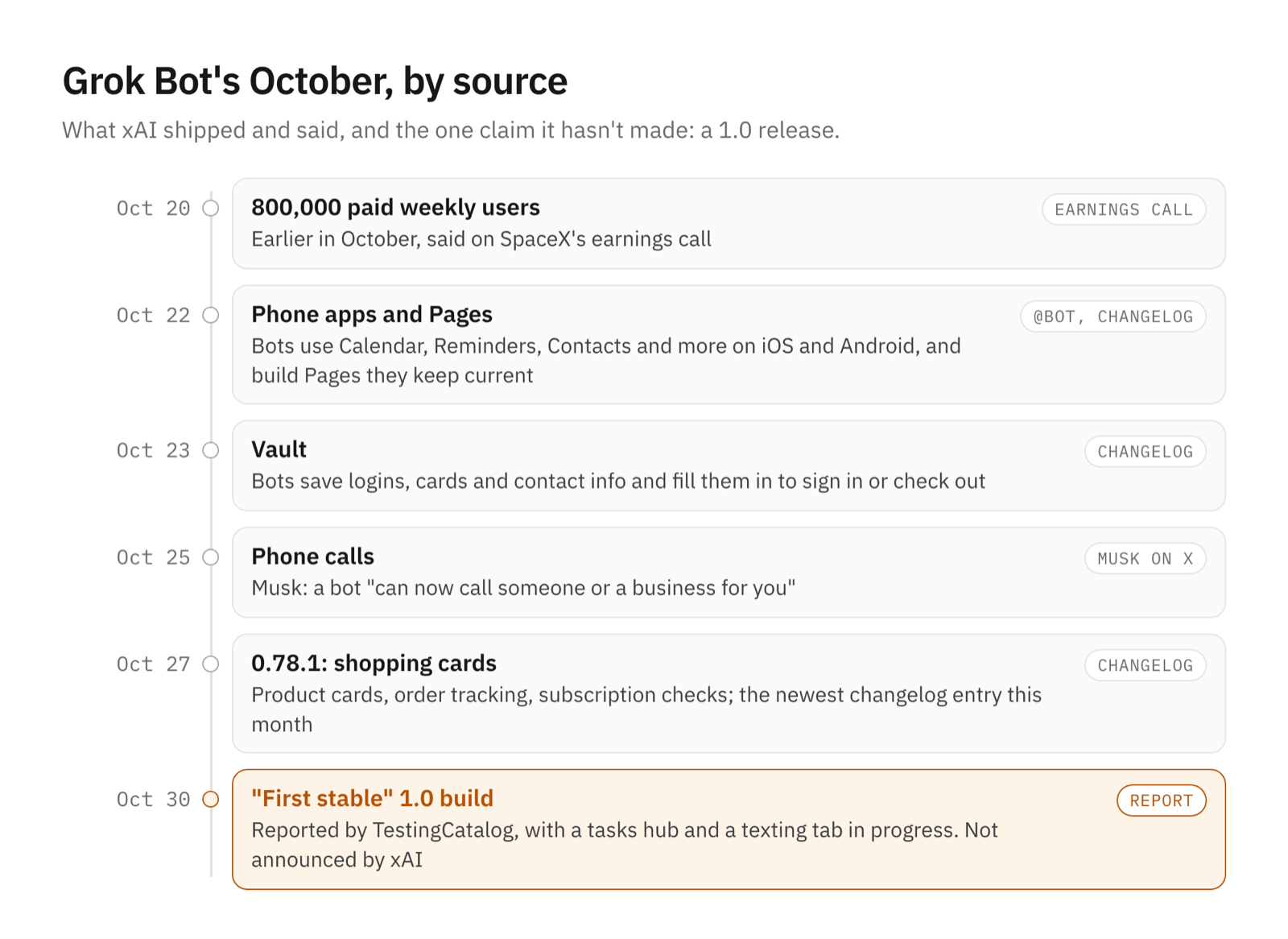
- Phone apps (October 22). "Grok Bot can now use Calendar, Reminders, Contacts, and more apps on your phone. Rolling out now on iOS and Android" (@bot). The docs list Calendar, Contacts, Location and Alarms on both, plus Reminders and Apple Home on iPhone. They work only while the app is open on the phone (xAI).
- Pages (October 22). Bots build "reports, memos, and dashboards" that you edit together or that the bot keeps up to date.
- Vault (October 23). "Bots can save your logins, cards, and contact info to a Vault in Settings and fill them in to sign in or check out." Bots can also forward email from their own inbox.
- Fewer approvals (October 24). Auto-review now checks an action before it shows you an approval card, and a bot can offer to add or change a rule.
- Phone calls (October 25). Elon Musk posted that Grok Bot "can now call someone or a business for you, make a request on your behalf, take notes on the response and send you a note summarizing the conversation" (Musk on X). The changelog through October 27 doesn't list it yet.
- Shopping (October 27). Version 0.78.1 shows products as cards with photos, ratings and prices, tracks orders, and can check or cancel subscriptions after confirming with you. Where Grok Bot offered a free trial, it now offers a plan.
- On the way. TestingCatalog also spotted a tasks hub and a settings tab named "texting", which it reads as a sign of iMessage and RCS support. That's a guess from an unreleased build.
Usage is growing fast. On SpaceX's October 20 earnings call, Gwynne Shotwell said Grok Bot "launched in August, and we already had paid weekly users of 800,000 earlier this month, more than doubling over the last month" (transcript).
Grok Bot vs OpenTeam at a glance
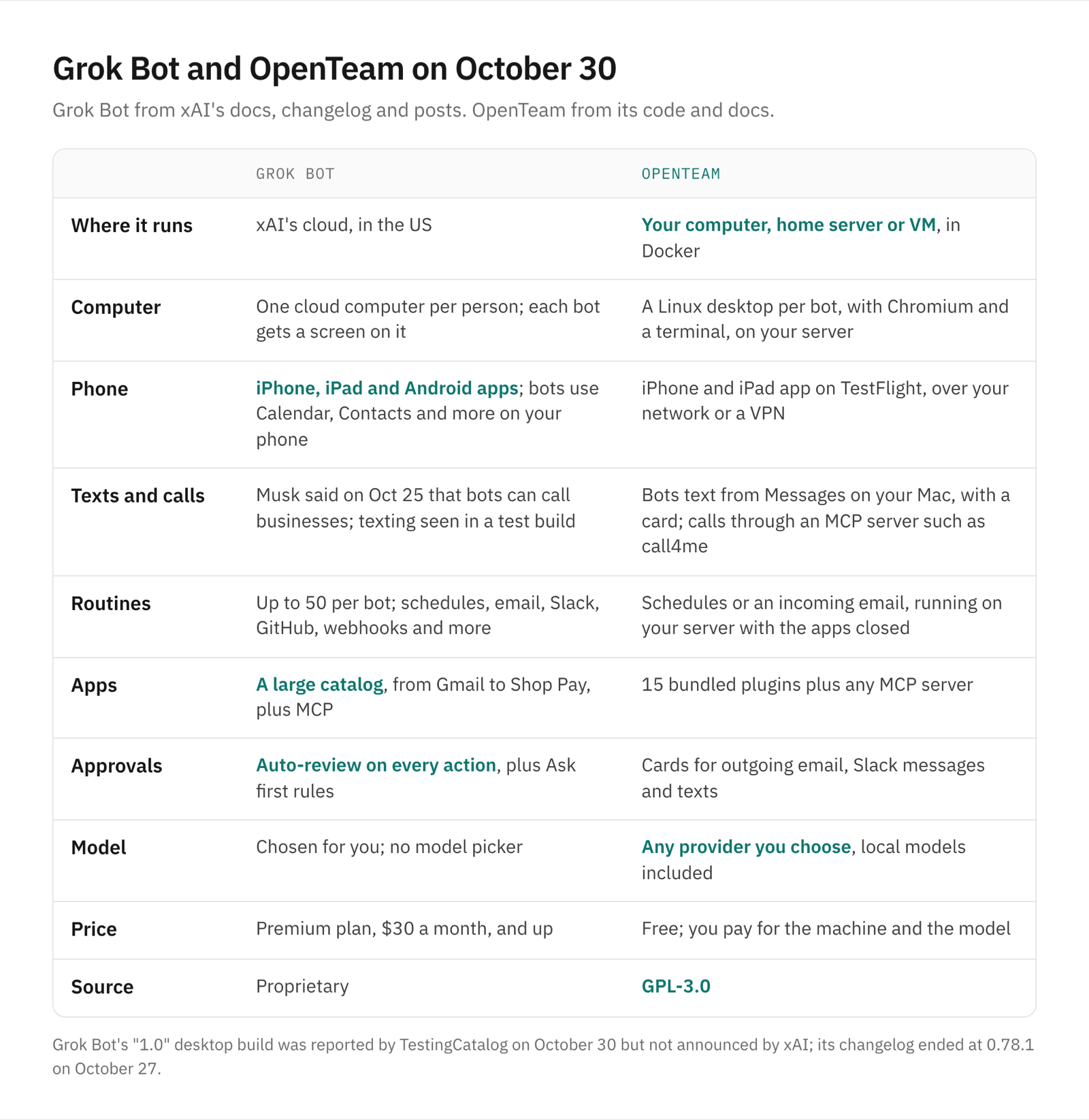
Grok Bot facts from the xAI and Cursor pages linked in this post, as of October 30, 2026. OpenTeam facts from its code and docs.
| Grok Bot | OpenTeam | |
|---|---|---|
| Price | The $30-a-month Premium plan and up, or a linked SuperGrok or X Premium+ subscription | Free; you pay for the machine and the model |
| License | Proprietary | GPL-3.0 |
| Where it runs | xAI's cloud, in the US | Your computer, home server or VM, in Docker |
| Computer | One cloud computer per person; each bot gets a screen on it | A Linux desktop per bot, with Chromium and a terminal, on your server |
| Phone | iPhone, iPad and Android apps that use your phone's apps | iPhone and iPad app on TestFlight |
| Texts and calls | Calls, per Musk; texting not released | Bots text from Messages on your Mac; calls through a third-party MCP server |
| Routines | Up to 50 per bot; schedules, email, Slack, GitHub, webhooks | Schedules or an incoming email |
| Apps | A large catalog plus custom MCP servers | 15 bundled plugins plus custom MCP servers |
| Approvals | Auto-review on every action, plus "Ask first" rules | Cards for outgoing email, Slack messages and texts |
| Model | Chosen for you; no model picker | Any provider you choose, local models included |
| Desktop apps | macOS, Windows, Linux | macOS (Apple silicon), Linux x64 |
Where the two differ
The computer
Both give bots a real computer that keeps working with your laptop closed. Grok Bot's is a cloud machine per person: "The computer is assigned per user, not per Bot," and each bot gets its own screen on it (xAI). Those computers "run in the United States" (xAI).
OpenTeam gives each bot its own persistent Linux desktop with Chromium and a terminal, and all of them run in one container on your server. You can watch a bot's screen and take over, and bots share a /workspace folder and website sign-ins (how the bot computer works). The difference is who runs the machine.
Phone, texts and calls
Grok Bot's October phone apps let bots use your calendar, contacts and reminders, and Musk says bots now make calls for you.
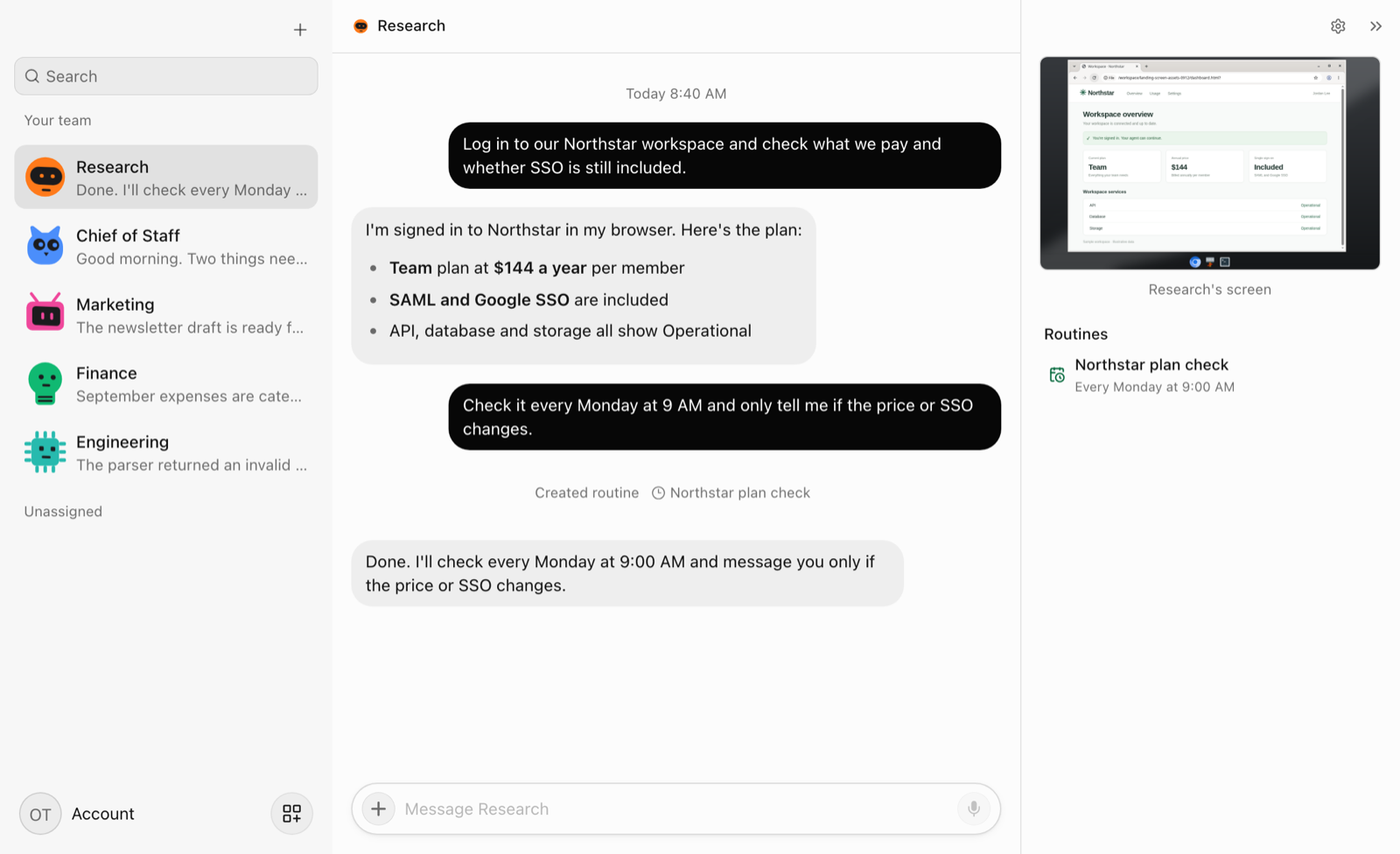
OpenTeam's iPhone and iPad app, on TestFlight, talks to your bots over your network or a VPN. For texting, OpenTeam goes through your Mac. Bots read and send texts in Messages on any Mac where you turn it on, and each text waits on a Send this message? card unless you allowed that person (texting your AI agent). For calls, you add a third-party service such as call4me as a custom MCP server (phone calls from OpenTeam).
Routines and apps
Grok Bot's routines have several kinds of trigger. A bot can hold up to 50, at least five minutes apart (xAI). Besides schedules, they start on "a Slack message, a GitHub, Linear, Sentry, or PagerDuty event," an email to the bot's own address, or "a webhook call." Its app catalog runs from Gmail and Notion to Robinhood and Shop Pay (Cursor). A bot can also add an MCP server "by URL or by a command that runs on its computer" (xAI).
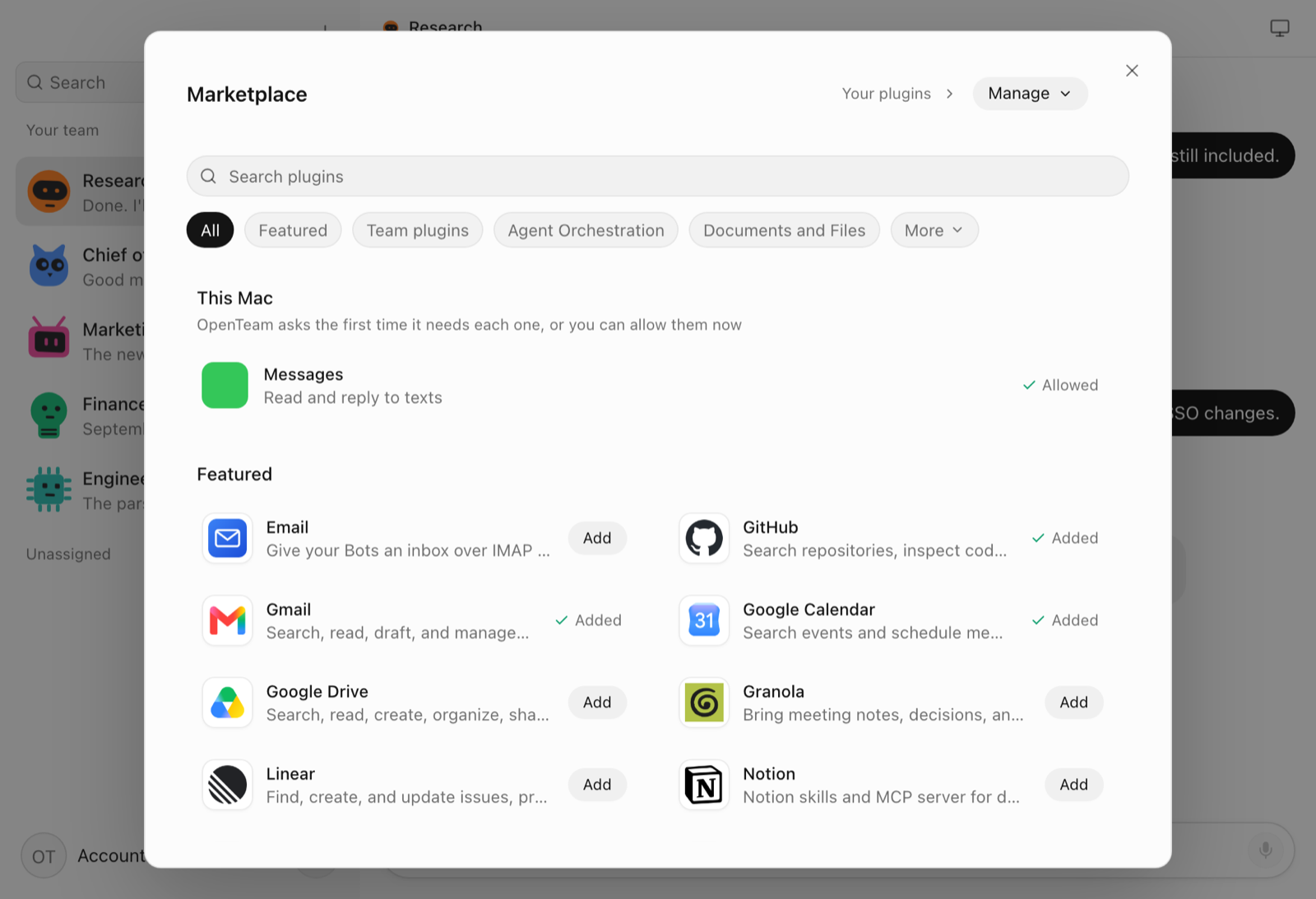
OpenTeam's routines run on a schedule or when an email arrives through the Email plugin. They run on the server with the apps closed (routines). It bundles 15 plugins, including Gmail, Google Calendar, Drive, Docs, Sheets and Slides, GitHub, Linear, Notion, Slack, Granola, 1Password and Plaid, plus custom MCP servers and saved skills (plugins). Every plugin and connected account is available to every bot.
Model, price and data
Grok Bot "has no per-user or per-request model selection, and there is no model picker" (Cursor). It's included in the $30-a-month Premium plan and the higher tiers of xAI's new plans (xAI, plans). Older Cursor plans and linked SuperGrok or X Premium+ subscriptions still include it (Cursor).
With OpenTeam you choose the model for your bots in Settings → Model: a ChatGPT or Claude subscription sign-in, an OpenAI, Anthropic or OpenRouter key, or a compatible endpoint, including a local model (models). Conversations, files, memory and sign-ins stay on your server, and only what each task needs goes to the provider you picked (privacy). It's free, and the bill is your machine and your model usage.
Which should you choose?
- Choose OpenTeam if you want each bot's computer on hardware you control, your own model provider or a local model, and open source code you can read and change.
- Choose Grok Bot if you want a hosted assistant on your phone that calls and shops for you.
Frequently asked questions
Is Grok Bot 1.0 out?
Not officially, as of October 30, 2026. TestingCatalog reported a "first stable" 1.0 desktop build, but xAI's changelog ends at 0.78.1 on October 27 and xAI hasn't announced a 1.0.
Is Grok Bot open source?
No. Grok Bot is a proprietary xAI service that runs in xAI's cloud. OpenTeam (GPL-3.0) is an open-source, self-hosted alternative; our hands-on roundup covers five more.
Can Grok Bot make phone calls?
Elon Musk said on October 25 that it can "call someone or a business for you" and send you a summary. xAI's changelog didn't list calling by October 30. OpenTeam bots can place calls through a third-party MCP server such as call4me.
How much does Grok Bot cost?
On October 30, 2026, it came with xAI's $30-a-month Premium plan and higher tiers, older Cursor plans that include it, or a linked SuperGrok or X Premium+ subscription. OpenTeam is free; you pay for the machine and the model.
Can I self-host Grok Bot?
No. Its computers run in xAI's cloud in the US, and there's no self-hosted edition. OpenTeam runs on your own computer, a home server or a VM; see how to self-host AI agents.
Can OpenTeam bots send texts?
Yes. OpenTeam bots read and send texts through Messages on your Mac, from your own number, with a Send this message? card for each text unless you've allowed that person. You turn it on in the desktop app under Settings → Computer.
Try OpenTeam
Install the server with curl -fsSL https://openteam.so/install | sh on macOS or Linux, and guided setup follows. The quickstart walks you through your first bot, and the apps are on the download page.